
Murf AI
A voiceover studio, a per-character speech API and a dubbing credit meter sold side by side
Scored on the published rubric, from documentation, pricing and verified user reports.
Best for: One person producing a lot of narration a year, who needs hours of generation rather than team seats.
Verdict
Murf AI sells three separate things from one pricing page, and the tab you land on decides what you think the product costs.
The Studio tab is the voiceover editor. Creator is $19 a month billed annually at $228 a year, and Business is $66 a month billed annually at $792 a year.
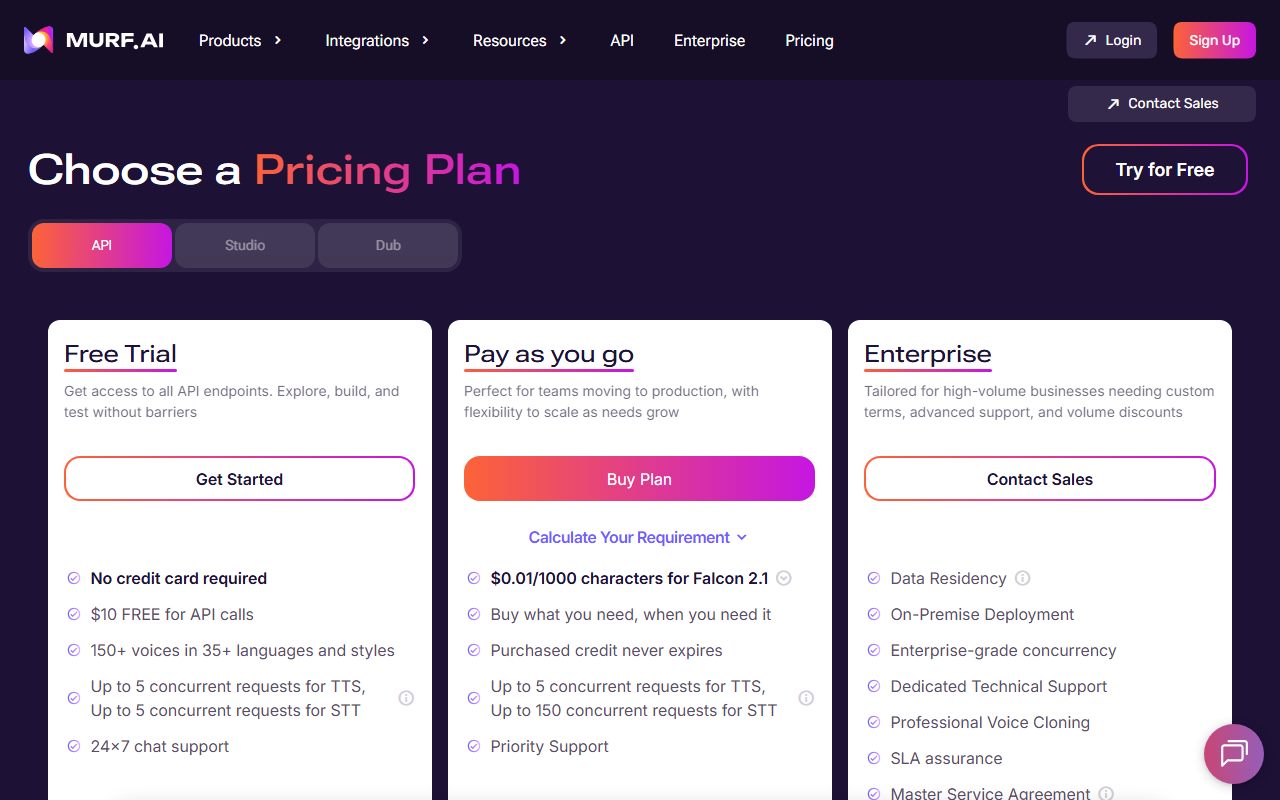
The API tab is metered per character, from $0.01 per 1,000 characters on the Falcon 2.1 model. The Dub tab runs on credits, from $0.25 a credit at two credits per minute per language.
The unusual part is the Studio meter. Creator buys 24 hours of voice generation a year and Business buys 96 hours, with downloads unlimited once you are on a paid plan.
This is a documentation review. The figures above were read from the pricing page HTML on October 29, 2026. No paid account was opened.
Visit Murf AI
We have no affiliate relationship with this vendor. Link goes to the official site.
Where it is strong
- Creator buys 24 hours of voice generation a year, which is a lot of narration for $228
- The three products are priced on separate tabs, so you can buy the API without the editor
- API credit, per the API tab, never expires once purchased
- The free Studio plan is a real plan with 10 projects and 10 minutes of generation, no card asked
- Pronunciation editing, emphasis and variability controls are listed as studio features, not add-ons
Where it falls short
- Every self serve Studio plan is capped at one editor seat; multiple seats start at Enterprise
- The monthly billing rates did not appear in the pricing page HTML, so only the annual rates can be quoted
- Commercial rights are excluded from the free plan, and the free plan allows no downloads
- Full broadcasting rights are an Enterprise add-on rather than part of any listed plan
- The pricing page footer still carries a 2024 copyright line, which makes the page hard to date
At a glance
| Starting price | $19/mo billed annually ($228/year), Studio Creator |
|---|---|
| Pricing note | Studio Creator is $19/mo billed annually at $228/year, Business $66/mo at $792/year (pricing page HTML, checked October 29, 2026) |
| Free plan | Yes, 10 projects and 10 minutes of generation, no downloads, no commercial rights |
| Editor seats | 1 on Creator and Business; custom 5 or more on Enterprise |
| Studio meter | Voice generation time: 24 hours a year on Creator, 96 hours on Business |
| Voices | 200 or more voices across 30 or more languages and accents, per the Studio comparison table |
| API rate | From $0.01 per 1,000 characters (Falcon 2.1); $0.03 per 1,000 characters on Gen2 |
| Dub rate | 2 credits per minute per language, pay as you go from $0.25 a credit |
What Murf AI actually sells
Murf is three products sharing one pricing page, and the page opens with a tab switcher: API, Studio, Dub.
Studio is the editor. You paste a script, pick a voice, and adjust pronunciation, emphasis and pacing before exporting audio.
The API is a speech endpoint for developers, billed per character with no subscription. Dub is a localisation service billed in credits per minute per language.
Reading only one tab gives you a wrong idea of the price. The entry Studio plan and the entry API spend have almost nothing to do with each other.
Who Murf is best for
Murf fits a producer whose constraint is volume of narration rather than number of collaborators.
- Course and training teams exporting long modules, where 24 hours of generation a year is the useful unit
- Single editors who own the whole script and do not need a second seat
- Developers who want a per-character speech endpoint without a monthly commitment
- Teams localising existing video, who need the Dub meter rather than the Studio editor
- Anyone who needs pronunciation fixed once and reused across a script
- Presentation builders, since PowerPoint and Google Slides plugins are listed on Business
Who should skip it
Three groups will hit a wall that has nothing to do with audio quality.
- Teams who need two or more editors, because that starts at Enterprise
- Buyers who insist on seeing the monthly price next to the annual one before paying
- Broadcasters who need full broadcasting rights written into a listed plan
What the free Studio plan includes, as of October 2026
The free plan is a real account rather than a countdown. The Studio tab lists it at $0 a month with 10 projects, 10 minutes of voice generation and one editor.
The card also says it carries everything in the Business plan, with downloads excluded. So you can hear the expensive features before you pay for them.
Two restrictions matter. The free plan grants no commercial rights, and it allows no downloads at all. It is a listening account, not a production one.
How Studio pricing is structured
Every Studio figure here was read from the pricing page HTML on October 29, 2026, with the billing toggle in its yearly position.
Creator is listed at $19 a month and $228 billed annually. Twelve times $19 is $228, so the two labels on the card agree. That multiplication check is ours.
Business is listed at $66 a month and $792 billed annually. Twelve times $66 is $792, which again matches.
Enterprise shows Custom with a Contact Sales button, so there is no list price to quote for it.
The toggle itself is labelled Billed Yearly with a Saved 33% badge. The monthly rates behind that badge did not appear anywhere in the page HTML, so this review does not print a monthly figure for Murf.
The Studio meter counts generation, not downloads
This is the detail that decides whether Murf is cheap for you. The Studio cards sell voice generation time by the year, not finished minutes by the month.
Creator lists 24 hours a year of voice generation and 100 projects. Business lists 96 hours a year and 500 projects. Enterprise lists unlimited generation.
Downloads are separately listed as unlimited on both paid plans. So re-rendering a line after a script edit spends generation time, while exporting the final file does not cost extra.
That model rewards a careful writer. It punishes a producer who regenerates the same paragraph twenty times to audition voices.
If you want fewer regenerations, tighten the script before it reaches the voice engine. Our guide on writing a prompt that gets a usable first draft applies to narration scripts as much as to chat prompts.
What Creator leaves out and Business adds
The Studio comparison table on the pricing page is unusually detailed, and the gap between the two paid tiers is wider than the price suggests.
- Emphasis, Variability and Say It My Way are marked absent on Creator and present on Business
- Audio to Text transcription is Business only, listed at 48 hours; Enterprise is unlimited
- Business adds a PowerPoint plugin, Google Slides support and Murf voices for Windows apps
- Business adds deletion recovery, listed as 60 days, where Creator has none
- Business adds a Business License; Creator carries personal commercial rights only
- AI Translation, SSO, access logs and an MSA are listed only on Enterprise
Seats are the real ceiling on the self serve plans
The comparison table puts maximum editor seats at 1 for both Creator and Business, and Custom with a 5 or more note for Enterprise.
Viewer seats follow the same pattern: none on the paid self serve plans, unlimited on Enterprise.
So a two-person studio cannot simply buy two Business plans and share a project. Sharing and collaboration is listed as an Enterprise feature.
That is a harder limit than the headline prices imply, and it is the main reason the value score here is not higher.
The API is billed per character, with no plan to join
The API tab prices each endpoint separately, and the rates below came from that tab's HTML on October 29, 2026.
Text to speech on the Falcon 2.1 model is $0.01 per 1,000 characters, described as tuned for voice agents with time to first audio under 100ms.
The Gen2 text to speech model, described as studio quality, is $0.03 per 1,000 characters. Speech to text, marked Beta, is $0.24 an hour.
Voice changer is $0.10 a minute of input audio and translation is $0.02 per 1,000 characters.
The free API trial gives $10 of calls with no card, 150 or more voices across 35 or more languages, and up to five concurrent requests. Purchased credit, per the same tab, never expires.
Dub is a third meter, counted in credits
The Dub tab is the one most buyers never open, and it uses neither of the other two units.
The free tier gives 100 credits and two projects at a time. Pay as you go starts at $0.25 a credit, removes watermarks and allows five projects at once.
The consumption rule is printed on the page: two credits per minute per language. At $0.25 a credit, that works out to $0.50 per finished minute per language. That multiplication is ours, not a price Murf quotes.
QA assured dubbing, volume discounts and unlimited projects sit on Enterprise.
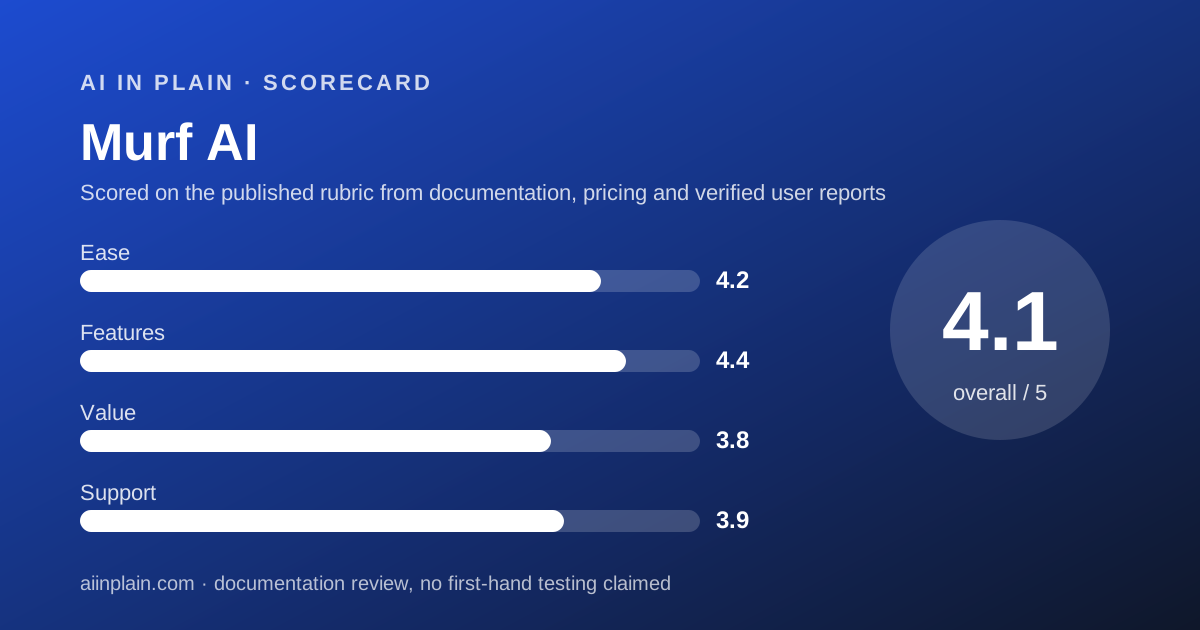
Ease of use: what the 4.2 is built from
The score covers getting a usable export, graded from the published feature tables rather than a stopwatch.
The editor idea is simple: projects hold clips, clips hold text, and controls sit beside the text. Pronunciation changes and a pronunciation library are listed on every paid tier.
The friction is commercial rather than technical. Choosing a plan means guessing how many hours of generation a year you will burn, which is not a number most buyers have.
The pricing page also makes dating hard. It was read on October 29, 2026, yet the footer still shows a 2024 copyright line.
Features: breadth is the strongest column
On published features Murf is the widest of the three voice tools graded here. The Studio table lists 200 or more voices and 30 or more languages and accents.
Voice styles and tonalities are listed as unlimited on Business. Export quality is Full HD on Creator and a higher bitrate option on Business.
Around the editor sit a voice changer, dubbing, transcription, translation and a Canva add-on. Few competitors publish that many adjacent tools under one login.
If you also build slides around the narration, our AI presentation tools guide and our Gamma review cover the deck side of the same job.
Value: strong per hour, weak per person
Per hour of narration, Creator is good value. $228 a year for 24 hours of generation is roughly $9.50 an hour of audio produced, by our arithmetic on the published figures.
Per person it looks different. One editor seat is the cap on both paid plans, so a second voice editor means an Enterprise conversation.
The 3.8 value score is the average of those two readings. A soloist should score it higher than a team would.
For comparison, WellSaid Labs publishes both monthly and annual rates and meters downloaded minutes instead, which suits a different habit entirely.
Support and the limits the vendor states
Email and chat support is marked present on every Studio tier. Priority support, an AI voice specialist and a dedicated success manager are Enterprise only.
- Editor seats are capped at one on Creator and Business
- Transcription is absent on Creator, 48 hours on Business, unlimited on Enterprise
- Deletion recovery is listed only on Business, at 60 days
- Custom models and custom integrations are Enterprise add-ons, not included features
- Full broadcasting rights are an add-on even at Enterprise level
- Success planning is listed twice a year and value reviews four times a year on Enterprise
What the vendor displays about itself
The pricing page carries a 4.7 rating badge beside customer quotes, and a line reading trusted by over 300 of the Fortune 2000. Both are figures Murf publishes about Murf.
The security strip claims HIPAA, GDPR, ISO 27001 and SOC 2 Type II. Those are vendor claims on a marketing page, not certificates read by us.
Treat all of it the way you would treat any self-reported number. Our guide on checking an AI answer before you pass it on describes the same habit applied to output rather than marketing.
What could not be read on October 29, 2026
Three things did not resolve, and the gaps are worth stating plainly.
The monthly billing rates are not in the pricing page HTML. Only the yearly state renders, so the Saved 33% badge cannot be checked against a monthly number.
The pricing FAQ answers, including the refund policy and the definition of voice generation time, are collapsed and their text does not appear in the HTML either.
Aggregate ratings on G2 and Capterra were not reachable from this machine that day, so no independent rating appears in this review.
Alternatives, and when to choose them instead
WellSaid Labs meters finished downloaded minutes and leaves generation unlimited, and it prints both billing states. Choose WellSaid if you would rather audition freely and be billed on what you keep.
Listnr sells credits across four plain tiers, with the lowest published entry for commercial use. Choose Listnr if monthly flexibility and bundled storage matter more than language breadth.
If the voice is going into edited video rather than a standalone file, an editor may serve you better. Our Descript review and our Opus Clip review cover that path.
Otherwise choose Murf when one person needs many hours of narration and the adjacent tools in one account.
Plan the exit before you commit
Audio projects are easy to start and awkward to move. Scripts, pronunciations and finished files all live inside the account.
Read our guide on getting your data out before you cancel while you are still inside the free plan, not after the renewal.
If the narration is going into short social cuts, pair this with our Descript versus Opus Clip comparison to see where the audio lands.
For a different reading of the same market, our note on ElevenLabs covers the voice tool most people name first.
Bottom line
Murf is the right call for a single producer who needs hours of narration a year and likes having dubbing, transcription and an API on the same account.
It is the wrong call for a team of two. One editor seat on every self serve plan is the limit that will decide this for most small studios.
Buy it if
- You produce hours of narration a year and want the meter counted in generation time
- You want one bill for the editor and a speech API, bought separately on the same account
- You need pronunciation and emphasis control over a long script rather than one-shot clips
- You are a single editor, so the one-seat cap costs you nothing
Skip it if
- You need two or more people editing, which is not offered below Enterprise
- You want to compare monthly against annual before signing, which the page did not show
- You need full broadcasting rights inside a listed plan rather than as an add-on
Frequently asked
How much does Murf AI cost?
Studio Creator is $19 a month billed annually at $228 a year, and Business is $66 a month at $792 a year, per the pricing page HTML checked October 29, 2026. Enterprise is quote only.
Does Murf AI have a free plan?
Yes. The Studio tab lists a $0 plan with 10 projects, 10 minutes of voice generation and one editor. It grants no commercial rights and allows no downloads, checked October 29, 2026.
What is voice generation time?
It is the Studio meter. Creator lists 24 hours a year and Business 96 hours a year. Downloads are separately listed as unlimited, so re-rendering a line costs generation time but exporting does not.
How many people can edit on a Murf plan?
One. The Studio comparison table puts maximum editor seats at 1 for both Creator and Business, with a custom number of 5 or more only on Enterprise, checked October 29, 2026.
What does the Murf API cost?
Text to speech is $0.01 per 1,000 characters on Falcon 2.1 and $0.03 on Gen2. Speech to text is $0.24 an hour, voice changer $0.10 a minute, translation $0.02 per 1,000 characters.
Can I see Murf's monthly prices?
Not from the page source. The toggle offers Billed Monthly and shows a Saved 33% badge, but the monthly rates did not appear in the pricing page HTML read on October 29, 2026.
Can I use Murf voiceovers commercially?
The paid Studio plans list commercial rights, and Business adds a Business License. The free plan is marked as having no commercial rights. Full broadcasting rights are listed as an add-on.
Sources
- Murf AI pricing page, Studio tab plan cards and full comparison table read from the page HTML - checked October 29, 2026
- Murf AI pricing page, API tab per-endpoint rates - checked October 29, 2026
- Murf AI pricing page, Dub tab credit rate - checked October 29, 2026
Update history
- October 29, 2026 - First publication. Studio, API and Dub figures read from the three pricing page tabs in the page HTML.
Visit Murf AI
We have no affiliate relationship with this vendor. Link goes to the official site.