
OpusClip
A one-job clipper that turns a long upload into captioned vertical shorts, priced at one credit per minute of source video
Scored on the published rubric, from documentation, pricing and verified user reports.
Best for: Creators and podcasters who upload long recordings every week and want captioned vertical clips plus a scheduler, and who can count their upload minutes in advance.
Verdict
OpusClip does one job and prices it honestly. You hand it a long video, it finds the moments, it crops to vertical, it burns in animated captions, and it gives each clip a virality score. The pricing unit is the clearest in this category: the help centre states that processing clips will cost 1 credit per minute of the original video imported. A 30-minute podcast costs 30 credits. That makes budgeting arithmetic rather than guesswork. This is a documentation review built from the pricing page and the help centre; no usage claims are made here. The free plan gives 60 credits a month but watermarks clips, blocks editing, and makes exports unavailable after three days. Starter at $15 a month lifts the watermark and extends storage to 29 days. Pro at $29 a month, or $14.50 a month billed annually as $174, adds 300 credits, 100GB of storage, 16:9 and 1:1 output, a scheduler, Premiere and DaVinci export, and a team workspace. Two things should slow you down. The vendor states it may use data from individual users to train its AI models, with no documented opt-out below enterprise. And the vendor's own pages disagree about who gets 4K. OpusClip earns 3.9 overall.
Visit OpusClip
We have no affiliate relationship with this vendor. Link goes to the official site.
Where it is strong
- The pricing unit is published and simple: 1 credit per minute of source video, with worked rounding rules, per the help centre checked October 22, 2026
- Unused credits roll over for 2 months on monthly plans and stay valid for 12 months on yearly plans, so a quiet week is not written off
- A Pro user can refund a whole project in credits within 14 days of upload, provided no clip has been downloaded yet
- The free trial of Pro needs no card and converts to the Free Forever plan after 7 days rather than charging you
- Pro includes distribution, not just clipping: a scheduler across nine platforms, 6 social account connections and clip analytics
- Export to Adobe Premiere Pro and DaVinci Resolve from Pro, so clips can be finished by a human editor
Where it falls short
- The vendor states that for individual non-enterprise users it may use your data to improve its AI models, and documents no opt-out below enterprise
- The pricing page lists 4K schedule and download on Business only, while the help centre article grants 4K export to Pro and both 4K rows to Enterprise - both read October 22, 2026
- Free clips carry a watermark, allow no editing, and stop being exportable after 3 days
- Starter is monthly only, has no team workspace, and crops to 9:16 alone; 1:1 and 16:9 start at Pro
- Seats cannot be bought on their own; you add a pack, and the help centre caps a team workspace at 4 users while the pricing page offers up to 15 packs
- Deleting a project does not return the credits it consumed, and subscriptions cannot be paused
At a glance
| Starting price | Free forever at no cost; Starter $15 a month; Pro $29 a month or $14.50 a month billed annually as $174 (pricing page, October 22, 2026) |
|---|---|
| Pricing note | Free plan with 60 credits a month; Starter $15 a month, monthly billing only; Pro $29 a month or $14.50 a month billed annually as $174; Business quoted by sales (pricing page, read October 22, 2026) |
| Free plan | Yes - 60 credits a month, up to 1080p rendered clips, watermark, no editing, clips no longer exportable after 3 days |
| Credits per month | Free 60 - Starter 150 - Pro 300 per pack, or 3,600 a year on annual billing |
| What a credit buys | One minute of source video processed; under a minute rounds up, part minutes round down, and posting to X costs 3 credits |
| Maximum video length | 10 hours, per the help centre; longer files may hit processing issues |
| Aspect ratios | 9:16 on Free and Starter; 9:16, 1:1 and 16:9 on Pro and Business |
| Storage | Free expires after 3 days, Starter after 29 days, Pro 100GB fixed, Business customised |
| Seats | None on Free or Starter; Pro gives 2 users per pack to a maximum of 4; Business unlimited |
| Security | SOC 2 Type II, audited annually by an independent third party, with reports in the Trust Center |
Short answer
Use OpusClip when you already publish long videos and the only thing you want is vertical clips out of them, captioned and ready to post.
Work out one number before you look at the plans. How many minutes of source video do you upload in a normal month.
That number is the price, because one credit buys one minute of source video. Sixty minutes a month fits the free plan. A hundred and fifty fits Starter. Three hundred fits Pro.
Then decide whether the watermark matters. It is the one thing the free plan cannot give you, and it is why most people who stay end up on Starter or Pro.
What OpusClip actually is
OpusClip is a single-purpose machine, not a video editor with AI attached. You give it a long recording and it returns short vertical clips.
The pipeline, per the pricing page read October 22, 2026, is clipping with a virality score, auto reframe to the aspect ratio you want, animated captions, an auto hook, and optional B-roll.
That narrowness is the product's strength. There is no timeline to learn on the free plan because there is no editing on the free plan at all.
Around the core, the paid tiers add distribution. Pro posts and schedules to nine platforms, reports clip analytics, and exposes a video editing API, a scheduler API and an MCP connector.
If what you actually need is a transcript of a meeting rather than clips of it, the tools in our guide to the best AI meeting note takers for small teams are a cheaper fit.
Who OpusClip is best for
OpusClip suits people with a steady supply of long talking-head footage and a social calendar to feed.
- Podcasters publishing a weekly episode who want five or six clips from each one without opening an editor.
- Livestreamers with hours of raw footage, since the system accepts files up to 10 hours and lets you process only a selected timeframe.
- Marketing teams repurposing recorded webinars, who need captions burned in and a scheduler rather than a design tool.
- Interview-led shows where the transcript matters too. Otter.ai and tl;dv cover that side, and OpusClip does not pretend to.
- Agencies on Pro that need clips handed to a human editor, because Premiere Pro and DaVinci Resolve export is included there.
- Anyone automating - the MCP connector, Zapier integration and APIs all sit on Pro.
Who should skip it
Three groups should look elsewhere.
- People whose footage has little speech. Clipping, auto hooks and captions all key off spoken words.
- People who need a full edit from the same tool. There is no multitrack editing here, and no audio mixing; a transcript-first editor does that job instead.
- Buyers who cannot accept model training on their footage. The vendor reserves the right for individual accounts and documents no opt-out below enterprise.
The prices, as the page states them
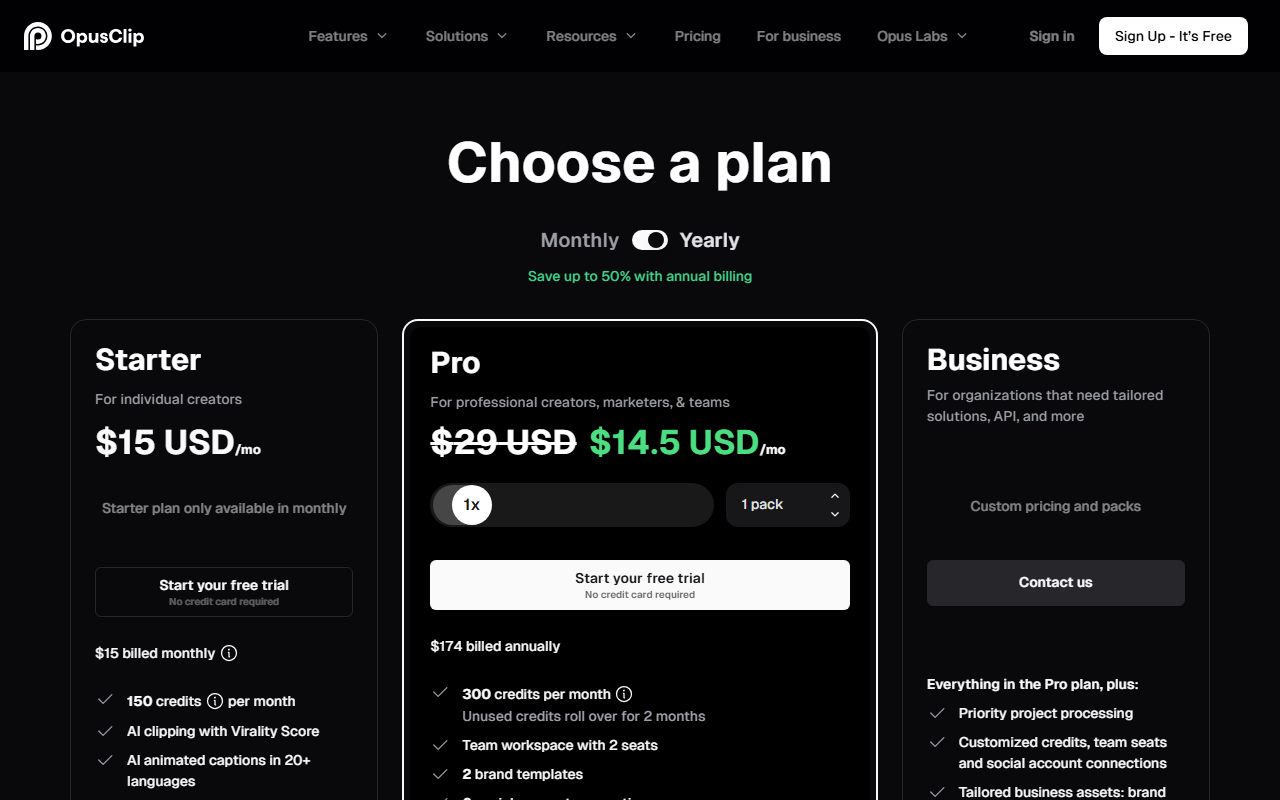
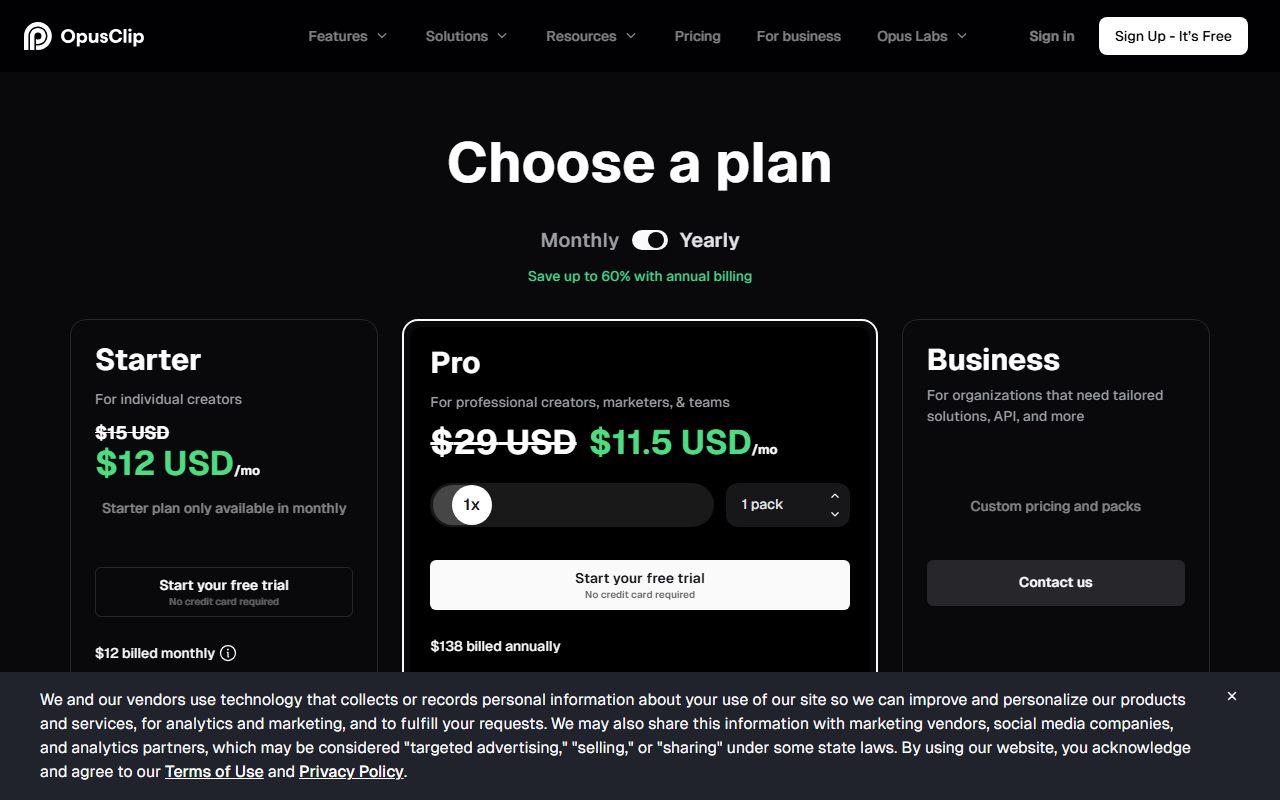
OpusClip's pricing page is unusually readable, with one quirk. Read in a headless Chrome session on October 22, 2026, it showed four tiers and a Monthly or Yearly toggle marked save up to 50 percent with annual billing.
Free Forever is $0 a month. Starter is $15 a month, and the card says in so many words that the Starter plan is only available in monthly.
Pro shows $29 a month on the monthly toggle and $14.50 a month on the yearly one, with the line $174 billed annually. That is a genuine halving, and the only annual option in the lineup.
Business carries no figure. The card reads custom pricing and packs, and the help centre points organisations needing over 10 seats to a contact form.
Seats work differently here from most tools. You cannot buy a seat. You buy a pack, and each pack adds 300 credits a month and 2 team seats.
The cap is where the vendor's pages part company. The help centre says a team workspace holds up to 4 users at 2 packs. The pricing page slider offers up to 15 packs. Both read October 22, 2026.
One credit is one minute, and that is the whole price list
This is the clearest pricing unit in the category, and it is the main reason to shortlist OpusClip.
The help centre states that processing clips will cost 1 credit per minute of the original video imported. A 30-minute upload costs 30 credits. There is no model tier, no image surcharge, no per-clip fee.
The rounding is documented in both directions. A file under a minute rounds up, so 0.5 minutes costs 1 credit. A part minute above that rounds down, so a 4.5-minute file is charged as 4.
One small extra charge exists: posting to X costs 3 credits per post.
You can also cut the bill before you spend it. The processing timeframe slider lets you submit only the section you care about, which matters a lot on a three-hour stream.
The allowances are 60 credits a month on Free, 150 on Starter and 300 per pack on Pro, or 3,600 a year on annual Pro.
Expiry is the detail buyers miss. On monthly plans, credits last 60 days, which is one month of rollover. On yearly plans they stay valid for 12 months. Cancel and the remaining balance expires at the end of the current cycle.
There is one more quirk worth knowing. The help centre will not let you downgrade to Free unless you have fewer than 30 minutes of credits left, because Free clips are watermarked.
What the free plan includes, as of October 2026
The free plan is a sampler with three deliberate walls, all stated plainly on the card.
You get 60 credits a month, AI captions with emoji and keyword highlighting, import from YouTube and local files, 1 brand template, and clips rendered up to 1080p.
The first wall is the watermark. The card says has watermark, and the dedicated help article confirms that Free Trial and Free Plan clips carry an OpusClip brand logo, removed automatically if you upgrade later.
The second is editing. The card says no editing. Text and timeline-based editing, music, text overlays and transitions all start higher up.
The third is the clock. The card says that after 3 days the clips will no longer be exportable, and the storage row says media expires after 3 days.
The seven-day Pro trial is the better way to evaluate the tool, and it needs no card. The help centre lists what the trial withholds: 4K, bulk download, social posting, team features, speech enhancement, analytics and project credit refunds.
At the end of seven days the trial converts to Free Forever rather than charging you, which is the honest default.
What the four scores are built from
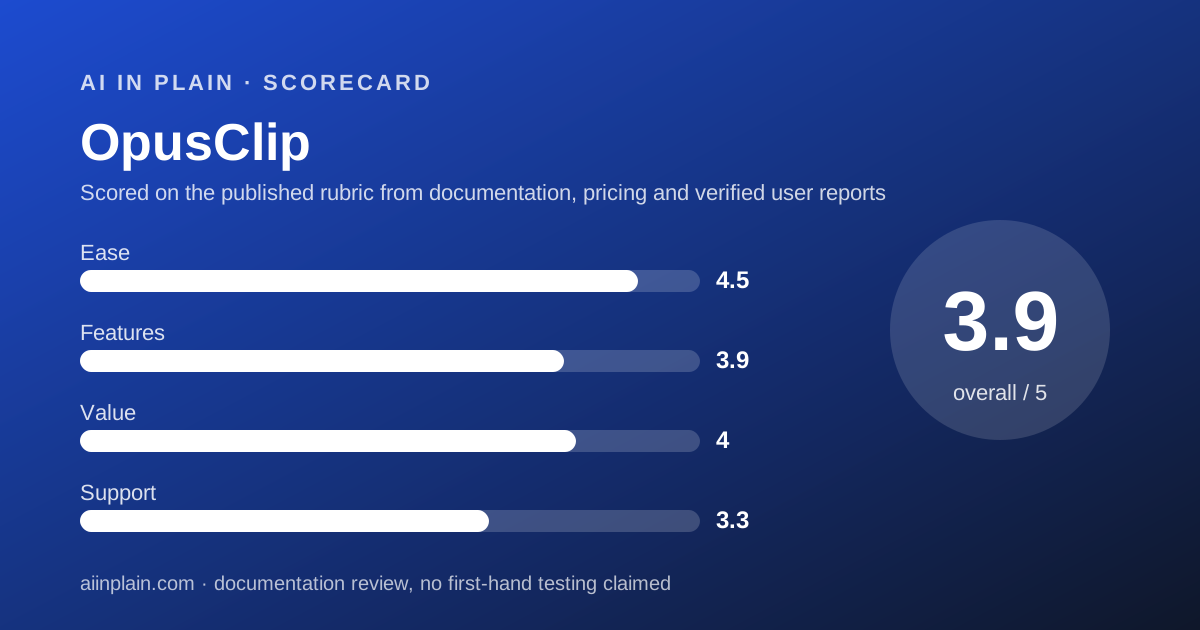
Ease of use, 4.5. This is the highest score we have given in the cluster, and it reflects narrowness rather than polish. Upload, pick a timeframe, pick a length band, submit.
The clip length options are fixed bands: 0 to 1, 1 to 3, 3 to 5, 5 to 10 and 10 to 15 minutes. Nothing about models or resolutions has to be decided first.
The virality score does the work most people struggle with, which is choosing. A tighter brief helps here too, and the habit in how to ask an AI tool for what you want applies to the reprompt field on Pro.
Features, 3.9. Deep in one lane, thin everywhere else. Captions, reframing with moving object tracking on Pro, genre-specific reframing models, dynamic layout switching and a gameplay layout are all there.
So is distribution: a scheduler to nine platforms, 6 social account connections, clip analytics and real-time trend analysis on Pro. What is missing is any real editor, plus speaker-based caption colours, which the table shows on Business alone.
Value, 4.0. Pro at $14.50 a month billed annually, with 3,600 credits a year, works out at about half a cent per source minute by our arithmetic from the vendor's figures. That is cheap for the job.
The cost of being on the wrong tier is what pulls the score down. Starter has no rollover advantage, no team, no 1:1 or 16:9 and no Premiere export, and it cannot be bought annually at all.
Support, 3.3. Free and Starter get Discord and an AI chat agent. Pro adds Intercom live chat. A dedicated Slack channel and an MSA are Business only. No response-time commitment is published at any tier.
Subscriptions cannot be paused, only cancelled and restarted. Credits from a deleted project are gone for good.
The 4K question, and why we print both answers
This is the one place where OpusClip's documentation contradicts itself, and it is worth spelling out because 4K is often the reason someone upgrades.
The pricing page comparison table, read October 22, 2026, puts a dash against 4K schedule and download for Free, Starter and Pro, and a tick for Business only.
A dedicated help article, read the same day, gives a different table: Free no, Starter no, Pro 4K export yes but 4K schedule and post no, Enterprise yes to both.
We are not picking a winner between the vendor's own two pages. If 4K matters to your decision, ask support to confirm in writing before you pay.
One thing both pages agree on, and it is the part most buyers get wrong. The article says 4K export is not upscaling, and only activates when your source video is genuinely 3840 by 2160.
Privacy and data use
OpusClip's position on training is the clearest reason some buyers will rule it out, and the vendor states it plainly rather than hiding it.
The help centre article, read October 22, 2026, says that for individual non-enterprise users it may use your data to improve its AI models and enhance the quality of its services.
It adds that any data used for training is carefully selected and stripped of personally identifiable information.
For enterprise customers it says the opposite: it does not use your data to train AI models, with terms governed by contract.
No opt-out toggle is documented for individual accounts. The article's only suggestion for people who want more control is to contact the sales team.
On security the record is solid. The vendor says it is compliant with SOC 2 Type II, undertakes an independent audit every year, and publishes the latest reports in its Trust Center. SSO and software licence management are Business features.
Alternatives
A transcript-first editor. Choose one if the same recording also has to become a full edit, a dubbed version or a written transcript. Otherwise choose OpusClip when clips are the whole deliverable and you want them scheduled too.
A browser editor sold in credits. Choose one if you want subtitles, templates and generated media in a single tab, and you make more than clips. Otherwise choose OpusClip for the simpler meter.
A still-image tool. If the output is a thumbnail or a carousel rather than video, Ideogram is the one to read, because text inside the image is its specialty.
If the caption copy is the part that stalls you, our guide to writing a prompt that gets a usable first draft is the shorter route than fighting the reprompt field.
Whichever way you go, write down how you would leave. Our guide to getting your data out before you cancel covers the order, and here it matters more than usual: Free storage expires in 3 days and Starter in 29.
Frequently asked
Every figure below is from the pricing page or the help centre, read October 22, 2026.
- Is it free? Yes, 60 credits a month, up to 1080p, watermarked, no editing, exports unavailable after 3 days.
- How much? Starter $15 a month, monthly only. Pro $29 a month or $14.50 a month billed annually as $174. Business by quote.
- What is a credit? One minute of source video. Under a minute rounds up; part minutes round down. Posting to X costs 3 credits.
- Do credits roll over? Yes. Sixty days on monthly plans, 12 months on yearly plans. They expire if you cancel.
- How long is the trial? Seven days of Pro, no card, converting to Free Forever rather than charging you.
- Can I refund a bad batch? On Pro, within 14 days of upload, if no clip has been downloaded. Deleting a project refunds nothing.
Bottom line
OpusClip is the easiest tool in this cluster to budget for and the narrowest in what it does. Both of those are on purpose.
Do this in order. Start the seven-day Pro trial rather than the free plan, because the free plan withholds editing and watermarks everything.
Put your own worst recording through it, not a demo file, and use the processing timeframe slider so you learn what a credit really buys.
Then count your monthly source minutes. Under 150 and Starter is enough, if you can live without 16:9 and a team. Over that, annual Pro at $14.50 a month is the clear buy.
If model training on your footage is a problem for your employer or your clients, this is not the tool. The vendor says so itself for individual accounts, and that is worth more than a privacy page that says nothing.
This is a documentation review. Prices, credit rules, limits and policy wording come from the OpusClip pricing page, read in a headless Chrome session, and from the help centre articles on credits, plans, 4K, data training and project refunds, all read October 22, 2026.
Buy it if
- You publish long-form every week - a podcast, a stream, a webinar. The credit model rewards steady volume because rollover covers the gaps.
- You want the posting handled too - Pro schedules to nine platforms and reports clip analytics, which Descript and VEED do not.
- You need the clip to be finishable elsewhere - Pro exports to Adobe Premiere Pro and DaVinci Resolve.
- You can say how many source minutes you upload a month - that single number picks your tier here, because one minute is one credit.
Skip it if
- Your content is not people talking - clipping relies on speech, and a silent timelapse gives it nothing to score.
- You cannot accept model training on your footage - the vendor says it may use individual users' data, with no opt-out documented below enterprise.
- You need more than four people in the workspace - the help centre caps a team workspace at 4 users.
Frequently asked
Is OpusClip free?
Yes, there is a Free Forever plan with 60 credits a month, which is 60 minutes of source video. Clips render up to 1080p, carry a watermark, cannot be edited, and stop being exportable 3 days after processing, per the pricing page read October 22, 2026.
How much does OpusClip cost?
Starter is $15 a month and the page notes it is only available monthly. Pro is $29 a month, or $14.50 a month billed annually as $174. Business is quoted by sales. All figures read from the pricing page on October 22, 2026.
What is an OpusClip credit?
One minute of the original video you import. The help centre states processing costs 1 credit per minute of source video. Videos under a minute round up, part minutes round down, so a 4.5-minute file counts as 4. Posting to X costs 3 credits.
How long is the OpusClip free trial?
Seven days, with no card required. The help centre says a Free Trial Pro Account converts automatically to a Free Forever Account after 7 days, and that trials cannot be paused. Trial exports carry the watermark and exclude 4K, bulk download and social posting.
Can I get my credits back if the clips are bad?
On Pro, yes, within limits. The help centre says you can refund a project from the three-dot menu up to 14 days after upload, provided you have not downloaded any clip. Deleting a project, by contrast, returns nothing.
Does OpusClip export in 4K?
The vendor's pages disagree. The pricing comparison lists 4K schedule and download on Business only. A dedicated help article shows 4K export available on Pro, with 4K scheduling and posting only on Enterprise. Both were read October 22, 2026, and 4K requires genuine 3840 by 2160 source.
Does OpusClip train its AI on my videos?
For individual accounts, possibly. The help centre says that for individual non-enterprise users it may use your data to improve its AI models, with personally identifiable information stripped. For enterprise customers it says it does not. No individual opt-out is documented.
What is the longest video OpusClip accepts?
Ten hours. The help centre says the system supports videos up to 10 hours long and that longer files may hit processing issues, suggesting you select a portion instead. Local uploads are capped at 10GB on Starter and 30GB on Pro.
Sources
- OpusClip pricing and plan comparison - checked October 22, 2026
- How do credits work? - checked October 22, 2026
- Plans: what kind of plans do you offer? - checked October 22, 2026
- Download and post in 4K - checked October 22, 2026
- Does OpusClip use my data to train AI models? - checked October 22, 2026
- Refunding a project - checked October 22, 2026
Update history
- October 22, 2026 - First published from the OpusClip pricing page (read in a headless Chrome session on October 22, 2026 because the plan comparison table is script-drawn) plus the help centre articles on credit consumption, plans and credits, 4K download, data training, project refunds, video length and free trial exclusions.
Visit OpusClip
We have no affiliate relationship with this vendor. Link goes to the official site.