Descript vs OpusClip: which clips your video
Short answer: OpusClip if cutting long uploads into vertical clips is the whole job, because one credit buys one minute of source video and Pro costs $14.50 a month billed annually as $174. Descript if the same recording also has to become a full edit, a transcript, a dubbed version or a set of captions, because Hobbyist starts at $16 per person per month on annual billing and the transcript is the editor. Both are documentation reviews built from vendor pricing pages and help centres read October 22, 2026, not from usage. The figure that should decide it is not the subscription. It is how many minutes of raw footage you upload in a normal month.
 4.1Descript
 3.9OpusClip
The short answer
Two tools that look similar in a demo and are built on opposite bets about what you need.
- OpusClip is best for people with a steady stream of long talking-head footage who want captioned vertical clips, a virality score on each one, and a scheduler to post them.
- Descript is best for people whose recording has more than one destination: a full edit, a transcript, captions, a dubbed version and clips, all out of the same project.
- Winner for most readers of this site: Descript, because the free plan lets you learn the editing model properly and because one subscription removes a second one. If clips are genuinely the only job, buy OpusClip instead and spend less.
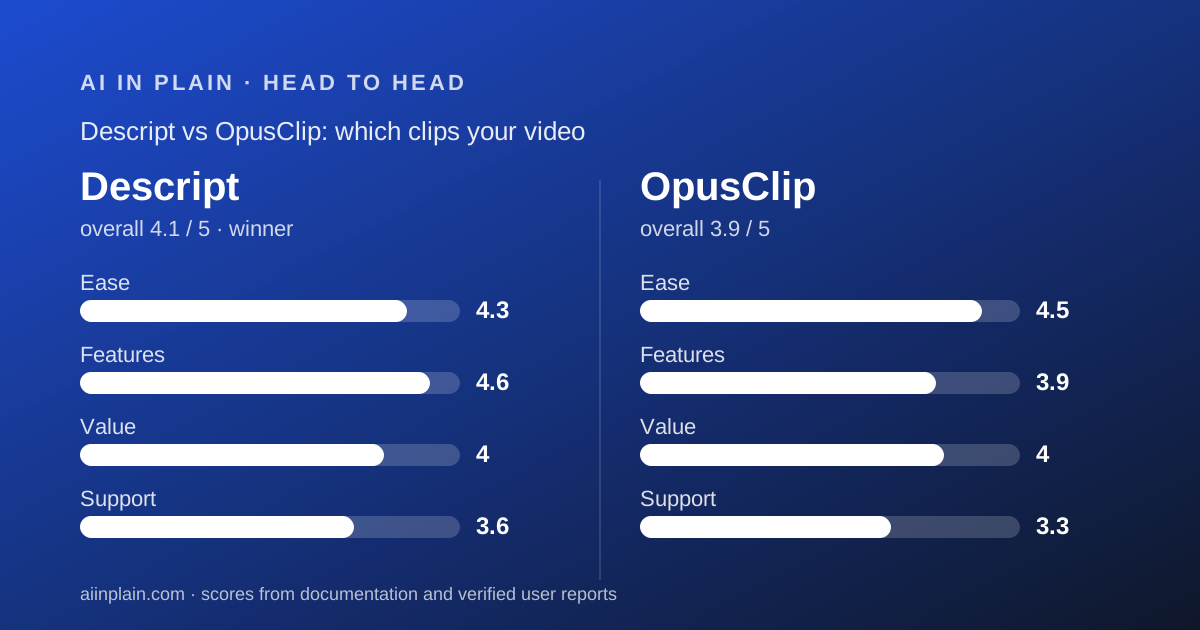
Side by side, as the vendor pages state it
Every row below was read on October 22, 2026, from the pricing page and the help centre of each vendor. Where a vendor's own pages disagree with each other, both figures appear.
- Entry paid price - Descript: $16 per person per month on annual billing, $24 on monthly. OpusClip: $15 a month, monthly only.
- Best paid value - Descript: Creator $24 per person per month annual, $35 monthly. OpusClip: Pro $14.50 a month billed annually as $174, or $29 monthly.
- Free plan - Descript: 60 media minutes a month, 100 AI credits once, 720p, watermarked. OpusClip: 60 credits a month, up to 1080p, watermarked, no editing, exports dead after 3 days.
- The metered unit - Descript: media minutes for input plus AI credits for AI actions, two separate meters. OpusClip: one credit per minute of source video, and nothing else except 3 credits to post to X.
- Rollover - Descript: none on plan allowances; purchased top ups last 12 months. OpusClip: 60 days on monthly plans, 12 months on yearly.
- Export resolution - Descript: 720p free, 1080p Hobbyist, 4K Creator and Business. OpusClip: up to 1080p free, highest available on paid; 4K rows disagree between the pricing page and the help centre.
- Aspect ratios - Descript: portrait 9:16 and square 1:1 presets in Create clips. OpusClip: 9:16 on Free and Starter, plus 1:1 and 16:9 on Pro.
- Maximum input - Descript: file size up to 1GB free rising to 50GB on Business. OpusClip: videos up to 10 hours, local files up to 10GB on Starter and 30GB on Pro.
- Scheduling and analytics - Descript: none published. OpusClip: scheduler across nine platforms, 6 social connections and clip analytics on Pro.
- Editing after clipping - Descript: full multitrack editor, timeline export to Premiere, Final Cut Pro, Pro Tools and more from Creator. OpusClip: editor on paid plans, export to Premiere Pro and DaVinci Resolve on Pro.
- Seats - Descript: 1 on Hobbyist, 1 to 3 on Creator, up to 5 on Business. OpusClip: none on Free or Starter, 2 per pack to a maximum of 4 on Pro.
- Refunds - Descript: plan refundable within 48 hours of the invoice date, seats within 7 days, top ups never. OpusClip: project credits refundable within 14 days on Pro if no clip was downloaded.
- AI training on your footage - Descript: production models use no user data, with an opt-out toggle. OpusClip: may use individual users' data, with no opt-out documented below enterprise.
- Security - Both state SOC 2 Type II. OpusClip publishes reports in a Trust Center and says it is audited annually.
OpusClip is cheaper per minute of footage, and the gap is wide
This is the clearest difference and the easiest to calculate, because OpusClip's unit is published and Descript's is not quite comparable.
OpusClip Pro on annual billing is $174 for 3,600 credits a year. One credit is one minute of source video. By our arithmetic from those two published figures, that is about 4.8 cents a source minute.
Descript Creator is $24 per person per month on annual billing for 1,800 media minutes, or $288 a year for 21,600 minutes. By the same arithmetic that is about 1.3 cents a media minute.
On that comparison Descript looks cheaper per minute, and for raw input volume it is. But the two meters are not measuring the same work.
Descript's media minutes buy ingestion. Turning that footage into clips then spends AI credits as well, and those are capped at 800 a month on Creator with no rollover.
OpusClip's credit buys the whole pipeline. Clipping, reframing, captions and the virality score are all inside the one credit per minute.
So the fair reading is this. If your month is one long upload and twenty clips, OpusClip is cheaper and simpler. If your month is thirty hours of footage with light AI use, Descript is cheaper.
The cheapest entry point of all is OpusClip Starter at $15 a month, but it is monthly-only, crops to 9:16 alone, has no team workspace and cannot export to Premiere.
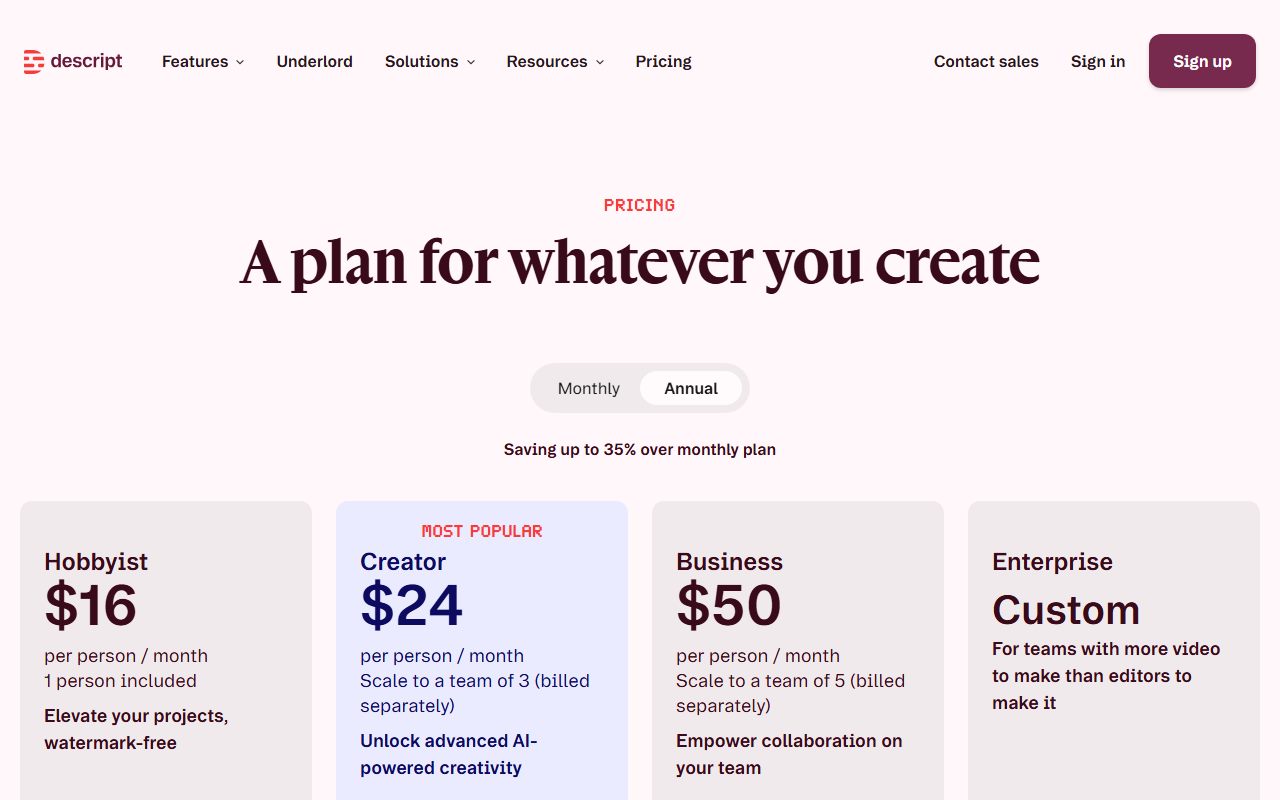
Descript is one tool where OpusClip is one job
OpusClip does clipping and distribution. It does not pretend otherwise, and that is a virtue.
Its pipeline, per the pricing page, is AI clipping with a virality score, auto reframe with moving object tracking on Pro, animated captions, an auto hook and optional B-roll. Then it schedules to nine platforms and reports analytics.
Descript starts from a different idea. The transcript is the edit, so deleting a sentence of text deletes it from the video. Create clips is one tool inside that editor.
The practical difference shows up when the clip is wrong. In OpusClip you reprompt or trim. In Descript you edit the words, add a layer, swap the layout and export the long version too.
Descript also covers work OpusClip has no answer for: transcription in 25 languages, caption translation in 61, audio dubbing in 30, remote recording through Rooms, avatars and text-to-speech.
And OpusClip covers work Descript has no answer for: posting. There is no scheduler and no clip analytics anywhere in Descript's published feature table.
If your source is a meeting rather than a show, neither is the obvious first buy. Start with the best AI meeting note takers for small teams, and read Otter.ai or tl;dv before adding a video tool on top.
Both free plans watermark, but they fail in different places
Neither free tier is a working plan, and it is worth knowing which wall you will hit first.
Descript's free plan gives 60 media minutes a month, 100 AI credits once, 5GB of storage, one seat and uploads to 1GB. Export is 720p with a watermark, and most AI rows read Limited rather than Included.
What it does let you do is learn the editor. Projects are unlimited, commenting and live collaboration are included, and the transcript works.
OpusClip's free plan gives 60 credits a month, captions with emoji and keyword highlighting, one brand template and clips up to 1080p.
It carries a watermark, allows no editing at all, and the card says that after 3 days the clips will no longer be exportable.
That three-day clock is the harsher limit. It means you cannot evaluate at your own pace.
OpusClip's better offer is the seven-day Pro trial, which needs no card and converts to Free Forever rather than charging you. The help centre lists what it withholds, including 4K, bulk download, social posting and project credit refunds.
Descript has no trial of a paid tier at all. Its free plan is the trial, and the plan refund window is 48 hours.
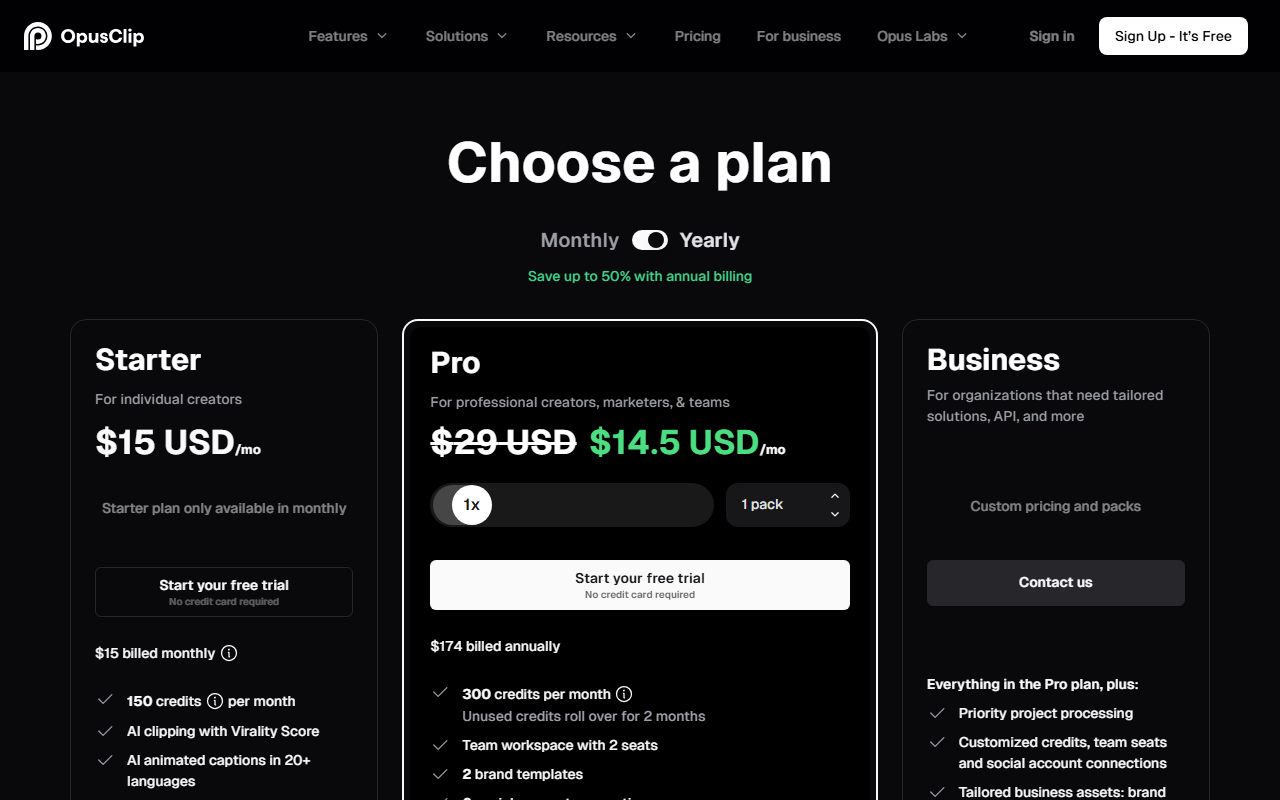
Descript states its position on training; OpusClip states the opposite
For some buyers this section decides it, and both vendors are clear enough that no guessing is needed.
Descript's privacy article, read October 22, 2026, says current AI models in production use no Descript user data, and that internal research models use only data from users who opted into data sharing.
It adds that there are no plans to use data from anyone who has opted out, at any stage. The opt-out is a toggle in App Settings, and Enterprise drives have sharing off by default.
OpusClip's article, read the same day, says that for individual non-enterprise users it may use your data to improve its AI models, with personally identifiable information stripped out.
For enterprise customers it says it does not. No opt-out is documented for individual accounts; the article's only suggestion is to contact sales.
Neither position is dishonest. One is simply more restrictive than the other, and if your footage contains clients, patients, students or unreleased product, that difference is the whole decision.
On infrastructure the two are level. Both state SOC 2 Type II compliance, and OpusClip adds that it is audited annually with reports in its Trust Center.
Where each vendor's pages contradict themselves
We read both sites in a headless Chrome session because the plan tables are drawn by script, and both turned up internal disagreements worth knowing before you buy.
OpusClip has two. The pricing comparison puts 4K schedule and download on Business only, while a dedicated help article grants 4K export to Pro and both 4K rows to Enterprise.
The second is seats. The help centre says a team workspace holds up to 4 users at 2 packs. The pricing page slider offers up to 15 packs, and the plans article points organisations needing over 10 seats to Business.
Descript's pages were consistent on every figure we checked, which is unusual enough to say out loud.
The one thing its pricing page does not spell out is which of the two numbers on each card is annual. The page data settles it, and the page's own meta description agrees: paid plans start from $16 a month, which is the annual rate.
Where a vendor disagrees with itself, do not take our reading as settled. Ask support to confirm the row that matters to you in writing.
Apply the same scepticism you would to any generated answer, as in how to check an AI answer before you pass it on.
Choose Descript if
Four conditions point clearly at Descript.
- The recording has more than one destination - a long edit, a transcript, captions, a dubbed version and clips, from one project.
- You want to edit by reading - the transcript is the timeline, which is the single biggest reason non-editors stay with it.
- Model training on your footage is a problem - production models use no user data, and there is an opt-out toggle.
- A human editor finishes the work - timeline export to Premiere, Final Cut Pro, Pro Tools, Logic and Audition starts at Creator.
Choose OpusClip if
Four conditions point clearly at OpusClip.
- Clips are the entire deliverable - nothing here is spent on features you will not open.
- You want the posting handled - a scheduler across nine platforms and clip analytics are included on Pro, and have no equivalent in Descript.
- You need the budget to be predictable - one credit per minute of source video, with rollover of 60 days monthly or 12 months yearly.
- You want to try the real thing first - seven days of Pro, no card, converting to the free plan instead of charging you.
Bottom line
Descript wins on breadth and on the privacy clause. OpusClip wins on simplicity, on distribution and on the clarity of its meter.
The mistake to avoid is buying both. That happens when someone picks OpusClip for clips, then discovers they also need a transcript and a long edit, and ends up paying twice for the same footage.
So decide in this order. Write down every destination the recording has to reach this quarter. If that list is only clips, buy OpusClip Pro annually. If it has two or more items on it, buy Descript.
Then run the free pass on your own worst recording rather than a demo file, and write the prompt tightly: how to ask an AI tool for what you want saves credits in both tools.
And before you commit to either, read our guide to getting your data out before you cancel. OpusClip free storage dies in 3 days and Starter in 29; Descript keeps files but refunds a plan for only 48 hours.
Full detail on each tool is in our Descript review and our OpusClip review.
Frequently asked
Which is cheaper, Descript or OpusClip?
For one person doing only clips, OpusClip. Pro is $14.50 a month billed annually as $174 for 3,600 credits a year, which is about 4.8 cents a source minute by our arithmetic. Descript's cheapest paid tier is $16 per person per month on annual billing.
Can OpusClip do everything Descript does?
No. OpusClip has no multitrack editing, no transcription product, no dubbing in 30 languages and no remote recording. Descript publishes all four. Equally, Descript has no social scheduler and no clip analytics, which OpusClip includes on Pro.
Which one makes better clips?
We did not run tests, so we will not rank output quality. On documented features OpusClip does more automatically: a virality score, an auto hook, moving object tracking and genre-specific reframing. Descript gives you 1 to 20 clips of 10 seconds to 5 minutes and a full editor to fix them.
Do either of them export in 4K?
Descript does, on Creator and Business, per the comparison table read October 22, 2026. OpusClip's own pages disagree: the pricing table lists 4K on Business only while a help article grants 4K export to Pro. Both require genuine 4K source footage.
Can I switch from one to the other?
Yes, since neither locks your source files. Download your finished clips and project exports first. OpusClip free storage expires after 3 days and Starter after 29, so pull files before cancelling rather than after.
Which is cheaper for a team of three?
Descript Creator, which scales to a team of 3 at $24 per person per month on annual billing. OpusClip gives no seats on Free or Starter, and Pro provides 2 users per pack to a maximum of 4, so a third seat means a second pack.
Sources
- Descript pricing and plan comparison - checked October 22, 2026
- OpusClip pricing and plan comparison - checked October 22, 2026
- OpusClip: how do credits work? - checked October 22, 2026
- Descript: track and understand your media minutes and AI credits - checked October 22, 2026
- Descript: account data and privacy - checked October 22, 2026
- OpusClip: does OpusClip use my data to train AI models? - checked October 22, 2026
Visit Descript
We have no affiliate relationship with this vendor. Link goes to the official site.
Visit OpusClip
We have no affiliate relationship with this vendor. Link goes to the official site.