
Descript
A text-based video and audio editor that cuts long recordings into shorts, metered in media minutes and AI credits rather than in seats alone
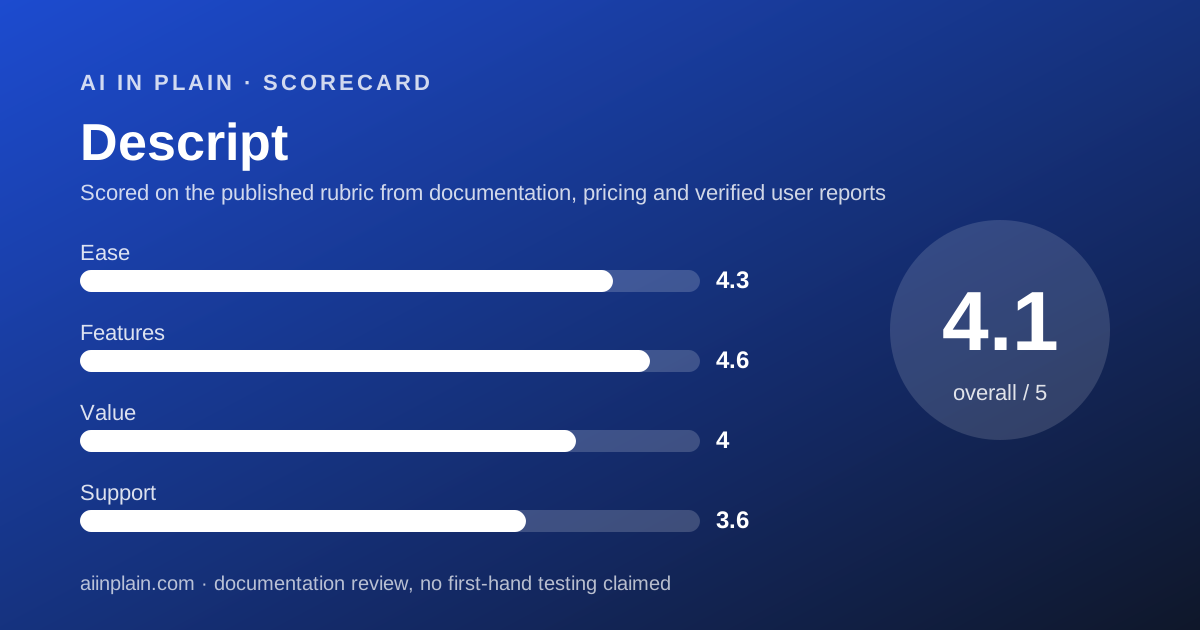
Scored on the published rubric, from documentation, pricing and verified user reports.
Best for: People who already have long recordings on disk and want shorts out of them without learning a timeline editor, and who can plan their month around a media-minute allowance.
Verdict
Descript is the one tool in this category that treats a video as a document. You delete a sentence in the transcript and the video loses that sentence. Create clips then scans the composition and pulls out shorts, with the number of clips set between 1 and 20 and the length between 10 seconds and 5 minutes, per the help centre read October 22, 2026. This is a documentation review built from the pricing page, the billing help articles and the privacy article; no usage claims are made here. The thing to understand before paying is that Descript meters two separate currencies. Media minutes count what you upload or record. AI credits pay for the AI actions. Neither rolls over. The free plan gives 60 media minutes a month and 100 AI credits once, and it watermarks exports at 720p. Hobbyist at $16 per person per month on annual billing lifts that to 600 media minutes, 400 credits a month and watermark-free 1080p. Two things should slow you down. The refund window for a plan is 48 hours from the invoice date. And top ups, the safety valve when you run dry mid-project, are only sold on Creator and Business. Descript earns 4.1 overall.
Visit Descript
We have no affiliate relationship with this vendor. Link goes to the official site.
Where it is strong
- Transcript-first editing means anyone who can use a word processor can make a cut, with no timeline skills required
- Create clips is documented rather than mysterious: 1 to 20 clips per run, 10 seconds to 5 minutes each, with portrait and square layout presets
- The free plan is usable for a trial rather than a demo: 60 media minutes a month, no card required per the pricing page FAQ, checked October 22, 2026
- Exports leave cleanly from Creator up: timeline exports to Premiere, Final Cut Pro, Pro Tools, Logic, Audition, Samplitude and Reaper
- Data use is stated plainly: the privacy article says current AI models in production use no Descript user data, and there is a single opt-out toggle
- Top up pricing is published to the unit: 350 AI credits for $35, 1,000 for $80, 4,000 for $200, and media minutes at 5 hours for $25 down to 50 hours for $150
Where it falls short
- Plan refunds run for 48 hours from the invoice date, which is the shortest window of the three tools in this cluster (refund policy, checked October 22, 2026)
- Unused media minutes and AI credits do not roll over to the next cycle, so a quiet month is simply lost
- Top ups are only available on Creator and Business, so Hobbyist buyers who run out must upgrade rather than buy a bundle
- Chatting with Underlord costs AI credits even when no tool runs, and the vendor states the same request can cost different amounts each time
- The free plan watermarks exports and caps local export at 720p, and stock library search is limited to the first 5 results
- Still images consume media minutes at 1 second each, which is easy to forget when a clip is mostly stills
At a glance
| Starting price | Free at no cost; Hobbyist $16 per person per month on annual billing and $24 on monthly (pricing page, October 22, 2026) |
|---|---|
| Pricing note | Free plan at no cost; Hobbyist from $16 per person per month on annual billing and $24 on monthly, Creator $24 and $35, Business $50 and $65, per the pricing page read October 22, 2026 |
| Free plan | Yes - 60 media minutes a month, 100 AI credits once, 720p export with watermark, 5GB storage, 1 seat |
| Media minutes per editor | Free 60 - Hobbyist 600 - Creator 1,800 - Business 2,400 per month |
| AI credits per editor | Free 100 one-time - Hobbyist 400 - Creator 800 - Business 1,500 per month |
| Export resolution | 720p on Free, 1080p on Hobbyist, 4K on Creator and Business, both locally and on web links |
| Clip generation | Create clips produces 1 to 20 clips per run at 10 seconds to 5 minutes each, in portrait 9:16 or square 1:1 presets |
| Upload limits | File size up to 1GB on Free, 10GB Hobbyist, 20GB Creator, 50GB Business; file resolution up to 4K on Free and Hobbyist, up to 5K above |
| Refund window | 48 hours from the invoice date for a plan, 7 days for an added editor seat, nothing for top ups |
| Security | The pricing page FAQ states Descript is SOC 2 Type II compliant |
Short answer
Use Descript when the thing you need to cut is mostly people talking, and when you would rather read a transcript than scrub a waveform.
Start on the free plan. It gives 60 media minutes a month, which is one long interview, and that is enough to learn whether transcript editing suits how you think.
Before you pay, work out two numbers. How many hours of raw footage do you upload in a normal month, and how heavily you lean on AI actions. Those pick your tier here, not the feature list.
Then check the refund rule. A plan is refundable for 48 hours from the invoice date, which is short enough to matter.
What Descript actually is
Descript is a word processor that happens to hold video. The transcript is the edit. Delete a sentence of text and that sentence leaves the video.
That single idea is why it keeps turning up in repurposing shortlists even though it is not a dedicated clipper. The hard part of making a short is deciding which forty seconds to keep, and that decision is easier to make in text.
The product has grown wide around that core. The pricing page navigation, read October 22, 2026, lists video editing, podcasting, a screen recorder, Rooms for remote recording, captions, AI speech, transcription, templates, an API and an MCP server.
Underlord is the agent layer sitting on top. It can be asked to make clips, write a script or draft social posts, and it bills by the work it does.
For comparison, the tools in our guide to the best AI meeting note takers for small teams stop at the transcript. Descript starts there.
Who Descript is best for
Descript suits people whose bottleneck is cutting, not filming, and whose raw material is speech.
- Podcasters who publish a full episode and want five vertical clips from it in the same afternoon.
- Course and tutorial makers recording screen walkthroughs, since the screen recorder and the editor are the same product.
- Marketing teams turning a recorded webinar into social cuts, with captions and a brand layout pack applied once.
- Interviewers and researchers who need the transcript anyway, and would otherwise pay separately for it. Otter.ai and Fireflies.ai cover that half alone.
- Small agencies that must hand a project to a human editor later, because timeline exports to Premiere and Final Cut Pro are included from Creator up.
- Anyone who dubs - the comparison table lists caption translation in 61 languages and audio dubbing in 30, read October 22, 2026.
Who should skip it
Three groups will be happier elsewhere.
- People who only want vertical clips from one long upload and nothing else. A single-purpose clipper does that job for less money and fewer decisions.
- People whose footage is mostly silent - b-roll, gameplay, timelapse. Transcript editing has nothing to grip, and Create clips needs speech to find a highlight.
- Buyers who need a long cooling-off period. The plan refund window is 48 hours from the invoice date.
The prices, as the page states them
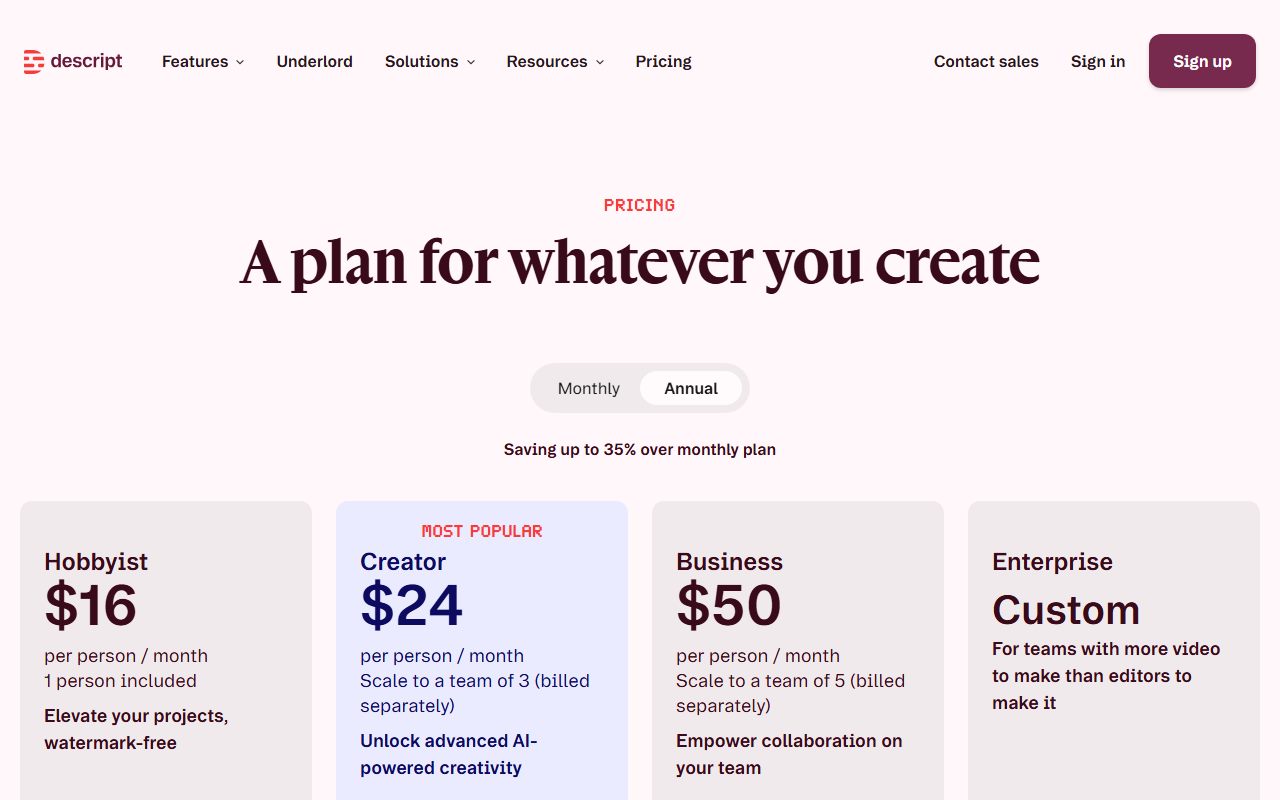
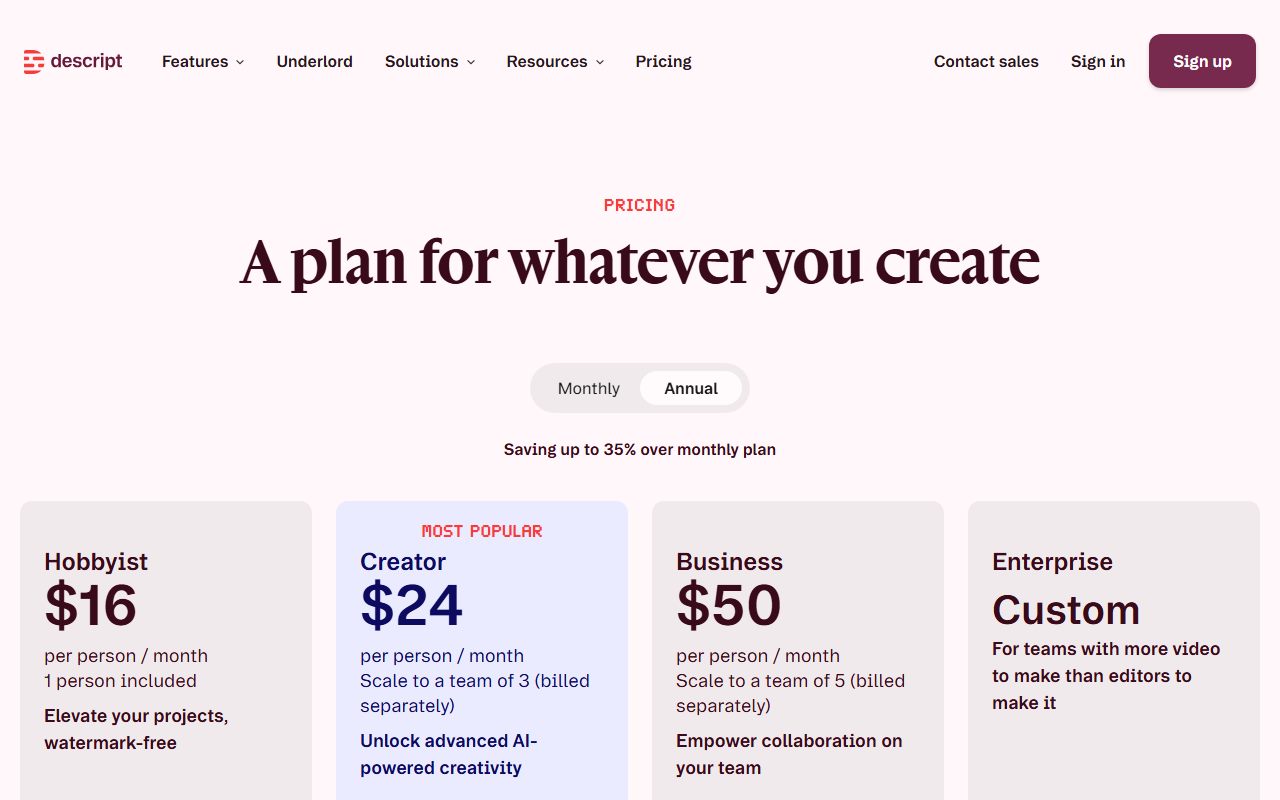
Descript's pricing page shows two figures per plan and a toggle between Monthly and Annual, with the line saving up to 35 percent over monthly plan.
Read in a desktop Chrome session on October 22, 2026, the underlying page data gave both numbers for each tier. Hobbyist is $16 per person per month on annual billing and $24 on monthly.
Creator is $24 and $35. Business is $50 and $65. Enterprise carries no published figure and routes to sales.
The page's own meta description says paid plans start from $16 a month, which confirms that the lower number of each pair is the annual rate.
Seats are counted per person and billed separately. Hobbyist includes one person, Creator scales to a team of 3 and Business to 5.
That matters more here than on most tools, because the allowance is per editor seat. Each seat adds its media minutes and AI credits to a shared drive pool, and viewers cannot draw on it.
The two currencies are the real price list
Descript meters usage twice, and buyers who only read the dollar figure get caught by the second meter.
Media minutes count what you put in. Per the billing help article read October 22, 2026, that includes uploads, in-app recording, Rooms sessions and screen, webcam or microphone capture. Still images count as 1 second each.
The allowances are 60 minutes a month on Free, 600 on Hobbyist, 1,800 on Creator and 2,400 on Business, per editor.
One detail is genuinely generous. A Rooms recording charges the session length, not the per-participant total, so a one-hour session with five people costs 60 media minutes rather than 300.
AI credits pay for the AI actions: Underlord, Studio Sound, Remove Filler Words, Green Screen, Eye Contact, AI speech, avatars and generated media. Free gets 100 once; paid plans get 400, 800 and 1,500 a month.
Two published guardrails are worth knowing. Studio Sound and Remove Filler Words are capped at 30 credits per application no matter how long the file is.
And the vendor warns that chatting with Underlord costs credits even when no tool runs, because the agent itself is a model call. Running a tool through Underlord bills twice: the agent, then the tool.
Neither currency rolls over. The article says so twice.
Create clips: what the repurposing tool actually does
This is the feature that puts Descript in a video repurposing shortlist, and it is narrower than the marketing suggests.
Per the help centre read October 22, 2026, you open the AI Tools panel, scroll to the Repurpose section and select Create clips. You then set the number of clips, from 1 to 20, and the length, from 10 seconds to 5 minutes.
A layout is optional. The gallery includes portrait 9:16 and square 1:1 presets, plus custom layout packs. You can also type a topic, goal or criteria to steer which moments get picked.
The discipline in how to check an AI answer before you pass it on applies to the transcript too: automatic transcription is good, not correct.
Output lands in a folder named after the source composition. Each clip is a full composition of its own, so it can be edited further rather than only trimmed.
The documented limit is on the input, not the output. A source composition must be at least as long as the clips you want, and the vendor says compositions under one minute may not generate clips at all.
What is missing, compared with a dedicated clipper, is a scoring layer. There is no published virality score and no scheduler. Descript hands you clips; posting them is your problem.
Underlord can be asked to do the same job conversationally. The habit in how to ask an AI tool for what you want applies directly, and a tighter prompt here costs fewer credits.
What the free plan includes, as of October 2026
The free plan is a real trial rather than a shop window, with three hard edges.
Per the comparison table read October 22, 2026, it gives 60 media minutes a month, 100 AI credits once, unlimited projects, 5GB of cloud storage, one seat, uploads up to 1GB, and email support.
The first edge is the watermark. Watermark-free video export is listed as not included on Free and included on all three paid tiers.
The second is resolution. Local export and web link export are both capped at 720p on Free, against 1080p on Hobbyist and 4K on Creator and Business.
The third is the word Limited. Most AI rows on the Free column read Limited rather than Included, including Underlord, Studio Sound, Eye Contact and the Repurpose row that contains Create clips.
The stock library is capped too: first 5 search results on Free, first 12 on Hobbyist, unlimited on Creator and above.
None of that stops you evaluating the editing model, which is the thing worth evaluating.
What the four scores are built from
Ease of use, 4.3. Import, read, delete, export. That is a different skill ceiling from a timeline editor, which is why Descript gets recommended to people who do not call themselves editors.
We held it below 4.5 because two meters must be understood before you can budget, and the price of an AI action is only visible after the action.
Features, 4.6. This is the strongest column. Transcription runs in 25 languages with speaker detection for 8 or more speakers. Caption translation covers 61 languages and dubbing 30, with native-sounding voices in 14. Translation proofread is Business only.
Recording is a real part of the product. Rooms gives 2 hours on Free and 5, 15 and 25 hours a month on the paid tiers, with 10 participants on every plan.
Timeline exports to Premiere, Final Cut Pro, Pro Tools, Logic, Audition, Samplitude and Reaper start at Creator, as does batch file export.
What is absent is distribution. No social scheduler, no clip analytics. If a deck rather than a clip is the deliverable, Gamma covers that end.
Value, 4.0. Each step up roughly triples media minutes and doubles credits. By our arithmetic from the vendor's figures, Creator at $24 per person per month annual carries 1,800 media minutes, about 1.3 cents a minute before any AI use.
Top ups are priced to the unit: AI credits at 350 for $35, 1,000 for $80 or 4,000 for $200, and media minutes at 5 hours for $25, 20 for $80 or 50 for $150.
They are sold only on Creator and Business, and they are non-refundable.
Support, 3.6. Knowledge base and email on every plan, in-app live chat from Hobbyist, priority support with an SLA on Business only. A plan is refundable within 48 hours of the invoice date, an added seat within 7 days, a top up never.
There are no prorated refunds for unused time. Upgrades behave better: they apply immediately and credit the remaining time on the old plan.
Privacy and data use
Descript's privacy article, read October 22, 2026, states that current AI models in production use no Descript user data, and that internal research models use only data from users who opted into data sharing.
It adds that there are no plans to use data from anyone who has opted out, at any stage of research, development or production.
The opt-out is a single toggle: App Settings, Profile tab, Share data with Descript. Enterprise drives cannot toggle it, because sharing is off by default for them.
On sub-processors, the article says some features rely on third parties such as OpenAI, with agreements that no data is used by them to train their models. The pricing page FAQ adds that Descript is SOC 2 Type II compliant.
Alternatives
A dedicated clipper. Choose one if the only job is vertical clips from long uploads, scored and scheduled for you. Otherwise choose Descript when the same recording must also become a full edit, a transcript and a dubbed version.
A browser editor sold in credits. Choose one if you want subtitles, templates and generated media in a tab and never want to install anything. Otherwise choose Descript when the transcript is the thing you want to edit.
A meeting note taker. If the recording is a meeting and the deliverable is notes, start with the best AI meeting note takers for small teams. tl;dv is the one to read if meetings are your raw material.
Before you cancel anything, pull your files out first. Our guide to getting your data out before you cancel covers the order, and Descript exports transcripts as docx, txt, rtf, md or html and subtitles as SRT or VTT.
Frequently asked
Every figure below is from the pricing page or the help centre, read October 22, 2026.
- Is Descript free? Yes, no card required. Sixty media minutes a month, 100 AI credits once, 720p watermarked export, 5GB storage, one seat.
- How much is it? Hobbyist $16 per person per month annual or $24 monthly; Creator $24 or $35; Business $50 or $65; Enterprise by quote.
- What is a media minute? A minute you upload or record. Still images count as 1 second each. Rooms charges session length, not per participant.
- Do allowances roll over? No. Plan media minutes and AI credits reset each cycle. Purchased top ups roll over for 12 months.
- Can it make shorts? Yes, through Create clips: 1 to 20 clips per run, 10 seconds to 5 minutes each, with portrait and square presets.
- Is there a refund? A plan within 48 hours of the invoice date, an added seat within 7 days, a top up never.
Bottom line
Descript is the most complete tool in this cluster and the one most likely to be mispriced by the buyer, because the dollar figure is only half the meter.
Do this in order. Spend the free 60 media minutes on your own worst recording, not a demo file. Run Create clips on it and look at what it chose.
Then count the hours of raw footage you really uploaded last month. Under ten and Hobbyist is the answer. Over twenty-five and Creator is cheaper than topping up, which Hobbyist cannot do at all.
Subscribe on a day when you can check it within 48 hours, because that is the whole plan refund window.
This is a documentation review. Prices, allowances, limits and policy wording come from the Descript pricing page and from the help centre articles on media minutes, top ups, refunds, Create clips and data privacy.
All were read on October 22, 2026. We read the pricing page in a headless Chrome session because the comparison table is drawn by script.
Buy it if
- Your raw material is talk - interviews, podcasts, webinars, screen recordings. Transcript editing is strongest where the content is words, and Create clips needs enough speech to find a highlight.
- You want one tool for the whole job - record, transcribe, cut, caption, clip, dub and publish all sit in the same project rather than in four subscriptions.
- You will hand the file to an editor later - timeline exports to Premiere, Final Cut Pro and Pro Tools are included from Creator up.
- You can forecast roughly how many hours a month you upload - that number, not the feature list, is what picks your tier here.
Skip it if
- Your volume is lumpy - allowances do not roll over, and top ups are sold only on Creator and Business.
- You need a long refund window - plan refunds close 48 hours after the invoice date.
- You only ever need vertical clips from one long video - a dedicated clipper is cheaper and faster for that single job.
Frequently asked
Is Descript free?
There is a free plan with no card required, per the pricing page FAQ checked October 22, 2026. It includes 60 media minutes a month and 100 AI credits once, caps local export at 720p, adds a watermark, and gives 5GB of cloud storage and one seat.
How much does Descript cost?
Per the pricing page read October 22, 2026, Hobbyist is $16 per person per month on annual billing or $24 on monthly, Creator is $24 or $35, and Business is $50 or $65. The page says annual saves up to 35 percent. Enterprise is quoted by sales.
What is the difference between media minutes and AI credits?
Media minutes count what you upload or record, including Rooms sessions and screen captures, with still images charged at 1 second each. AI credits pay for AI actions such as Studio Sound, Eye Contact, Underlord and generated media. Neither rolls over.
Can Descript turn a long video into shorts?
Yes. The Create clips tool sits under Repurpose in the AI Tools panel. You set the number of clips between 1 and 20 and the length between 10 seconds and 5 minutes, optionally pick a portrait or square layout, and optionally type a topic to steer the selection.
Does Descript train AI on my videos?
The privacy article, read October 22, 2026, states that current AI models in production use no Descript user data, and that internal research models use only data from users who opted into data sharing. Enterprise drives have sharing disabled and cannot toggle it.
Can I get a refund from Descript?
Plan purchases are refundable within 48 hours of the invoice date and added editor seats within 7 days, by request to support. Top up purchases of media minutes or AI credits are non-refundable, and there are no prorated refunds for unused time on a cycle.
Does the free plan put a watermark on exports?
Yes. The plan comparison table lists watermark-free video export as not included on Free and included on Hobbyist, Creator and Business, as read on October 22, 2026. The Hobbyist card is sold on exactly that line: elevate your projects, watermark-free.
What happens if I run out of media minutes mid-project?
On Creator or Business you can buy a top up: media minutes at 5 hours for $25, 20 hours for $80 or 50 hours for $150. Top ups expire 12 months after purchase and are only drawn on after the monthly allowance is gone. Hobbyist has no top ups.
Sources
- Descript pricing and plan comparison - checked October 22, 2026
- Track and understand your media minutes and AI credits - checked October 22, 2026
- Top ups: Buy additional media minutes and AI credits - checked October 22, 2026
- Descript refund policy - checked October 22, 2026
- Create Clips from your content - checked October 22, 2026
- Account data and privacy - checked October 22, 2026
Update history
- October 22, 2026 - First published from the Descript pricing page (read in a headless Chrome session on October 22, 2026 because the plan comparison table is script-drawn), plus the help centre articles on media minutes and AI credits, top ups, refunds, Create clips and account data and privacy.
Visit Descript
We have no affiliate relationship with this vendor. Link goes to the official site.