The best AI presentation tools for small teams
Short answer: for a small team that already writes things down, the best AI presentation tool is Gamma, because its free plan lets everyone test it tonight with no card and its credit prices are published down to the image. If your team sends client-facing decks every week and wants a flat seat price with no meter, Beautiful.ai is the better buy at $14.50 per member per month billed annually, checked October 20, 2026. We graded both from vendor documentation rather than from use, and the one figure we could not read anywhere is a US dollar price for Gamma's individual plans.
Our picks
- Best overall for small teams: Gamma
- Best for client-facing decks and brand control: Beautiful.ai
The two tools at a glance

Two products, two commercial ideas. The fastest way to choose is to decide what you are paying to remove: a credit meter, or the hour your team spends making slides line up.
- Gamma - best overall for small teams. Free plan with no card, 400 one-time credits, credit prices published per card and per image, and output beyond slides.
- Beautiful.ai - best for client-facing decks. $14.50 per member per month billed annually, unlimited AI generation, over 300 auto-designing layouts, brand controls on the Team tier.
- Deciding between them? Read Gamma vs Beautiful.ai for the row-by-row comparison.

Start with the question that actually splits them
Not features. Not output quality. The question is how each vendor charges for AI work, because that decides your monthly bill and your team's behaviour.
Gamma meters it. Per the pricing page read October 20, 2026, each plan carries a monthly credit allowance and every generation, image and agent edit draws from it. Unused credits roll over up to twice the allowance.
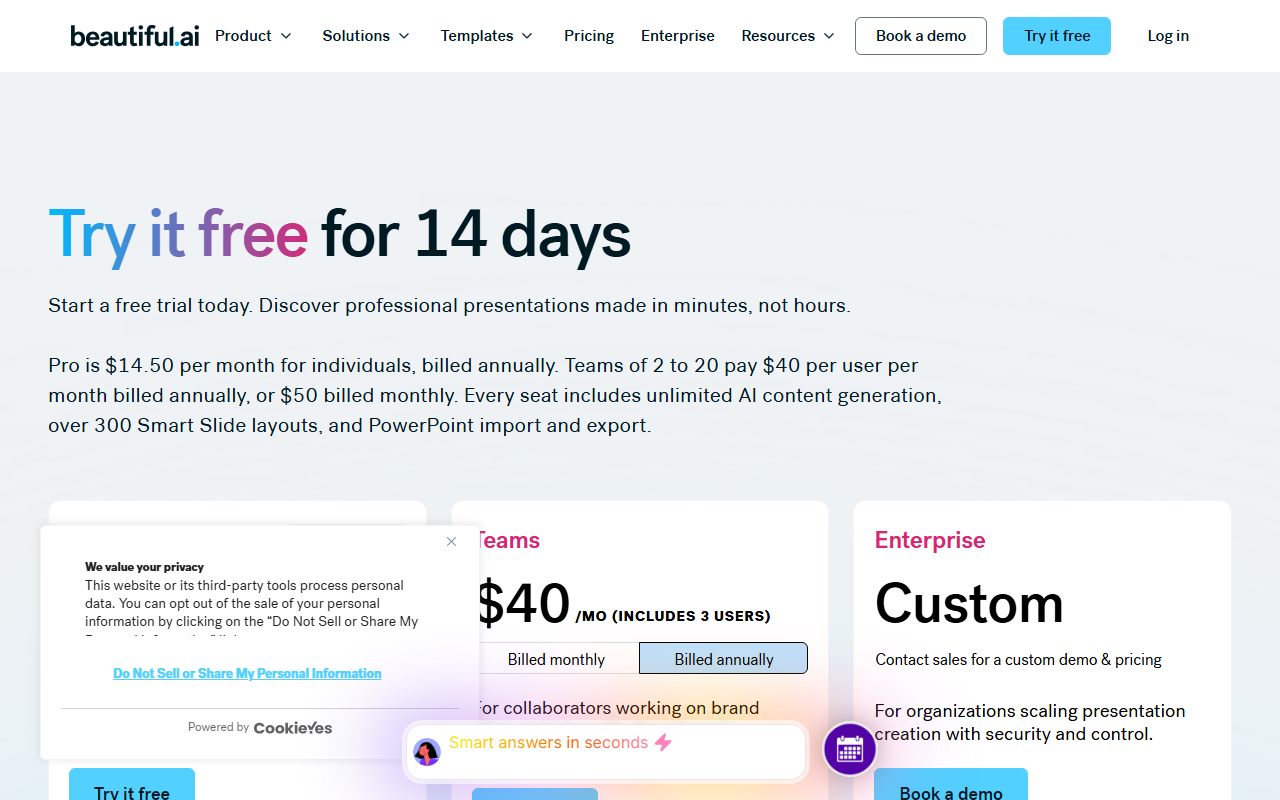
Beautiful.ai does not. Its pricing page lists unlimited AI content generation on Pro, Team and Enterprise, and its copy explicitly contrasts that with generation capped by credit limits.
A metered tool makes people cautious. A flat tool makes people generate ten versions. For a small team, which of those behaviours you want is a real management decision, not a technicality.
What a Gamma deck actually costs in credits
This is the most useful table either vendor publishes, and it sits in Gamma's developer documentation rather than on its pricing page.
Checked October 20, 2026: text generation runs 1 to 3 credits per card. Images run 2 to 15 credits on standard models, 20 to 33 on advanced, 34 to 75 on premium and 30 to 125 on ultra.
The documentation also gives worked examples. A deck of 10 cards with 5 basic images is listed at roughly 20 to 60 credits. A 20-card document with 15 premium images is listed at roughly 320 to 1,070.
Put that against a 1,000-credit Plus allowance. Ten text-led decks a month fit comfortably. One image-heavy document can take a third of the month's budget.
One honest caveat from the vendor: agent generations are charged by the work the agent does, and the same prompt can cost different amounts on different runs. For predictable cost, use classic generations and a standard image model.
The price we could not read, and why we are telling you
Gamma's pricing page prices by visitor location. Read from our office on October 20, 2026, in a desktop browser with no account signed in, it quoted Vietnamese dong for every paid tier.
The figures on the annual tab were ₫203,200 per seat per month for Plus, ₫430,000 for Pro and ₫2,368,328 for Ultra. We are not converting those, because a rate we chose would read like a price Gamma published.
What Gamma does publish in dollars, in its own help centre, is Business at $40 per member per month billed annually, and top-up credits at $6 per 1,500.
So there is one clean team-level comparison: Gamma Business and a Beautiful.ai Team seat are both $40 per member per month on annual billing, on the vendors' own pages. At five seats that is $2,400 a year either way, by our arithmetic.
Beautiful.ai's Team price is printed two different ways
We flag this because a small team is exactly the buyer it affects, and because it is on the vendor's own page twice.
The Team plan card reads $40 per month including 3 users, with a bullet underneath saying fixed pricing for up to three users. The FAQ further down the same page reads $40 per user per month billed annually, or $50 per user billed monthly.
For three people, those readings are roughly $480 and roughly $1,440 a year, by our arithmetic from the page's own numbers. That is not a rounding difference.
Do not resolve it from a search result or a third-party blog. Put three seats in the cart and read the total before you confirm.
How to try each one without wasting a week
The evaluation routes are completely different, and this is where Gamma earns the top spot for teams on a budget.
Gamma's free plan has no time limit and needs no card. You get 400 credits at signup that never refill, a 10-slide cap per prompt, and a 'Made by Gamma' badge on PDF and PPTX exports.
Its help centre states plainly that there is no trial of a paid tier.
Beautiful.ai runs a 14-day free trial of Pro or Team. Its own FAQ says a credit card is required and that it will be charged in full if you do not cancel before the trial ends.
So the practical sequence for a small team is: everyone opens a free Gamma account this week and generates one real deck each. If the output is good enough and the credit maths works, buy Gamma.
If the output looks generic in a way that embarrasses you in front of clients, then start the Beautiful.ai trial on a Monday with a reminder set for day 12.
Check the export before you commit, not after
An AI deck that cannot leave the tool is a liability, because the person who needs to edit it next may not have a seat.
Gamma documents its own export limits in detail. Theme fonts are embedded in PPTX, including custom uploads, but Google Slides ignores embedded fonts in an uploaded PowerPoint file and substitutes its own.
Tables export as editable tables by default on all plans, with square corners because PowerPoint does not support rounded ones. Speaker notes come through. Slide masters do not. Fillable PDFs are unsupported.
The same page says exports reflect Present Mode rather than the editing view, and that decks over roughly 150 slides can fail to export.
Beautiful.ai's comparison table lists PDF export, editable PowerPoint export and PowerPoint import. We found no equivalent published list of export limitations on the pages we read on October 20, 2026.
Either way, the test is the same: export the deck, open it in whatever your team actually presents from, and look at the fonts, the tables and the charts.
What the refund rules mean in practice
Both policies are tighter than most buyers assume, and both are published, which is more than several competitors manage.
Gamma allows refunds only within three days of subscribing, only on contacting support, and only if credit use stayed under a threshold: under 200 credits on Plus, 600 on Pro, 900 on Team, 1,000 on Business and 2,000 on Ultra.
Beautiful.ai says annual subscriptions may be eligible for a partial refund if requested within 24 hours of the initial purchase or renewal, that monthly subscriptions are non-refundable, and that all refunds carry a processing fee.
The rule that follows is simple. Whatever test you intend to run on a paid plan, run it on day one. Not at the end of the first week.
Getting out: what each contract says
Refunds are only half of the exit. The other half is how the subscription ends, and on that the two vendors read very differently.
Gamma treats it as a scheduled change. Its help centre, read October 24, 2026, says a lower plan takes effect at the end of the current billing period, with no prorations applied.
The same page adds a detail worth knowing before you pick a plan: Free is not offered as a downgrade option. Moving to Free means cancelling the paid plan, which then lapses at the period end.
It also notes that only one scheduled change is allowed at a time, and that the confirmation screen lists the benefits you are giving up before you confirm.
Beautiful.ai sets a different default in its terms of service, read October 24, 2026. Section 2.1 says the subscription term renews automatically for successive periods equal to the first one.
That renewal stops only if you give written notice of non-renewal or termination before the current term expires. Nothing in the clause asks the vendor to remind you.
Section 4.2 of the same document then states that all fees are non-refundable and non-cancellable. That sits awkwardly beside the help centre line in our refund section above, which allows a partial refund on an annual plan inside 24 hours.
We print both because both are the vendor's own words, on its own pages, on the days we read them. Ask support to confirm in writing which one governs your order before you pay for a year.
Section 6.3 is the clause to read twice. On termination for any reason the licences stop, and all fees for the remainder of the subscription plan become immediately due and payable.
For a small team the practical reading is short. With Gamma the exit is a calendar date; with Beautiful.ai it is a notice somebody has to remember to send.
Put the renewal date in a shared calendar on the day you subscribe, not in one person's inbox. The person who signed up is often not the person still there a year later.
What the terms let you claim about an AI deck
This matters most for the client-facing decks that Beautiful.ai is built for, and its terms are the more specific of the two documents.
Section 5.2 says the customer keeps all right, title and interest in its own content, including the presentations it creates and output based specifically on that content.
The same section then carves out a limit: any output based on Beautiful.ai materials is deemed Beautiful.ai materials, and comes back to you under the licence granted in the agreement rather than as your property.
It also warns that output may not be unique to the customer, and that the AI features may generate the same or similar output for other customers of the vendor.
One further clause is easy to miss. The agreement bars representing any output as being an original work or a wholly human-generated work, and bars representing it as approved or vetted by the vendor.
That does not stop you using the deck with a client. It stops you claiming a person made every slide, which is a line some agencies do cross in pitch documents.
We could not compare Gamma's equivalent clause. Its terms page returned HTTP 403 to both of our tools on October 24, 2026, so we are not quoting it here rather than guessing at it.
Security answers a small team can actually use
If your decks contain customer names, pricing or anything unreleased, this section matters more than the layout engine.
Beautiful.ai's security page is the more complete public document. It states SOC 2 Type II, GDPR, CCPA and PCI certifications, SAML SSO 2.0 and Google OAuth, SCIM provisioning, AES-256 encryption at rest and HTTPS 1.3 and 1.2 in transit.
It also states that data processed by its AI models will not be used to train public large language models, and that its AI sub-processors are barred from using customer data for training.
Gamma's pricing page carries the line that it is a SOC 2 Type II compliant organisation, and its Business help article says SOC 2 documentation is available on request.
On training, Gamma's privacy article says you control whether your data trains its models. The Business article adds that the opt-out is locked workspace-wide on Business, while on Pro an individual member can change it.
That last detail is the one to remember if you buy Pro seats for a team. The setting exists, but nobody enforces it for you.
How to choose in ten minutes
Answer four questions and the choice makes itself.
- Does your team already write documents? If yes, Gamma, because import keeps the layout and the Preserve option changes no wording.
- Do decks go outside the company weekly? If yes, Beautiful.ai, because the guardrails are the product and brand drift is the risk.
- Can you get a card approved this week? If no, Gamma, because it is the only one of the two with a genuine free tier.
- Do you need documents, sites or social posts too? If yes, Gamma, because all of it comes from one balance and one editor.
And if the real problem turns out to be the writing rather than the slides, stop here and read the best AI writing assistants for everyday work first. A beautiful deck full of vague sentences is still vague.
Bottom line
Gamma is the better first move for most small teams. It costs nothing to evaluate, it publishes what an action costs, and it covers more than slides.
Beautiful.ai is the better long-term home for a team whose decks are seen by customers. A flat seat with no meter and real design rules is worth $14.50 a month if presenting is part of the job.
Before you buy either, do three things: generate one real deck, export it to PowerPoint and open it, and confirm the seat total at checkout.
Then set the habits. How to write a prompt that gets a usable first draft cuts the rework, and how to ask an AI tool for what you want is the short version.
Then how to check an AI answer before you pass it on keeps a generated statistic out of a client meeting.
If the deck starts life as a recorded call, the transcript is your outline: see the best AI meeting note takers for small teams. And if you ever leave, read how to get your data out before you cancel first.
Last checked October 20, 2026, with the two sections on exits and ownership added October 24, 2026.
Every figure above comes from the vendors' own pricing, help centre, security, terms and developer pages read on those days, and may have changed since. We did not run tests of our own.
Best overall for small teams: Gamma
Gamma turns text you already have into a deck, and also into a document, a one-page site or a set of social cards. The free plan needs no card, has no deadline, and comes with 400 credits that never refill.
Paid plans carry monthly credit allowances: 1,000 on Plus, 4,000 on Pro, 20,000 on Ultra and 10,000 per seat on Business, per the pricing page read October 20, 2026.
Imports accept PPTX and DOCX up to 200 MB and PDF up to 100 MB, keeping original layouts. Exports cover PDF, PNG, PPTX and Google Slides, with editable tables and speaker notes on every plan.
It sits first because a small team can evaluate it properly without a purchase order, and because Gamma publishes what an action costs instead of hiding it behind a sales call.
Visit Gamma
We have no affiliate relationship with this vendor. Link goes to the official site.
Best for client-facing decks and brand control: Beautiful.ai
Beautiful.ai sells design rules rather than breadth. Smart Slides re-format and re-align as content changes, with over 300 layouts on the pricing page, and layout iteration preserves your exact copy and numbers.
Every paid tier lists unlimited AI content generation, so there is no balance to watch. Pro is $14.50 per member per month billed annually for one seat; Team covers 2 to 20 seats; a one-off month costs $45.
The Team tier is where the brand machinery lives: custom branded themes, locked slides, version control, a shared asset library and engagement analytics, all checked October 20, 2026.
It sits second only because there is no free tier and the refund window on annual billing is 24 hours. For a team already committed to weekly decks, it is the stronger product.
Visit Beautiful.ai
We have no affiliate relationship with this vendor. Link goes to the official site.
How we chose
We did not run tests of our own. Grades come from vendor pricing pages, help centres, security pages and developer documentation, all read on October 20, 2026.
Four things decided the ranking. First, whether a team can try the tool before paying. Second, whether the cost of AI use is published in a form you can budget against.
Third, whether the deck survives leaving the tool, which means PowerPoint and PDF export with fonts, tables and notes intact. Fourth, what the vendor commits to in writing on refunds, security and training on your data.
Where a vendor's own pages disagree with each other, we print both figures and the date we read them. Where we could not read a figure at all, we say so rather than guessing.
Frequently asked
What is the best AI presentation tool for a small team?
Gamma, for most small teams. Its free plan needs no card and has no deadline, so everyone can evaluate it first, and its credit costs are published at 1 to 3 credits per card plus 2 to 15 per standard image, checked October 20, 2026.
Is there a free AI presentation tool?
Gamma has a genuine free plan: 400 credits at signup that never refill, up to 10 slides per prompt, no card required and no time limit. Exports carry a 'Made by Gamma' badge while the workspace is on the free plan.
How much do AI presentation tools cost for five people?
At $40 per member per month on annual billing, five seats come to $200 a month or $2,400 a year, by our arithmetic. Gamma publishes that figure for Business; Beautiful.ai's pricing FAQ publishes the same rate per user for Team.
Do AI presentation tools export to PowerPoint?
Both do. Gamma exports PDF, PNG, PPTX and Google Slides on every plan, with embedded fonts and editable tables. Beautiful.ai lists PDF export and editable PowerPoint export in its comparison table, as read on October 20, 2026.
Which AI presentation tool is best for brand consistency?
Beautiful.ai. Custom branded themes, locked slides, version control and a shared asset library sit on its Team tier, and its auto-designing Smart Slides re-format content rather than letting a person nudge it out of alignment.
Can I try a paid plan before paying?
Not at Gamma: its help centre says there is no traditional free trial, only the free plan. Beautiful.ai offers a 14-day trial of Pro or Team, but its FAQ states a credit card is required and will be charged in full if you do not cancel in time.
Sources
- Gamma plans and pricing - checked October 20, 2026
- Gamma developer documentation: access and pricing - checked October 20, 2026
- What options does Gamma offer for teams and business? - checked October 20, 2026
- Beautiful.ai pricing and plan comparison - checked October 20, 2026
- Beautiful.ai security page - checked October 20, 2026
- How do I downgrade my Gamma subscription? - checked October 24, 2026
- Beautiful.ai terms of service - checked October 24, 2026