How to Get Your Data Out Before You Cancel an AI Tool
Cancelling is the easy part. Getting your work out first is the part people discover too late, usually on the day the account stops opening. This guide is the order to do it in: what to retrieve, where the answer lives in your own vendor's documentation, what an export usually leaves behind, and why cancelling, deleting and exporting are three different actions that have to happen in the right sequence.
The short answer
Export while the subscription is still live, open the export and check it, then cancel — in that order, with days between the steps rather than minutes.
There are four categories to retrieve, not one: the content you made, the configuration you built, the record of what happened, and the connections pointing in and out of the tool. Most people remember the first and lose the other three.
And there are three separate actions that get confused with each other. Exporting takes a copy out. Cancelling stops the billing. Deleting removes the data from the vendor. Doing them in the wrong order is how work disappears.
Everything below is the long version: why the deadline is earlier than you think, what to look for in each category, how to find your own vendor's rules instead of trusting a general claim, and what to do when the export comes back incomplete.
Why the deadline is earlier than the cancellation date
The export is produced from inside the product, by an account that is still allowed to log in. Cancel first and you may be asking a door you can no longer open.
Exports of any size are usually generated asynchronously: you ask, the service builds the file, and it tells you when the file is ready. That gap is not under your control and is not always short.
Delivery is commonly a download link sent by email, and links like that typically expire. If the link arrives while you are away, or lands in a mailbox tied to the account you just closed, the export exists and you do not have it.
None of those timings are fixed, and none of them are worth guessing at. What is worth doing is assuming the whole sequence takes days rather than minutes and starting early enough that one failed attempt does not cost you the data.
What to check for your own account: search your vendor's help centre for *export* and read what it says about how long generation takes and how long the link stays valid.
- Start the export while billing is still active and the account still opens.
- Expect a wait between requesting the file and receiving it.
- Expect the delivery link to have a lifetime, and collect it promptly.
- Leave enough runway to request a second export if the first one fails.
The four things worth getting out
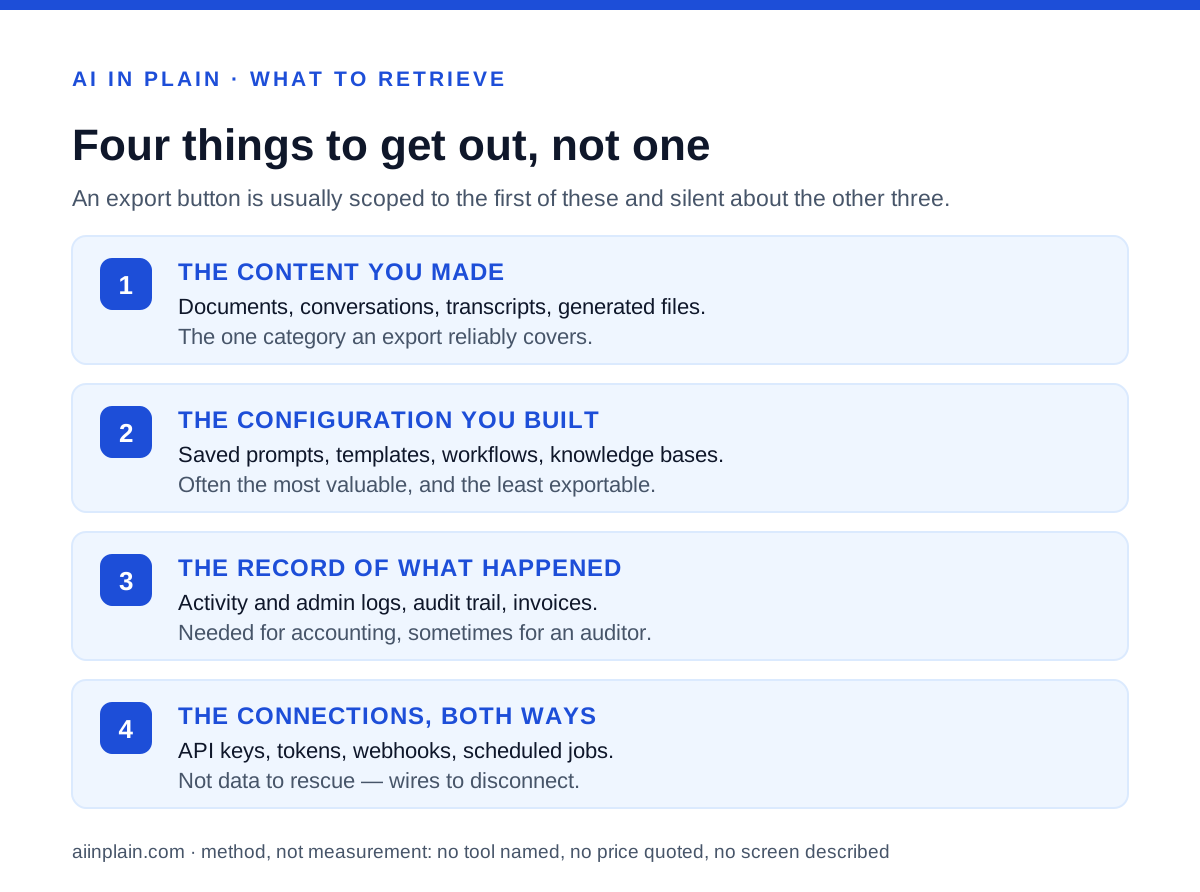
An export button is usually scoped to one of these and silent about the rest. Treat them as four separate retrieval jobs.
The content you made. Documents, conversations, transcripts, generated images, datasets, whatever the tool's unit of work is. This is the category every export feature covers and the only one most people think about.
The configuration you built. Saved prompts, custom instructions, templates, workflows, automations, assistants or agents you assembled, knowledge bases you uploaded, and the settings that make the tool behave the way your team expects. This is frequently the most expensive thing in the account, because it represents months of adjustment, and it is frequently the least exportable.
The record of what happened. Activity and admin logs, billing history, invoices, and the audit trail showing who did what. You need these for accounting, and occasionally for a question from a client or an auditor about a period when you were using the tool.
The connections. API keys and tokens you issued, webhooks pointing at the service, scheduled jobs, inbound integrations from other products, and anything in your own systems that calls this one. These are not data to rescue; they are wires to disconnect, and forgetting them leaves silent failures behind long after you have stopped paying.
- Content: the work itself, the one category exports reliably cover.
- Configuration: prompts, templates, workflows, knowledge bases, settings.
- Record: activity logs, audit trail, invoices and billing history.
- Connections: keys, tokens, webhooks, scheduled jobs, integrations both ways.
Where the answers live in your vendor's own documentation
This page cannot tell you what your service does, and will not guess. It can tell you exactly where to look, and the search takes about ten minutes.
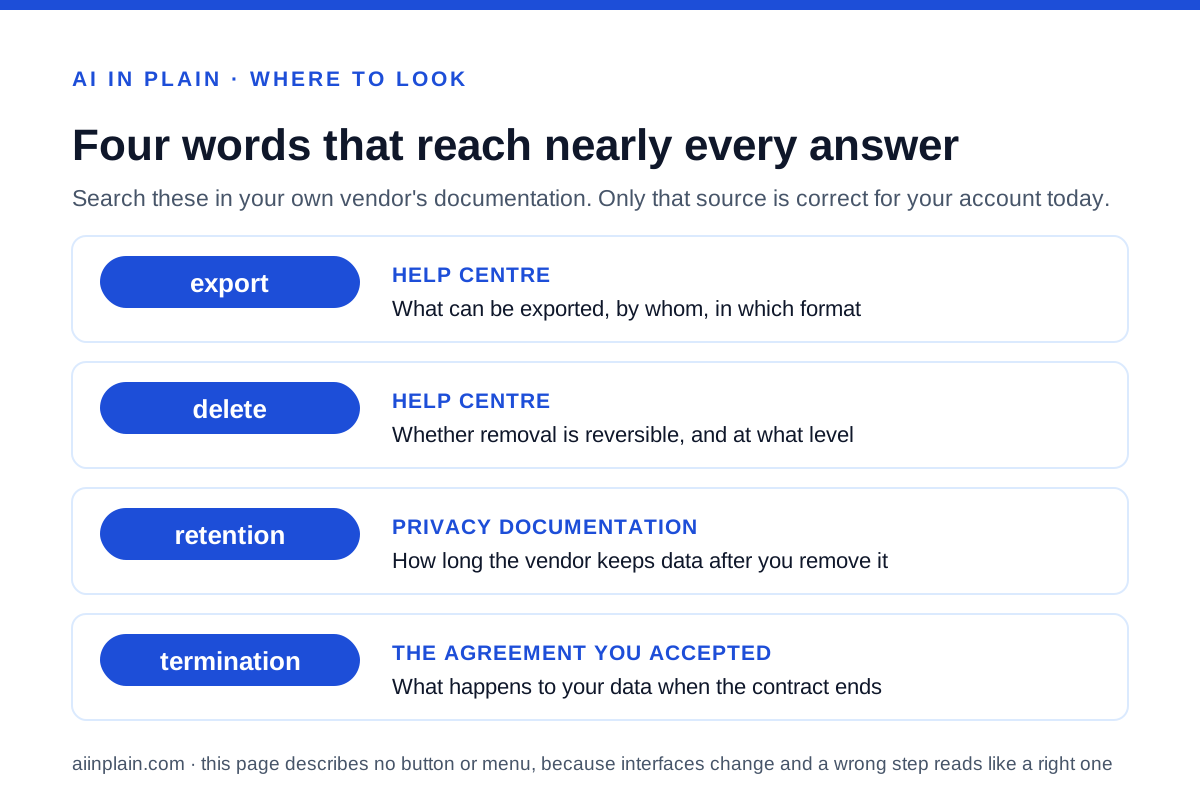
**The help centre, searched for the word *export*.** This gives you the mechanism: what can be exported, by whom, in which formats, and whether the request is made by a user or an administrator.
The privacy or data-controls documentation. This is usually where the vendor explains what it considers your data, what it keeps, and how to request a copy or a deletion through a formal privacy request rather than a product feature. The formal route often reaches data the in-product button does not.
The admin or workspace documentation, if you are on a team plan. Organisation-level exports are a different feature from personal ones, with different permissions and different scope.
**The agreement you accepted, searched for *termination*.** This is the part nobody reads and the part that binds. It is where you find what happens to your data when the contract ends, how long the vendor keeps it, and whether there is a window after cancellation during which you can still ask for a copy.
Four words — export, delete, retention, termination — reach nearly every answer. The rest of this guide assumes you have run that search, because nothing here can substitute for it.
- Search the help centre for export to find the mechanism.
- Read the privacy or data controls page to find the formal request route.
- Check the admin documentation separately if you are on a team or business plan.
- Search your signed agreement for termination to find what survives the cancellation.
What the file format tells you about how much you actually got
Open the export before you trust it. The format is the first clue to how portable the contents really are.
Plain, widely readable formats — text, structured data files, standard document and image types — mean the contents will still open in ten years with software you already have. That is the outcome you want, and it is a reason to prefer a plain export over a prettier one.
A single proprietary archive meant for re-importing into the same product is a backup, not a migration. It protects you against losing the data and does nothing to help you use it somewhere else. Both are worth having; only one is an exit.
A bundle of rendered pages or print-ready files preserves what the work looked like and loses what it was made of. Structure, fields and relationships do not survive that conversion, and you will notice when you try to load it into anything.
Whatever arrives, assume something is missing until you have looked. The usual casualties are comments, version history, permissions, links between items, uploaded attachments and anything the tool generated live rather than stored. Check a handful of items you know well, including your most complicated one, and see what is not there.
- Open, standard formats: portable, readable later, the best outcome.
- Proprietary archive for re-import: a backup, not a migration path.
- Rendered pages or print files: appearance kept, structure lost.
- Check your most complicated item first; simple ones always survive.
Whose data it is depends on whose account it is
One distinction decides who is allowed to press the button, and it surprises people at the worst moment.
On a personal account, you are usually the party who can request your own copy, through the product or through a privacy request. On a workspace that your employer or a client administers, the organisation generally holds the data and the export is an administrator's action, not yours. The same person can therefore be able to export at home and unable to export at work.
That has a practical consequence worth acting on now rather than later: find out which situation you are in, and who the administrator is, before the week you need them. If a personal account is going to be merged into a managed one, take your copy out first, because the merge can remove the route you were counting on.
It also shapes what counts as yours at all. Content you created is the uncontroversial part. Derived material — summaries, embeddings, usage statistics, model-side records of your activity — may be treated differently, and the vendor's privacy documentation is the only place that says how. The same goes for anything a colleague created inside a shared space, which is usually theirs or the organisation's rather than yours.
The reasoning behind how this site writes about such things is on the editorial policy page.
Cancelling, deleting and exporting are three different actions
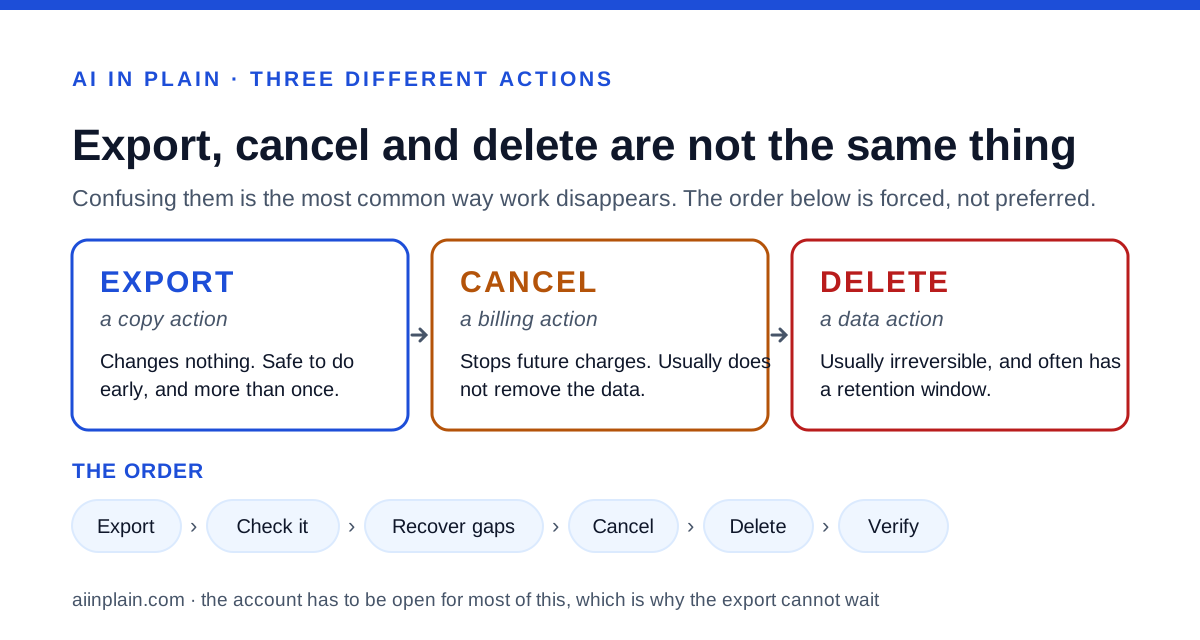
Conflating these is the single most common way people lose work, and it comes from assuming one does the job of the others.
Cancelling is a billing action. It stops future charges. Depending on the service it may end access immediately or at the end of a paid period, and it commonly leaves your data sitting in the account rather than removing it. A cancelled account is not an erased one.
Deleting is a data action, and it is usually the irreversible one. It may be offered at the level of a single item, a whole account, or an entire organisation, and those are different operations with different consequences. Deletion also tends to come with a retention window — a period during which the data is removed from your view but still exists on the vendor's systems — and the length of that window is written down in the privacy documentation rather than being a matter of opinion.
Exporting is a copy action and changes nothing about the account. It is the only one of the three that is safe to do early and more than once.
So the sequence is forced: export, verify, cancel, then delete if you want the data gone, then confirm the deletion happened. Any other order risks asking a closed account for something only an open one can give.
A sequence that works
Work down this list over several days, not in one sitting. The waiting steps are the reason it cannot be done on the last afternoon.
This is also the point to be honest about costs: moving to a different tool does not only mean moving files, it means rebuilding configuration that did not export. Budget for that before you decide the move is cheap. Pricing and plan limits change often enough that a figure printed here would be wrong by the time you read it — open the vendor's own pricing page and check what a downgrade would cost compared with leaving, because sometimes the cheapest exit is to stay on a smaller plan long enough to finish the move properly.
- Read the rules first. Search the help centre for export and the agreement for termination, and note any retention window after cancellation.
- Inventory what exists. List content, configuration, records and connections separately, so the export can be judged against something.
- Request the export early. Days before the cancellation date, not on it, so a failure leaves time for a second attempt.
- Open it and check it. Inspect your most complicated item, not your simplest, and compare against the inventory.
- Recover the gaps by hand. Whatever the export missed has to be copied manually while the account is still open.
- Capture configuration deliberately. Prompts, templates, workflow logic and settings usually have to be written down or screenshotted rather than exported.
- Save the records. Invoices, billing history and any audit log you may be asked about later.
- Disconnect the wires. Revoke keys and tokens, remove webhooks, stop scheduled jobs, and unlink integrations on both sides.
- Then cancel. Confirm in writing what the cancellation does and when access ends.
- Then delete, if you want deletion. Request it explicitly and keep the confirmation.
- Then verify. Check that the charges stopped and that nothing in your own systems is still calling the service.
What to do when the export comes back incomplete
This is normal rather than exceptional, so plan for it instead of treating it as a failure.
First, establish whether the gap is a limit of the feature or a limit of your permissions. Those have different remedies: the first needs a different route, the second needs a different person. The help centre usually distinguishes them if you read the eligibility paragraph rather than the instructions.
Second, try the formal privacy request route if the in-product export does not reach what you need. Vendors commonly operate a separate process for data requests, and its scope is often broader than the convenience feature in the settings.
Third, ask support in writing, before the cancellation date, and keep the reply. A dated written answer about what you can retrieve is useful on its own, and it occasionally produces an option that is not documented anywhere public.
Fourth, accept manual recovery for what remains. Copying the fifty things that matter out of five thousand is tedious and finite, and it is a better outcome than discovering the gap after access ends.
And if the answer is that something genuinely cannot be retrieved, record that fact somewhere your future self will find it. Knowing what was lost is worth something; discovering it by accident in a year is worth nothing.
Bottom line
Treat leaving as a project with a lead time, not a button you press when you have decided.
Export early, open what arrives, and check your hardest item rather than your easiest. Remember that configuration, records and connections are three categories the content export will not cover. Find out whether you or an administrator holds the right to the copy. Then cancel, then delete, then verify — in that order, because the account has to be open for most of it.
And do the reading in your own vendor's documentation. Four words — export, delete, retention, termination — will answer almost everything this guide deliberately refuses to guess at. Related reading on this site: how to write a prompt that gets a usable first draft covers the configuration side of the same problem, since a prompt you can re-use is a prompt you can take with you, and how to ask an AI tool for what you want covers the habit that makes the configuration worth keeping. What sits behind each page here is set out on the about page.
How we chose
This guide is method rather than measurement. It names no tool, quotes no price, and describes no specific button, menu or screen. Interfaces change every few weeks and a click path written here would be wrong by the time you read it — worse, a wrong instruction reads exactly like a right one. What does not change is the shape of the problem: which categories of data exist, which of them exports cover, what the file format implies, and the order the steps have to happen in. Every section below ends by telling you what to search for in your own vendor's help centre and contract, because that is the only source that is correct for your account on the day you act.
Frequently asked
Should I export before or after I cancel?
Before, always. Cancelling usually ends your access to the interface, and the export is produced from inside that interface. Finish the export, open it, confirm it is complete, and only then cancel.
Does cancelling delete my data?
Not necessarily. Cancelling is a billing action, deletion is a data action, and many services treat them separately. If you want the data gone as well as the payments stopped, you usually have to ask for deletion as a second, explicit step.
What usually does not come out in an export?
Expect the content and expect gaps. Comments, version history, permissions, links between items, attachments and anything the tool generated on the fly are the usual casualties. Open the export and look rather than assuming it is complete.
I am on a company workspace. Can I export my own work?
Often not by yourself. Managed workspaces commonly route exports through an administrator or owner, because the organisation rather than the individual holds the data. Find out who that is before you need them in a hurry.
What if the export link stops working?
Exports are usually generated asynchronously and delivered as a link with an expiry, so request a fresh one. This is the main argument for exporting days before the cancellation date rather than on it.
How do I find my vendor's actual rules?
Search the help centre for export, delete and retention, then search the agreement you accepted for termination. Those four words lead to almost every answer, and they are specific to your vendor in a way no guide can be.