
Wordtune
A sentence rewriter sold by the day on Free, by the year on paid, with the lowest unlimited price in the category
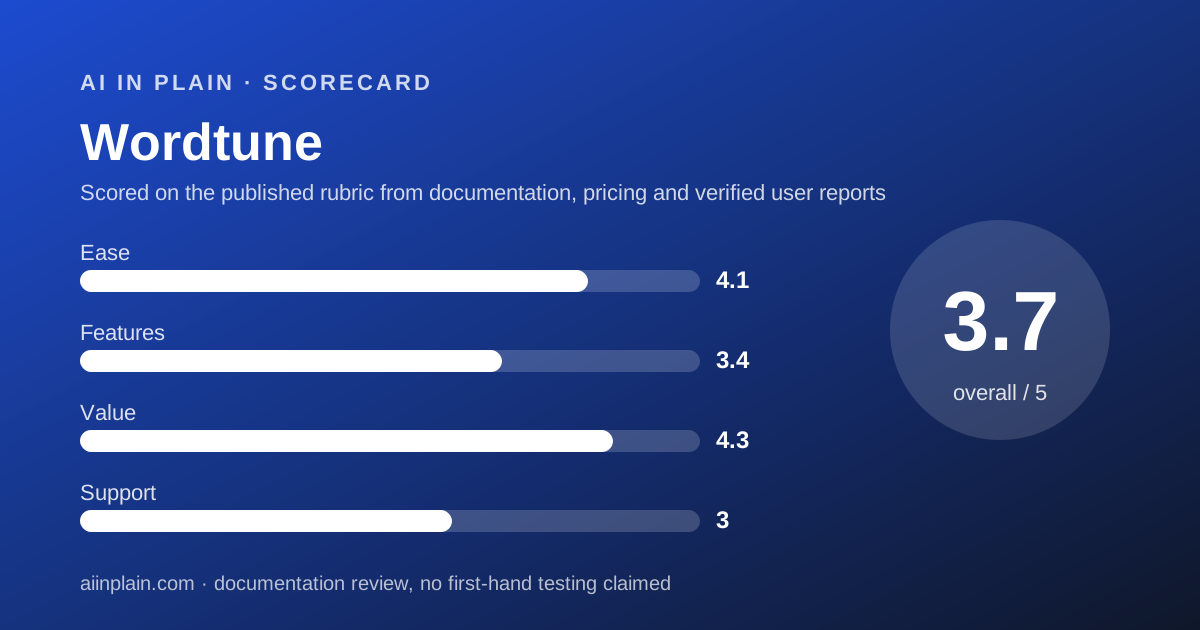
Scored on the published rubric, from documentation, pricing and verified user reports.
Best for: People who already know what they want to say and need a second way to say it, in a browser or on an iPhone, for the price of a coffee a month.
Verdict
Wordtune does one thing and prices it aggressively. Highlight a sentence, get several rewrites, pick one. The free Basic plan allows 10 rewrites and AI suggestions a day plus 3 AI summaries a month; Unlimited removes every cap for $6.99 a month billed annually, per the plans page checked October 10, 2026. That is the lowest unlimited price among the writing assistants we graded. This is a documentation review built from the plans page, the homepage, the privacy policy and Trustpilot; nothing here is a first-hand usage claim. The thinness shows up around the edges. The homepage lists only a Chrome extension, an Edge extension and an iOS app, so Word, Google Docs and Android users are not addressed. There is no refund policy, only a 3-day trial. The plans page lists SAML SSO and centralised billing as features but no plan that includes them, so a team has no self-serve path. Wordtune earns 3.7 overall: strong on value, decent on ease, weaker on features and support.
Visit Wordtune
We have no affiliate relationship with this vendor. Link goes to the official site.
Where it is strong
- Unlimited plan is $6.99 a month billed annually, the cheapest uncapped tier in this cluster, per the plans page checked October 10, 2026
- Free Basic plan needs no payment and includes 10 rewrites and AI suggestions a day, 3 AI summaries a month, and unlimited spelling and grammar checks
- 3-day free trial on both paid plans, card required but not charged until the trial ends
- Trustpilot shows 4.1 from 582 reviews, with rewrite quality and help for non-native writers the common praise as of October 10, 2026
- Summarizer handles text and video, per the homepage, which most grammar checkers do not offer
Where it falls short
- Homepage lists only Chrome, Edge and iOS; Word, Google Docs and Android are not named as supported platforms
- No refunds at all per the plans page; the 3-day trial is the only exit
- Monthly billing prices are shown struck through ($6.99 and $9.99) without a clear label, so the month-to-month cost is ambiguous
- No team plan with a published price; SSO and centralised billing are listed but attached to no tier
- Privacy policy says content may be aggregated to develop AI21 products, with opt-out by email rather than a setting
At a glance
| Starting price | Free; Advanced $4.89/month billed annually; Unlimited $6.99/month billed annually |
|---|---|
| Pricing note | Free; Advanced from $4.89/month billed annually, Unlimited $6.99/month billed annually (plans page, checked October 10, 2026) |
| Free plan | Yes - 10 rewrites and AI suggestions per day, 3 AI summarizations per month, unlimited spelling and grammar |
| Daily rewrite cap | 10 on Basic; 30 on Advanced; unlimited on Unlimited |
| Seat minimum | Not applicable; no team plan priced on the plans page |
| Trial | 3 days on Advanced and Unlimited (plans page, October 2026) |
| Platforms | Chrome extension, Edge extension, iOS app (homepage, October 2026) |
| Support channels | Standard support on Basic and Advanced; premium support on Unlimited; no response times published |
| Refunds | None; cancel before renewal or before the trial ends |
What Wordtune actually is
Wordtune is a rewriting tool made by AI21 Labs, an Israeli AI company. You highlight a sentence, and the extension offers several alternative versions: shorter, longer, more formal, more casual. You pick one or ignore them all.
That makes it different in kind from a grammar checker. Grammar checkers tell you what is wrong. Wordtune assumes the sentence is fine and offers other ways to say it. People who write in a second language, or who write a lot of similar emails, tend to find that more useful than another red underline.
The homepage, checked October 10, 2026, describes two jobs. Rewrite paraphrases emails, articles and messages. Read and Summarize condenses any text or video. Spelling and grammar correction is included on every plan but is not the headline.
The product runs where the homepage says it runs: a Chrome extension, a Microsoft Edge extension and an iOS app. That list is short, and it shapes who should buy. If your writing lives in a browser tab, Wordtune is present; if it lives in Word on a desktop, the vendor makes no claim.
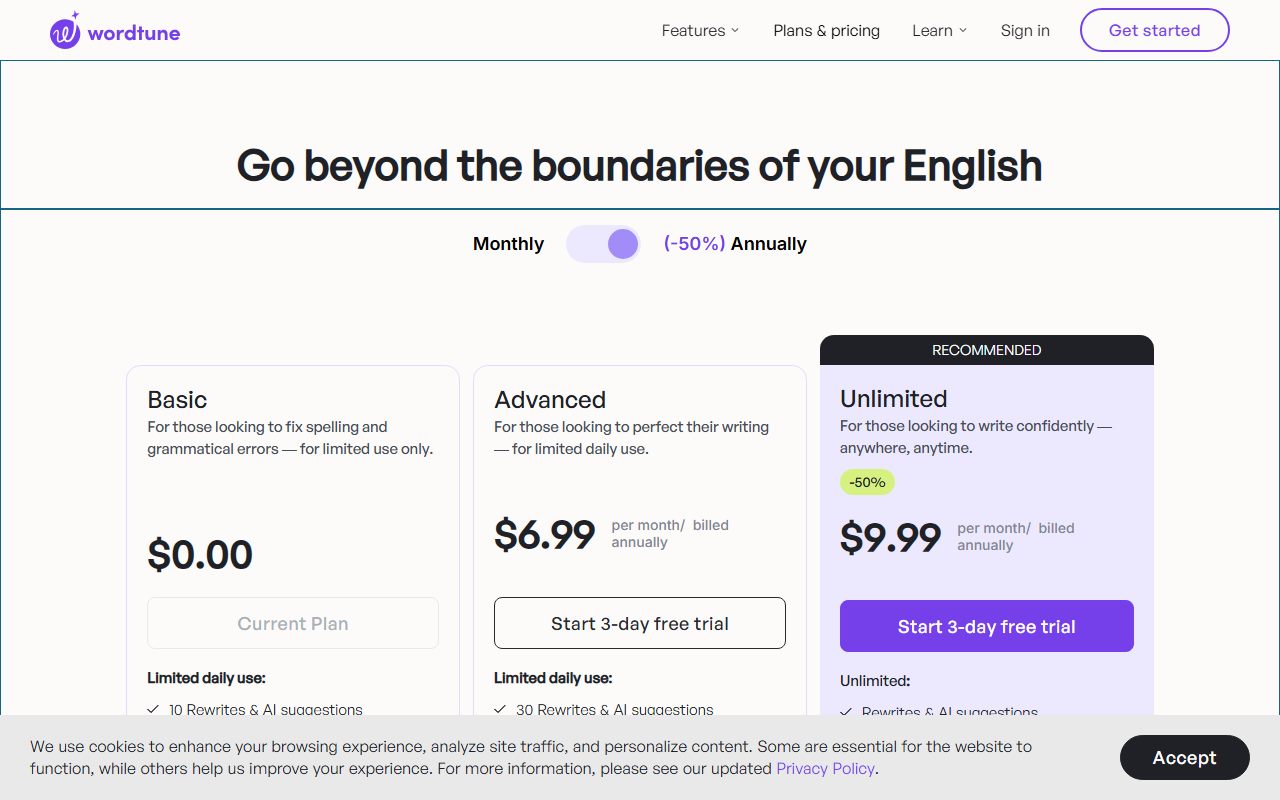
Pricing is by the day on the free plan and by the year on paid plans. Basic caps you at 10 rewrites a day. The paid plans lift or remove the cap and are quoted per month but billed annually, which is the single most important thing to understand before clicking the trial button.
Who Wordtune is best for
Wordtune suits people who produce a lot of short prose and want a quick second opinion on phrasing.
- Non-native English writers who want several fluent versions of a sentence, not one correction.
- People who answer a lot of similar emails and need variety without starting from scratch.
- Students and researchers who summarise long articles or lecture videos and want the summary in the same tool.
- Browser-first workers in Gmail, Notion, LinkedIn or a CMS, where a Chrome or Edge extension is enough.
- iPhone users who draft on the phone; the iOS app is one of only three platforms the homepage names.
- Budget buyers who want no cap at all for under $7 a month on annual billing.
Who should skip it
Three groups should look at the alternatives first.
- Teams - no priced team plan, no self-serve SSO, no central billing tier on the plans page.
- Word and Google Docs users - neither is named on the homepage; Grammarly lists both.
- Long-form writers who want reports on pacing, repetition and readability; see ProWritingAid.
What the free tier and each plan includes (as of October 2026)
Basic is free and, in the plans page's own words, for limited use only. It includes 10 rewrites and AI suggestions a day, AI generations with no quantity stated, 3 AI summarizations a month, and unlimited spelling corrections and grammar checks, per the page checked October 10, 2026.
Ten rewrites a day is enough to decide whether you like the tool. It is not enough to write a report with it. The daily reset also means a heavy Monday does not borrow from a quiet Friday.
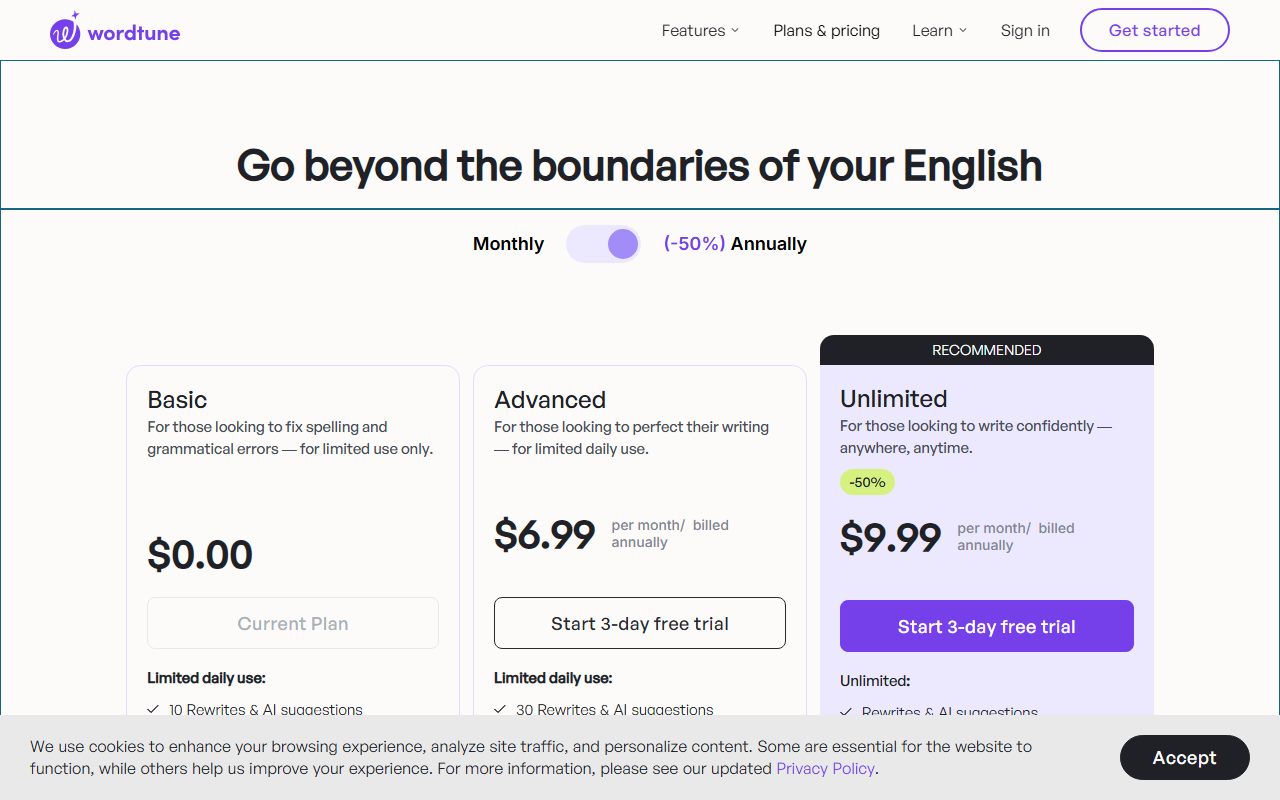
Advanced is listed at $4.89 per month billed annually, with $6.99 shown struck through. It raises the cap to 30 rewrites and AI suggestions a day and 15 AI summarizations a month, and adds unlimited AI recommendations. A 3-day free trial is offered.
Unlimited, marked Recommended, is listed at $6.99 per month billed annually with $9.99 struck through. It removes the caps on rewrites, AI suggestions and summarizations, and lists vocabulary enhancements, clarity improvements, fluency increases and premium support. It also has a 3-day trial.
One caution from the page itself: the comparison table shows dashes for some features that the plan descriptions say are included, such as AI recommendations on Advanced. The vendor's page is inconsistent, and we would confirm the feature you care about before paying.
Team features are listed in the table (business support, SAML SSO, centralised billing) but none of the three plans includes them. The footer link for Wordtune for business goes back to the same plans page. As of October 10, 2026 there is no published team price.
How the pricing is structured
Everything paid is billed annually. The plans page shows a per-month figure, but the small print under each price says billed annually, and the struck-through number appears to be the monthly rate. Because the page does not label it, we cannot confirm a true month-to-month price. The vendor does not publish this clearly.
In plain terms, Unlimited at $6.99 a month is $83.88 charged once a year, and Advanced at $4.89 a month is $58.68 a year. Both are our arithmetic from the page checked October 10, 2026.
There is no seat concept. Each person signs up alone, pays alone and is billed alone. A five-person team on Unlimited would spend $419.40 a year across five separate cards and five separate renewal dates, with no admin view. That is workable for a tiny team and painful beyond it.
The trial lasts 3 days from the date of purchase. You must enter payment details, you are not charged until the trial ends, and you can cancel before then at no cost through Manage Plan. There is no other way out: the plans page states that Wordtune does not offer refunds.
The combination of annual billing and no refunds is the trap to avoid. A reader who clicks the trial, forgets, and is charged $83.88 on day four has no stated route to recover it. Put the cancellation date in your calendar before you start.
If you later want to leave, Wordtune stores little that you would need to export; rewrites happen in place in your own documents. Our guide to getting your data out before you cancel still applies to any saved summaries.
Ease of use: what the 4.1 is built from
The free plan needs no card, the extension installs from the Chrome or Edge store, and the core interaction is a highlight and a click. Trustpilot reviewers as of October 10, 2026 single out ease of use and speed, especially for people writing in a second language.
We took points off for coverage. Three platforms is a short list, and a reader who moves between a browser, Word and an Android phone will find the tool present in only one of those places.
The pricing page itself costs a little ease. Struck-through prices without labels, a comparison table that disagrees with the plan descriptions, and business features with no business plan all require the reader to work out what is being sold.
For getting good rewrites, the input matters: a sentence with a clear intent produces better options than a vague one. Our plain-English note on asking an AI tool for what you want covers the habit.
Features: what the 3.4 is built from
Wordtune's feature set is narrow on purpose. Rewrites with several tones, a summariser for text and video, and spelling and grammar checks are the list on the homepage checked October 10, 2026.
The summariser is the one feature rivals do not match. Grammarly and ProWritingAid check and improve text you wrote; neither advertises condensing a video. For a student or researcher that can justify the subscription alone.
What is missing is everything a checker does beyond the sentence: no plagiarism detection, no AI-text detection, no document-level reports, no style guide, no team analytics. Grammarly Pro lists all of those at $12 a month on annual billing; ProWritingAid Premium lists 25 or more reports at $10.
The Advanced tier's own limits also cap the score. Thirty rewrites a day is fine for email and not for a 3,000-word document, and 15 summaries a month runs out fast for a reader who uses it daily. Unlimited is the plan most buyers will actually want.
Value: what the 4.3 is built from
Wordtune's value score is the best in this cluster because the uncapped plan costs less than the rivals' capped ones. Unlimited at $6.99 a month on annual billing compares with Grammarly Pro at $12 and ProWritingAid Premium at $10, both also on annual billing, per their pricing pages checked October 10, 2026.
For a single browser-based writer who wants rewrites without counting them, that gap is decisive. Over a year it is $83.88 against $144 for Grammarly and $120 for ProWritingAid, our arithmetic.
We held back from a higher score for two reasons. First, the price buys a narrower product, so the comparison is not like for like. Second, the no-refund policy shifts risk onto the buyer, and an annual charge with no refund is a real cost when the fit is wrong.
The free plan is a fair trial of the idea. Ten rewrites a day for a week will tell most people whether the rewrite panel changes how they write.
Support: what the 3.0 is built from
The plans page distinguishes standard support from premium support on Unlimited but defines neither. There are no published response times, no phone line, and no live chat on the page. Business support appears in the feature table attached to no plan.
Trustpilot, checked October 10, 2026, shows 4.1 from 582 reviews, with 71 percent five-star and 15 percent one-star. Praise includes responsive support with refunds and discounts in individual cases, which sits oddly against the written no-refund policy. Complaints include slow or missing replies and support repeating troubleshooting steps for an iOS problem.
The sample is small compared with Grammarly's 10,472, and the page notes only 41 reviews in the last 12 months. We score support at 3.0: adequate for an individual tool, undocumented for a business one.
What verified users report
Trustpilot's 582 reviews break down as 71 percent five-star, 9 percent four-star, 3 percent three-star, 2 percent two-star and 15 percent one-star, for a TrustScore of 4.1 as of October 10, 2026.
The praise is specific: rewrites that improve clarity and tone while keeping the writer's own wording, multiple suggestions per sentence, a useful synonym feature, speed, and value for academic and professional writing. Non-native English writers appear often among the positive reviews.
The complaints concentrate on the Ask Wordtune feature on iOS, slow support replies, difficulty finding the cancel button, and at least one billing dispute. Some reviewers find the paid price high for what they use.
Trustpilot does not fact-check reviews, the visible page shows a small sample, and we did not read G2 or Capterra for this review. Read the themes as directions for your own trial, not as measurements.
Limits stated by the vendor, and privacy
The published limits are the daily rewrite caps (10, 30, unlimited), the monthly summary caps (3, 15, unlimited), the 3-day trial and the no-refund rule. The vendor does not publish a character limit per rewrite or a size limit for summaries.
On privacy, the policy names AI21 Labs Ltd. as the data controller. It says information may be used for developing, enhancing, training, improving and marketing new products, and that the company may aggregate your personal information and content to develop AI21 products and services.
You can opt out of that aggregation going forward by contacting privacy@wordtune.com. There is no setting for it on the plans page, and the policy does not explicitly state that typed text is excluded from model training. Data is kept until the company deletes it or you send a valid deletion request.
For personal email that is probably acceptable. For client contracts or medical notes, a tool whose training opt-out is an email address is a weaker position than Grammarly's account setting. Before you forward any rewritten text, check that the rewrite still says what you meant; a fluent paraphrase can quietly drop a qualifier.
Alternatives
Grammarly. Choose Grammarly if you need the checker in Word, Google Docs, Safari or Android, or if you are buying for a team that wants shared snippets and analytics. Otherwise choose Wordtune if you work in Chrome or Edge and want unlimited rewrites for about half the annual price.
ProWritingAid. Choose ProWritingAid if you write long documents and want structural reports, a lifetime licence or a 3-day refund on yearly plans. Otherwise choose Wordtune for quick sentence-level help on short writing. The two heavier tools are set against each other in Grammarly vs ProWritingAid.
A general assistant. If you already pay for a chat assistant, a well-built prompt can produce rewrites too, without a second subscription. The trade is convenience: Wordtune works where you type. All three tools are ranked in our guide to the best AI writing assistants for everyday work.
Bottom line
Wordtune is the cheapest way to get unlimited sentence rewrites, and for a browser-based writer that is enough to recommend it. Start on the free plan, and if you upgrade, choose Unlimited and set a reminder for day two of the 3-day trial, because there are no refunds.
It is not a team tool, it is not a Word tool, and it is not a document-analysis tool. Readers who need any of those should look at Grammarly or ProWritingAid.
This is a documentation review. Prices, caps and policies come from Wordtune's own pages and Trustpilot as read on October 10, 2026, and may have changed since.
Buy it if
- Your main job is rephrasing, not proofreading - the rewrite panel is the product, and at $6.99 a month unlimited it is the cheapest way to get it.
- You write in a browser or on an iPhone - Chrome, Edge and iOS are the three platforms the homepage names.
- You want to try before paying and will remember to cancel - the 3-day trial is short but free, and there are no refunds after it.
- You summarise long articles or videos often - Advanced gives 15 AI summaries a month, Unlimited has no cap.
Skip it if
- You need it inside Word or Google Docs - Grammarly and ProWritingAid both list those add-ins; Wordtune's homepage does not.
- You are buying for a team - there is no priced team plan, no self-serve SSO and no central billing tier.
- You want structural feedback on long documents - Wordtune rewrites sentences; it does not run reports.
Frequently asked
Is Wordtune free?
Yes. The Basic plan is $0 and allows 10 rewrites and AI suggestions a day, 3 AI summarizations a month, and unlimited spelling corrections and grammar checks, per the plans page checked October 10, 2026. The plans page describes it as for limited use only.
How much does Wordtune Unlimited cost?
The plans page lists Unlimited at $6.99 per month billed annually, with $9.99 shown struck through, as of October 10, 2026. That is $83.88 a year by our arithmetic. Advanced is $4.89 per month billed annually with 30 rewrites a day and 15 summaries a month.
Does Wordtune offer refunds?
No. The plans page states plainly that the vendor does not offer refunds. You can cancel before the next billing cycle or before the 3-day trial ends through Manage Plan on the account page. Set a reminder on day two if you are trialling.
Does Wordtune work in Microsoft Word or Google Docs?
The homepage checked October 10, 2026 names a Chrome extension, an Edge extension and Wordtune for iOS. Word, Outlook, Android and Google Docs are not listed. A browser extension may surface in web apps, but the vendor does not claim Word or Docs support on that page.
Who makes Wordtune and what happens to my text?
Wordtune is made by AI21 Labs, which the privacy policy names as data controller. The policy says content may be aggregated to develop AI21 products and services, and that you can opt out going forward by emailing privacy@wordtune.com. It does not state that typed text is excluded from training.
Is Wordtune worth it in 2026?
For a browser-based writer who rephrases a lot, yes: Unlimited at $6.99 a month on annual billing undercuts every rival we graded. For teams, Word users or anyone who wants a refund window, Grammarly or ProWritingAid are safer buys despite higher prices.
Sources
- Wordtune plans page - checked October 10, 2026
- Wordtune homepage (platforms and features) - checked October 10, 2026
- Wordtune privacy policy (AI21 Labs) - checked October 10, 2026
- Trustpilot: Wordtune reviews - checked October 10, 2026
Update history
- October 10, 2026 - First published from the plans page, homepage, privacy policy and Trustpilot, all checked October 10, 2026.
Visit Wordtune
We have no affiliate relationship with this vendor. Link goes to the official site.