
Grammarly
A grammar and tone checker that follows you into almost every app, with AI rewrites metered by a monthly prompt count
Scored on the published rubric, from documentation, pricing and verified user reports.
Best for: People who write in many different apps all day and want one checker that shows up in all of them, and who can live with a monthly cap on AI rewrites.
Verdict
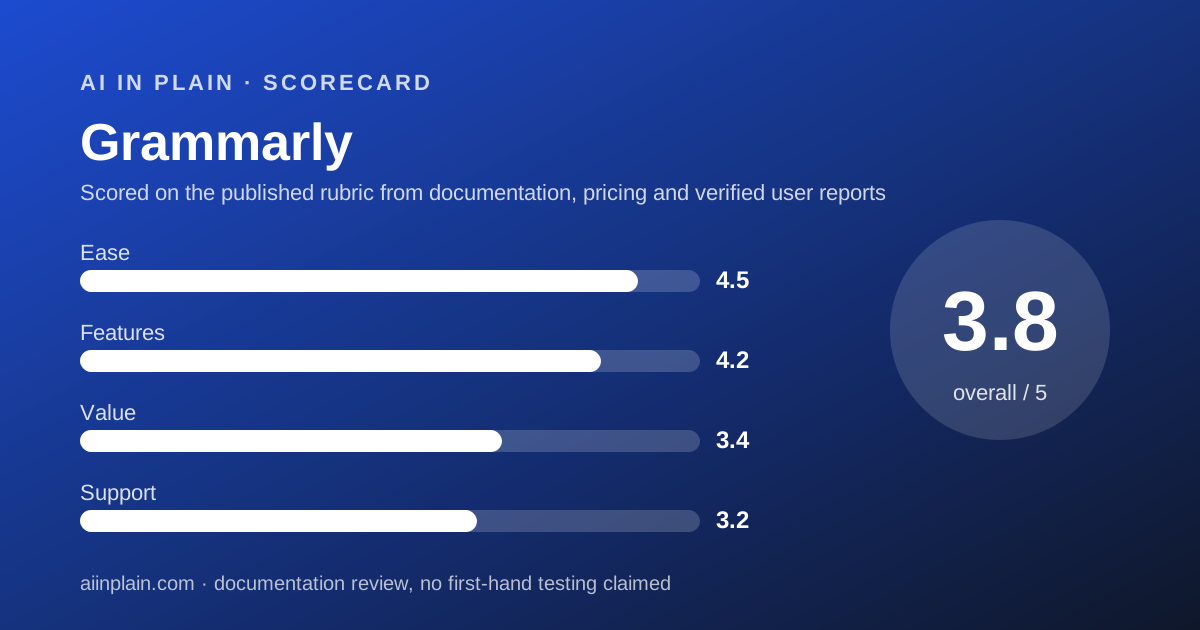
Grammarly is the writing checker to pick when the problem is not one document but a whole day of emails, chat messages, forms and docs spread across a dozen apps. The desktop apps for Windows and Mac, the browser extensions, the Office and Google Docs add-ins and the phone apps are what you are paying for. This is a documentation review built from the plans page, the premium page, the trust page and Trustpilot, all checked October 10, 2026; nothing here is a first-hand usage claim. The structure to understand is the prompt count. Free gives 100 AI prompts a month; Pro gives 2,000 per member and costs $12 a month billed annually or $30 billed monthly, per the premium page. Pro is replacing the old Premium plan and now includes team features, so one plan covers an individual and a small office. The weak points are a monthly price that is two and a half times the annual rate, a Trustpilot score of 3.1 driven by billing complaints, and a model-training setting that is on until you turn it off. Grammarly earns 3.8 overall: excellent on ease, good on features, average on value and support.
Visit Grammarly
We have no affiliate relationship with this vendor. Link goes to the official site.
Where it is strong
- Works in more places than any rival: Windows and Mac apps, Chrome, Safari, Firefox and Edge extensions, MS Office, Google Docs, iPhone, iPad and Android, per the homepage checked October 10, 2026
- Free plan needs no card and includes spelling, grammar, tone visibility and 100 AI prompts a month
- Pro is one plan for individuals and teams: 2,000 AI prompts per member, snippets, Knowledge Share, Team Analytics and roles are all listed on the plans page
- 7-day free trial on Pro with a reminder email two days before it ends, per the plans page
- Plagiarism and AI-text detection are included in Pro rather than sold as an add-on
Where it falls short
- Monthly billing is $30 against $12 on annual, a 150 percent premium for the flexibility (editorial arithmetic from the premium page)
- Trustpilot shows 3.1 from 10,472 reviews, with renewals, cancellation and pop-ups the most common complaints as of October 10, 2026
- Content may be used to train Grammarly's models unless you turn off Product Improvement and Training in settings, per the trust page
- SSO, SCIM and unlimited style guides sit on Enterprise, which is sold through Superhuman Go with no published price
- Pro allows 1 style guide, 1 brand tone and 2 user groups, which a growing team can outgrow
What Grammarly actually is
Grammarly is a checker that attaches itself to the places you already type. Install the desktop app or browser extension once and it underlines errors in Gmail, Slack, a web form or a Word document without you opening a separate editor.
That distribution is the whole idea. Many tools can fix a paragraph you paste into them. Grammarly's bet is that most writing happens in small pieces across the day, and the checker has to be there when the piece is written.
The homepage, checked October 10, 2026, lists apps for Windows and Mac, extensions for Chrome, Safari, Firefox and Edge, add-ins for MS Office and Google Docs, and apps for iPhone, iPad and Android. It also claims 50,000 organizations and 40 million people; that is the vendor's figure, not ours.
In 2026 Grammarly describes itself as part of Superhuman, and its homepage says the product is now delivered through something called Superhuman Go. For a plain-English reader the practical effect is a rebrand of the top plan, not a change to how the checker works.
Two layers sit on top of the checker. The first is the old Grammarly: spelling, grammar, punctuation and a tone indicator. The second is generative: full-sentence rewrites, tone adjustment and prompts that draft or shorten text. The second layer is metered, and the meter is what the pricing is built around.
Who Grammarly is best for
Grammarly suits people whose writing is scattered across many apps and who want corrections to appear wherever they type.
- Office workers who write all day in email, chat and docs and want one tool for all of them.
- Non-native English writers who want fluency suggestions in place, not in a separate window.
- Small teams that want a shared tone and shared snippets without buying an enterprise suite.
- Students and researchers who need plagiarism and citation-consistency checks in the same subscription.
- Managers who review others' writing and want tone visibility before a message goes out.
- Anyone willing to pay annually - the $12 rate is the one that makes the value case.
Who should skip it
Three kinds of readers will do better elsewhere.
- People who mainly want rewrites, not corrections - Wordtune sells unlimited rewrites for less.
- Novelists and long-report writers who want dozens of structural reports; see ProWritingAid.
- Teams that need SSO today - it is an Enterprise feature with no published price.
What the free tier and each plan includes (as of October 2026)
Free costs $0 and includes spelling and grammar checks, tone visibility and 100 AI prompts a month, per the plans page checked October 10, 2026. It does not include tone adjustment, full-sentence rewrites, plagiarism or AI-text detection, or any team feature. Support is the help center.
Free is a real plan, not a trial. For someone who wants typos caught in Gmail and nothing more, it may be the only plan they ever need.
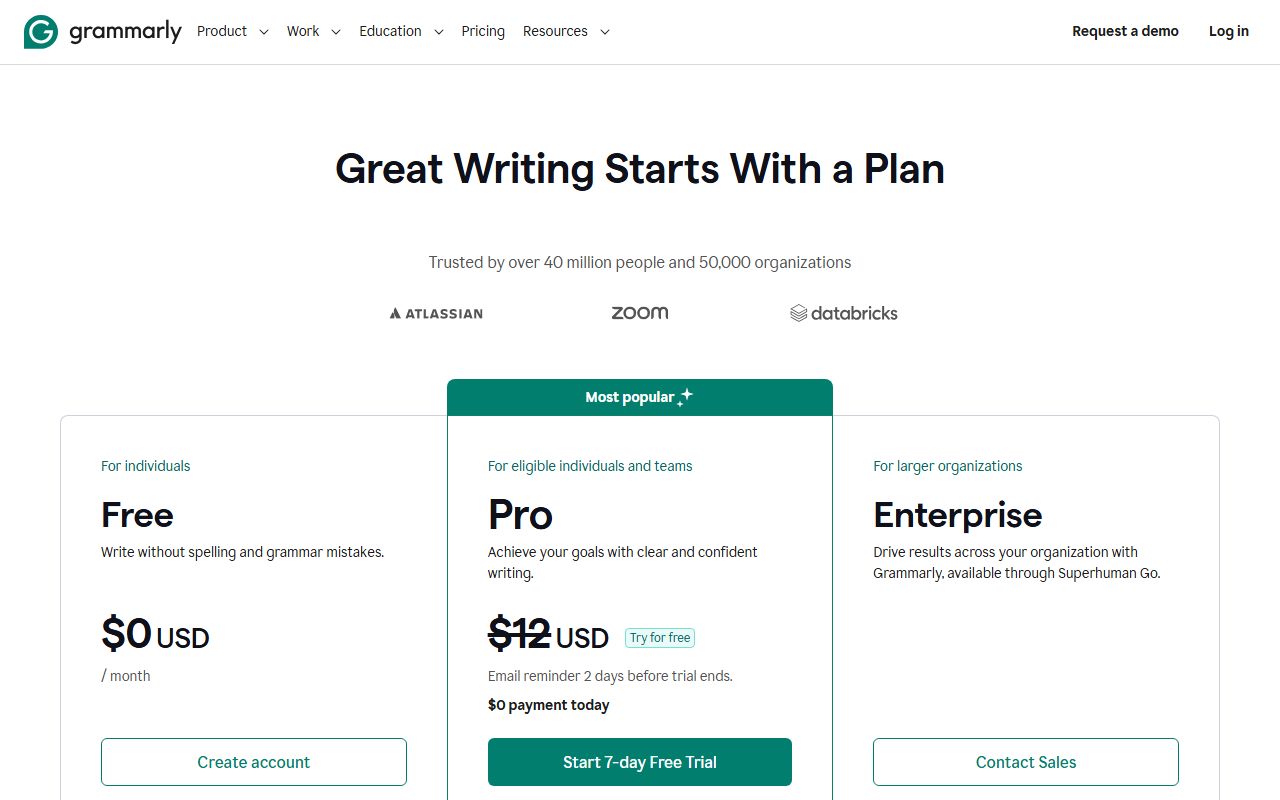
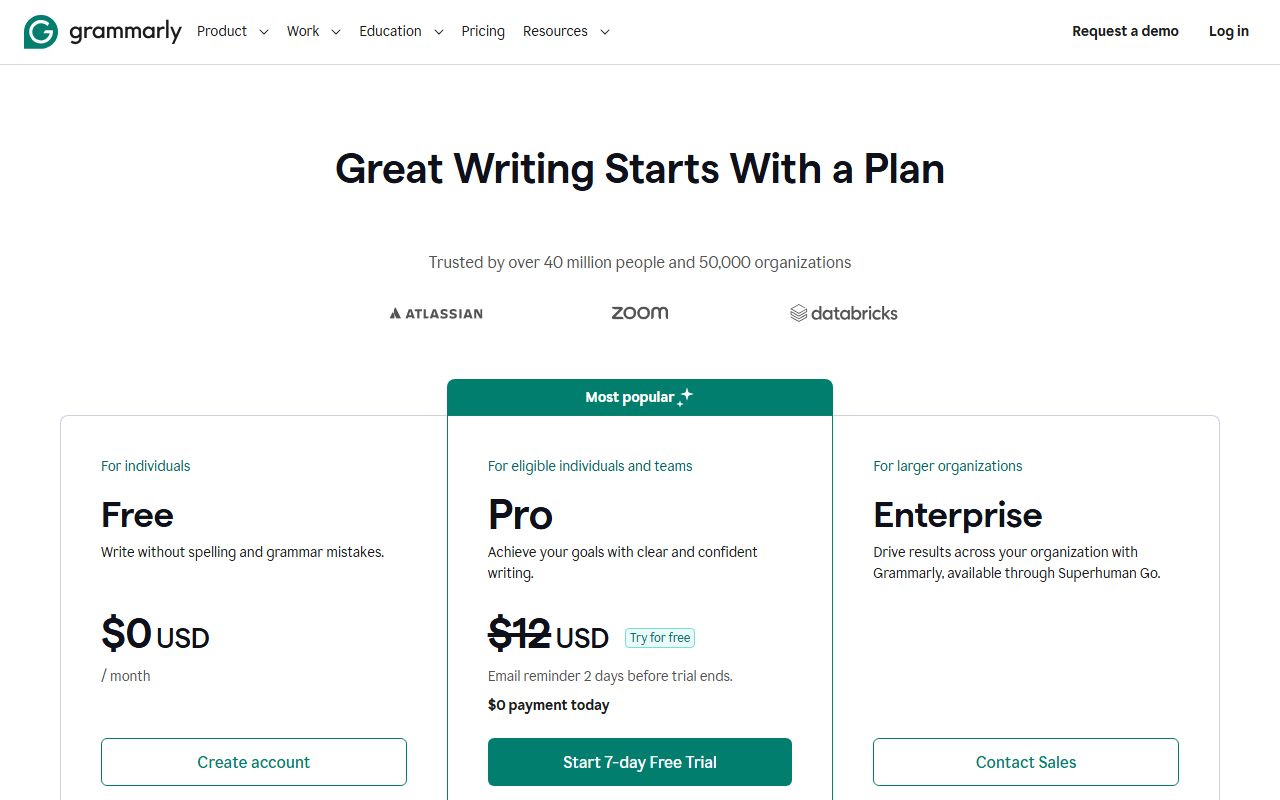
Pro is listed on the plans page at $12 and described as being for eligible individuals and teams. It includes everything in Free plus full-sentence rewrites, tone adjustment, fluent English writing, unlimited personalized suggestions, plagiarism and AI-text detection, inclusive language, citation consistency and 2,000 AI prompts per member per month.
Pro also carries the team layer: priority support, snippets, Knowledge Share, Team Analytics, and account roles and permissions. Team limits are 1 style guide, 1 brand tone and 2 user groups. The plans page offers a 7-day free trial with $0 due today.
Enterprise has no listed price. The plans page says it is for larger organizations and offered through Superhuman Go. It adds dedicated support, BYOK encryption, custom roles, data loss prevention, SAML single sign-on, SCIM, an Audit Logs API, and unlimited prompts, user groups, style guides and brand tones.
The plans page FAQ notes that Pro is rolling out gradually and is not yet available to Grammarly Business or Education customers. Those customers keep their current plan names for now.
How the pricing is structured
There are two prices for Pro and the gap between them is the biggest number on the page. The premium page, checked October 10, 2026, lists $12 per member per month billed annually and $30 per month billed monthly, with a Save up to 60 percent label.
In plain terms, a year of Pro costs $144 paid up front or $360 paid month by month. The month-by-month route costs two and a half times as much; that is our arithmetic, not a vendor claim.
The unit is the member, and the plans page lists no minimum. One person pays $12 a month on annual billing. A team of five pays $720 a year. A team of ten pays $1,440 a year, and at that size Grammarly will issue an invoice for an annual plan, per the plans page FAQ.
The meter inside the plan is the AI prompt count: 100 a month on Free, 2,000 per member on Pro, unlimited on Enterprise. Grammar and spelling suggestions do not count against it. The plans page does not say what happens when a Pro member uses prompt 2,001; we read it as the generative features pausing until the next month, but the vendor does not publish this.
Two FAQ details matter for switchers. Moving from an old Premium subscription to Pro cancels Premium and refunds the unused portion pro rata. Payment is by card or PayPal, except that PayPal cannot be used for invoiced plans.
The plans page does not state a general refund window for Pro, and we could not read a support article that does. Treat the 7-day trial as the refund policy: cancel before it ends and you pay nothing. If you need to leave later, our guide to getting your data out before you cancel applies.
Ease of use: what the 4.5 is built from
Grammarly scores highest here because of where it runs, not what it does. The homepage lists eleven platforms, from Safari to Android, and the trust page describes documents saved in a Grammarly Editor for the times you want a plain page to paste into.
Free needs no card, the Pro trial needs a card but charges nothing for seven days, and the plans page promises a reminder email two days before the trial ends. That is a lower-friction start than any rival in this cluster.
The half point we withheld is for the pop-ups. Trustpilot reviewers as of October 10, 2026 repeatedly mention upgrade prompts that interrupt writing, and some describe the Superhuman Go rollout as confusing. We cannot verify how often this happens, but it is the most common non-billing complaint.
If you want the generative features to behave, the way you phrase a request matters more than the tool. Our short guide to asking an AI tool for what you want was written for exactly this kind of prompt box.
Features: what the 4.2 is built from
The feature list on Pro is wide for the price. Full-sentence rewrites, tone adjustment, fluency suggestions, plagiarism detection, AI-text detection, inclusive-language checks and citation consistency are all listed on the plans page checked October 10, 2026.
The team layer is unusual at $12. Snippets let a team reuse approved phrasing, Knowledge Share surfaces company terms, and Team Analytics shows usage. Rivals in this category either sell these only to enterprises or not at all.
What holds the score below 4.5 is the ceiling on customisation. One style guide, one brand tone and two user groups is enough for a ten-person office with one voice. A company with a support team and a sales team that write differently will hit the limit and be sent to Enterprise.
The second limit is the prompt cap. Two thousand prompts a month is generous for a checker, but a person who uses Grammarly as a drafting tool rather than a proofreader can get through it. The vendor does not publish an overage price.
Value: what the 3.4 is built from
Value depends almost entirely on which billing button you press. At $12 a month on annual billing, Pro is priced in line with ProWritingAid Premium at $10 and buys more platforms and a team layer. That is a fair deal.
At $30 a month on monthly billing, Pro is the most expensive entry price in this cluster by a wide margin. Wordtune Unlimited lists $6.99 a month on annual billing and ProWritingAid lists $30 monthly for a product with more reports.
Our score splits the difference. A reader who commits for a year gets good value; a reader who wants to pay month to month is paying a large premium for the right to leave.
The free plan pulls the score up. One hundred prompts plus unlimited grammar checks across every platform is a usable tool, not a teaser, and for many people it is the right answer.
Support: what the 3.2 is built from
The plans page lists the help center for Free, priority support for Pro and dedicated support for Enterprise. It does not define response times for any tier, and the vendor does not publish a phone line or live chat for self-serve plans.
Trustpilot, checked October 10, 2026, shows 3.1 out of 5 from 10,472 reviews, with 68 percent five-star and 9 percent one-star. The one-star reviews cluster around unexpected renewal charges, difficulty cancelling and support replies that reviewers describe as automated.
We weigh public review scores as one signal among several, and a large sample like this one is more informative than a small one. The pattern is consistent enough to cost a point: the product is liked, the billing experience is not.
What verified users report
Trustpilot's 10,472 reviews as of October 10, 2026 break down as 68 percent five-star, 17 percent four-star, 4 percent three-star, 2 percent two-star and 9 percent one-star, for a TrustScore of 3.1.
The praise is for the basics: typo and grammar catches, time saved on daily writing, an easy free trial, and usefulness for academic work on the paid plan. A minority praise individual support agents.
The complaints are about money and interruptions: higher renewal prices than expected, refunds refused, cancellation friction, upgrade pop-ups, and confusion about the shift to Superhuman Go and generative features. Some reviewers find full-sentence rewrites too aggressive.
We did not read G2 or Capterra for this review. Trustpilot does not fact-check reviews, and the score reflects people motivated to write, so treat it as a map of where friction is, not a measurement of how common it is.
Limits stated by the vendor, and privacy
The hard limits on the plans page are the prompt counts (100, 2,000, unlimited) and the Pro customisation caps (1 style guide, 1 brand tone, 2 user groups). Grammarly does not publish a word limit per document for the checker itself.
On privacy, the trust page says you can opt out of allowing Grammarly to use your content to train its models by turning off Product Improvement and Training in account settings. Read plainly: training is on until you act. Opting out of the Tailored Assistance feature deletes the data stored for it.
Documents saved in the Grammarly Editor are kept until you delete the document or the account. The trust page says Grammarly maintains annual security certifications and links to a post about SOC 2 and ISO, but does not name the certifications in its body text. It does not mention HIPAA.
For a team handling client text, the sensible order is: create the workspace, turn the training setting off, then invite members. Our note on checking an AI answer before you pass it on covers the other side of the risk, which is trusting a rewrite that changed the meaning.
Alternatives
Wordtune. Choose Wordtune if your main job is rephrasing sentences and you want it cheap: Unlimited is $6.99 a month on annual billing with a 3-day trial, per its plans page. Otherwise choose Grammarly if you need the checker in Word, Google Docs and your phone, which Wordtune's homepage does not list.
ProWritingAid. Choose ProWritingAid if you write long documents and want 25 or more analysis reports, a lifetime licence option and a three-day refund on yearly plans. Otherwise choose Grammarly for short, everyday writing and a team layer. The full breakdown is in Grammarly vs ProWritingAid.
A general assistant. If your real task is drafting from scratch, a chat assistant plus a prompt that gets a usable first draft may replace the generative half of Grammarly, leaving the free checker to do the rest. All three tools in this cluster are ranked in our guide to the best AI writing assistants for everyday work.
Bottom line
Grammarly is the right checker for a person who types in ten places a day and wants the same red underline in all of them. Pay annually, turn off the training setting on day one, and the $12 Pro plan is good value with a team layer most rivals do not offer at this price.
Pay monthly and the same plan costs $30, which is hard to justify against Wordtune or ProWritingAid. The free plan is genuinely useful and is where most readers should start.
This is a documentation review. Prices, caps and policies above come from Grammarly's own pages and Trustpilot as read on October 10, 2026, and may have changed since.
Visit Grammarly
We have no affiliate relationship with this vendor. Link goes to the official site.