
Beautiful.ai
A presentation tool that sells auto-designing Smart Slides and unlimited AI generation on a flat seat price, with brand controls aimed at teams
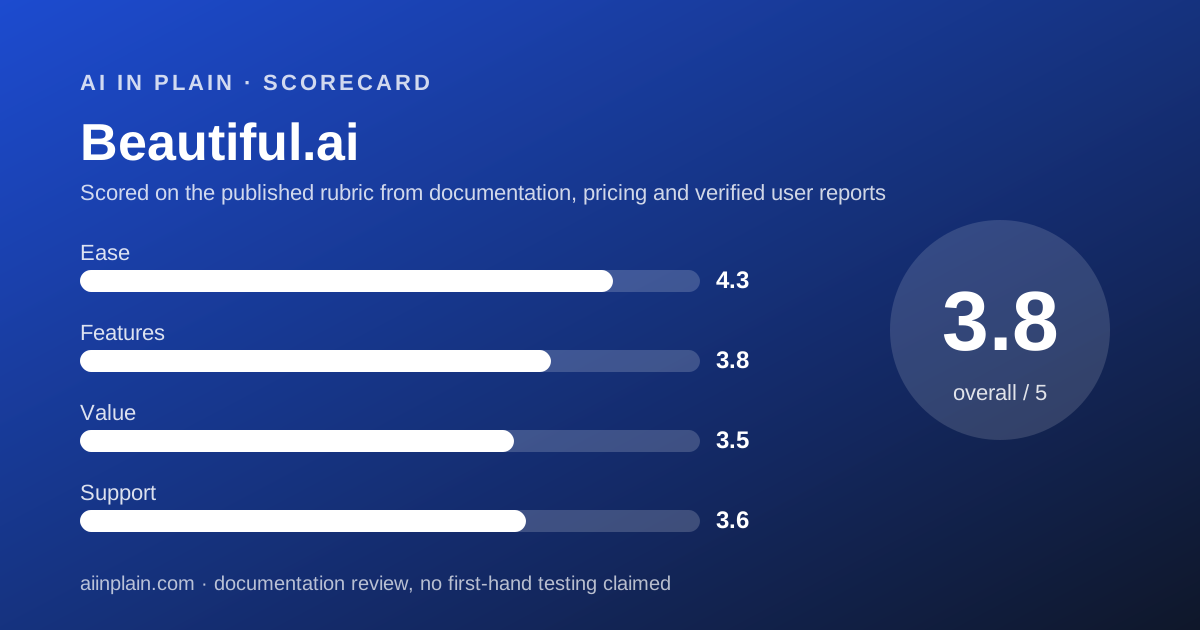
Scored on the published rubric, from documentation, pricing and verified user reports.
Best for: People and small teams who make client-facing decks often, want them to stay on brand without a designer, and would rather pay a flat seat price than watch a credit balance.
Verdict
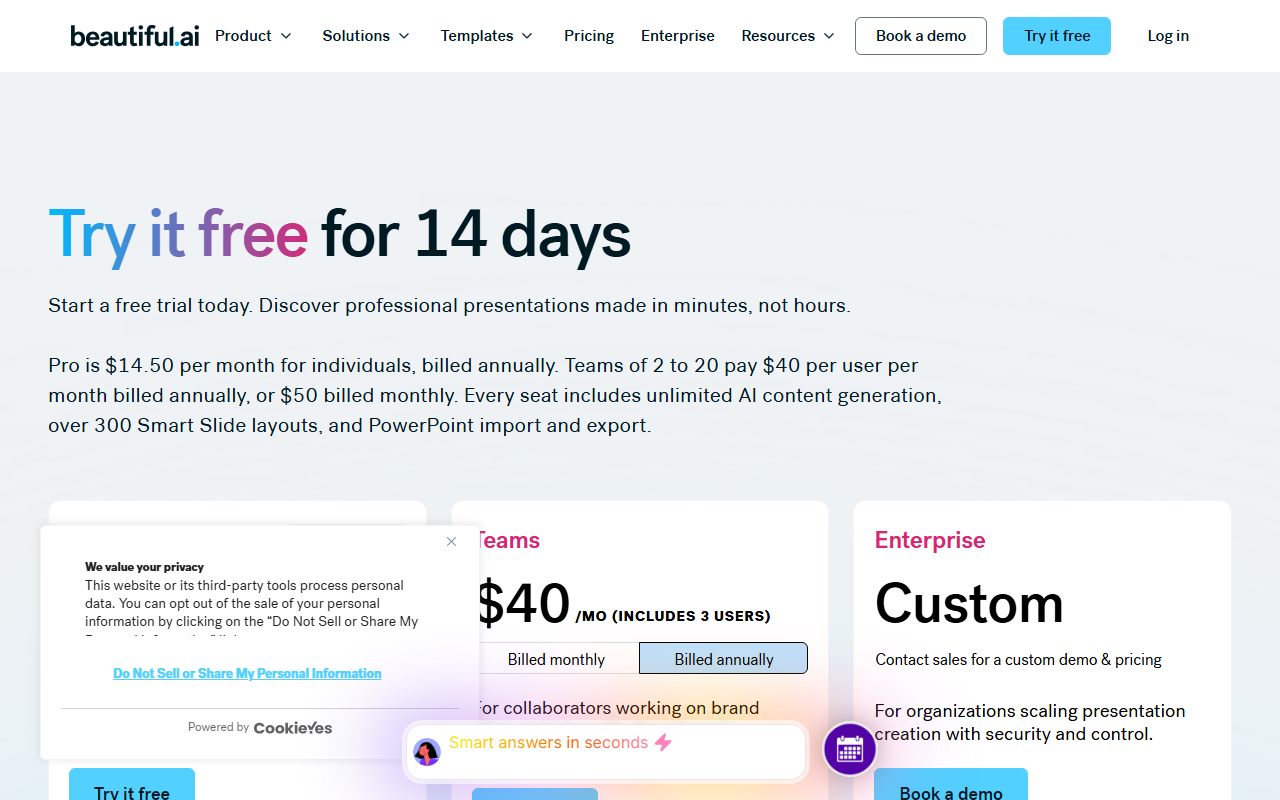
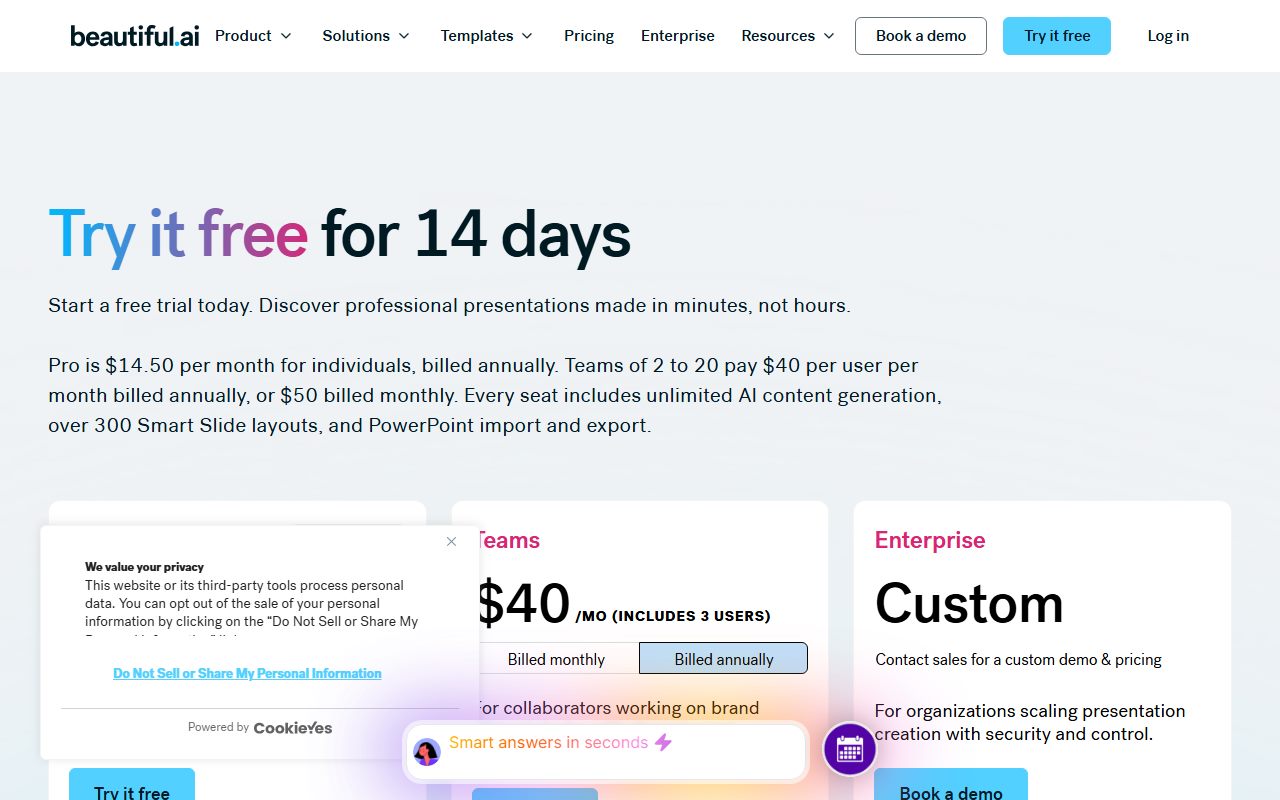
Beautiful.ai sells the opposite trade to most AI slide tools. Instead of a credit allowance, it sells unlimited AI content generation on a flat seat price and puts its effort into design rules that hold the deck together. The pricing page, checked October 20, 2026, lists Pro at $14.50 per month billed annually for one member, a Team plan at $40 per user per month billed annually or $50 monthly, and a $45 monthly option described as everything in Pro for ad hoc projects. There is a 14-day free trial of Pro or Team, and the page states it requires a credit card that is charged in full if you do not cancel in time. This is a documentation review built from the pricing page, the security page, the education page and the product pages; no usage claims are made here. The strength is the workflow: you review a slide-by-slide outline before design begins, then try different Smart Slide layouts with your copy and numbers kept intact. The weakness is the refund policy, which allows a partial refund on annual plans only within 24 hours of purchase or renewal, and none at all on monthly. One number on the page contradicts itself, and we print both readings below. Beautiful.ai earns 3.8 overall.
Visit Beautiful.ai
We have no affiliate relationship with this vendor. Link goes to the official site.
Where it is strong
- Unlimited AI content generation on every paid tier, stated on the pricing page checked October 20, 2026, so there is no credit balance to watch
- The outline comes before the design: the product page describes reviewing and refining a slide-by-slide outline so the narrative is right before slides are generated
- Layout iteration preserves your words: the page says you can try multiple Smart Slide layouts while preserving your exact copy and numbers
- Over 300 Smart Slide layouts, with auto-formatting, so a non-designer does not have to align anything by hand
- Security claims are specific and listed: SOC 2 Type II, GDPR, CCPA and PCI, SAML SSO 2.0, SCIM, AES-256 at rest and HTTPS 1.2 and 1.3 in transit
- Verified students with a .edu email are eligible for a free annual Pro subscription, per the education page
- A one-off $45 monthly option exists for a single project, which most competitors in this bracket do not publish
Where it falls short
- The refund rule is tight: annual plans may be eligible for a partial refund only within 24 hours of purchase or renewal, monthly plans are non-refundable, and all refunds carry a processing fee
- The trial requires a credit card and, in the vendor's own words, charges it in full if you do not cancel before the 14 days are up
- The Team price contradicts itself on the same page: the plan card reads $40 per month including 3 users, while the page FAQ reads $40 per user per month
- No free tier at all, only the 14-day trial, so there is no way to keep a deck in the tool without paying
- SSO, SCIM, audit logs, advanced permissions and brand guardrails appear in the Enterprise column only, which has no published price
- Workspace limits bite on Pro: 5 themes, 10 presentation templates, 50 slides in the library and 100 assets, against unlimited on Team
At a glance
| Starting price | $14.50 per member per month billed annually (Pro), per the pricing page checked October 20, 2026 |
|---|---|
| Pricing note | Pro $14.50 per month billed annually; one-off monthly option $45; Team $40 per user per month billed annually or $50 monthly (pricing page, checked October 20, 2026) |
| Free plan | None. A 14-day free trial of Pro or Team, credit card required |
| One-off option | $45 for a month, described as everything in the Pro plan billed monthly, for ad hoc projects |
| Team price | $40 per user per month billed annually or $50 monthly per the page FAQ; the plan card instead reads $40 a month including 3 users |
| Seats | Pro 1 member - Team 2 to 20 - Enterprise unlimited, per the comparison table |
| Smart Slide layouts | Over 300, stated on the pricing page |
| Languages | Presentations in 100 or more languages, with on-demand slide translation listed under Team |
| Security | The security page lists SOC 2 Type II, GDPR, CCPA and PCI certifications, SAML SSO 2.0, SCIM, AES-256 at rest and HTTPS 1.3 and 1.2 in transit |
| Refunds | Annual may be eligible for a partial refund within 24 hours of purchase or renewal; monthly non-refundable; processing fee applies |
Short answer
Pick Beautiful.ai when the deck has to look deliberate and you do not want to think about alignment, spacing or how much generation you have left this month.
The entry price is $14.50 per month billed annually for one person, checked October 20, 2026. A single-project option is $45 for one month.
There is no free plan. The trial is 14 days, takes a card, and charges it if you forget to cancel.
The design model is the real reason to choose it. Smart Slides re-arrange themselves as your content changes, so a deck does not slowly fall apart as you edit it.
What Beautiful.ai actually is
Beautiful.ai is a presentation tool with design rules baked in, and an AI workflow layered on top. It is not a general content generator.
The unit is the Smart Slide. The pricing page claims over 300 layouts that auto-format and auto-align as you add or remove content.
Classic slides exist as well, described on the pricing page as a blank start for when you want creative freedom instead of the guardrails.
The AI side is branded Create with AI. Per the product page read October 20, 2026, it takes a prompt, a pasted outline, a URL or an uploaded file as the starting input.
Then it does something most generators skip: it shows you a slide-by-slide outline to review before any design happens.
The vendor's own FAQ frames this as the difference from a one-shot generator, arguing you shape the story first so there are fewer surprises and less rework.
Who Beautiful.ai is best for
This suits people whose decks are seen by others, and who are paying to stop worrying about design consistency.
- Consultants and agencies sending client decks weekly, where a sloppy layout reads as sloppy thinking.
- Sales teams reusing an approved story, since Team adds a centralised slide and template library.
- Marketers who need brand colours, fonts and logos locked in rather than politely suggested.
- Heavy AI users - unlimited generation on a flat seat price beats a credit meter once you use the tool daily.
- Small teams of two to twenty - that is exactly the Team plan's published seat range.
- Students with a .edu address - the education page offers a free annual Pro subscription to verified students.
Who should skip it
Three groups are better served elsewhere.
- Anyone who needs a free tier to keep one deck alive. There is not one.
- Buyers who want a refund cushion - 24 hours on annual plans, none on monthly, with a processing fee.
- Teams needing SSO, audit logs or SCIM on a small budget - all three sit in the unpriced Enterprise column.
What the pricing page says, including where it contradicts itself
The individual tier is simple. Pro is $14.50 per month billed annually, one member, with a 14-day free trial, as read on October 20, 2026. That works out at $174 for a year, by our arithmetic.
Alongside it sits a monthly option at $45, described on the page as everything in the Pro plan billed monthly, for ad hoc projects. For one pitch in one week, that is the honest line item.
The Team tier is where the page argues with itself, and we are printing both readings rather than guessing.
The Team plan card shows $50 and $40 with the label per month including 3 users, and a bullet underneath reading fixed pricing for up to three users.
The FAQ lower on the same page reads that the Team plan covers 2 to 20 seats and that pricing is $40 per user per month billed annually, or $50 per user billed monthly.
For three people those two readings are a year apart in cost: roughly $480 on the first and roughly $1,440 on the second, by our arithmetic from the page's own numbers. Check the figure at checkout before you commit.
Enterprise is quoted, not published, with unlimited seats. A separate SMB plan is mentioned as flat rates for smaller teams with no price attached.
The workspace limits matter more than the seat price
The comparison table is where the real difference between Pro and Team lives, and it is not the AI.
On Pro the published allowances are 5 workspace themes, 10 workspace presentation templates, 50 slides in the workspace slide library and 100 items in the asset library. On Team each of those reads unlimited.
Members are listed as 1 on Pro, 2 to 20 on Team and unlimited on Enterprise.
Team also adds the collaboration layer: real-time collaborative editing, version control and locked slides, custom branded themes, a shared asset library and live data linking to charts and tables.
Engagement tracking sits there too, listed as viewer and slide analytics with engagement alerts and notifications.
So the upgrade question is not whether you want more AI. It is whether more than one person maintains the deck library.
Ease of use: what the 4.3 is built from
The auto-design model removes the single most common cause of ugly slides, which is a human nudging a text box three pixels left.
Smart Slides handle alignment, spacing and animation automatically, per the education page. Add a bullet and the layout re-flows instead of overflowing.
The AI flow is staged rather than one-shot: set the theme, image source, language and AI image style up front, review the outline, then generate and iterate on layouts.
Layout iteration is the detail we would highlight. The page says you can preview multiple layouts for the same content while preserving your exact copy and numbers, which is the opposite of regenerating and hoping.
The brief still decides the result. Our guide to writing a prompt that gets a usable first draft applies here, and so does the habit in how to ask an AI tool for what you want.
We stopped short of a higher score because the guardrails cut both ways. A tool that auto-designs is a tool that will not do the odd thing you wanted.
Features: what the 3.8 is built from
Narrower than the category average, and deliberately so. This makes presentations. It does not make websites, social posts or documents.
Within that scope the list is respectable. Per the comparison table, read October 20, 2026: Smart Slides and classic slides, slide animations, a stock media library, audio narration, version history, custom branding, PowerPoint import and integrations.
Distribution covers player branding, secure sharing, viewer analytics, offline playback, PDF export and editable PowerPoint export.
AI features listed on Pro include AI image generation, an AI writing assistant, AI language translation and the ability to include extra context from files or links.
If images are the sticking point and you need defensible licensing rather than convenience, read our Adobe Firefly review before leaning on any built-in generator.
What is absent is anything outside the deck. There is no document mode, no site publishing and no public API advertised on these pages.
Value: what the 3.5 is built from
At $14.50 a month on annual billing, a single seat with unlimited AI generation and over 300 layouts is a fair deal for anyone who presents regularly.
The cost shape is the genuinely different thing on offer. A flat seat with no generation quota is easier to budget than a credit allowance, and the vendor's own copy leans on that contrast.
Three things pull the score down. There is no free tier, so you cannot park a deck for free. The refund rule is 24 hours on annual and nothing on monthly. And the Team price is ambiguous on the page itself.
The $45 single-month option is better value than it looks for a one-off pitch, as long as you cancel. It is the same Pro feature set billed monthly.
The student offer is the best-value item on any of these pages: a free annual Pro subscription for a verified .edu address.
Support and billing: what the 3.6 is built from
The support rows in the comparison table are a self-serve knowledge base, email support, priority support, and onboarding and training. Priority support and onboarding read as the upper-tier items.
No response-time commitment appears anywhere on the pricing page as read on October 20, 2026. That is the main reason this is not higher.
The billing terms are stated clearly, which counts for something even when the terms are strict. Cancellation happens in the Billing section of your profile and you keep Pro until the end of the cycle.
The trial mechanics are spelled out rather than buried: a card is required, the card is charged automatically at the end of the 14 days unless you cancel, and your billing cycle starts when the trial ends.
If you do decide to leave, get the files out before the access ends. Our guide to getting your data out before you cancel covers the sequence.
On security the page is unusually concrete. It lists SOC 2 Type II, GDPR, CCPA and PCI certifications, SAML SSO 2.0 and Google OAuth, and SCIM provisioning.
It also names AES-256 encryption at rest, HTTPS 1.3 and 1.2 in transit, a data processing agreement, a published sub-processor list and data deletion on request.
On training it states that data processed by its AI models will not be used to train public large language models, and that AI sub-processors are barred from using customer data for training.
Alternatives
Gamma. Choose Gamma if you also need documents, one-page sites or social posts from the same tool, and if you can live with a credit allowance instead of unlimited generation. Otherwise choose Beautiful.ai when brand consistency across a team is the whole point.
PowerPoint or Google Slides. Choose these when your organisation already standardises on one and the requirement is a slide master everybody inherits. Beautiful.ai's own FAQ concedes that general tools can cost less per seat.
Fix the writing first. A well-designed deck full of vague sentences is still a vague deck. Our guide to the best AI writing assistants for everyday work and our Grammarly review cover that side.
Start from the meeting. If the deck is a recap of a call, the transcript is your outline. See the best AI meeting note takers for small teams.
Bottom line
Beautiful.ai is the sensible choice when a deck represents you to someone who is deciding something, and when you would rather pay a flat price than track a meter.
Start the 14-day trial on a day you are actually making a deck, and put a calendar reminder on day 12. The card is charged automatically otherwise.
Build one real presentation, export it to PowerPoint, and open it where you will present from. Then decide.
If you are buying for three people, get the Team figure confirmed in writing at checkout, because the page states it two different ways.
And apply the usual scepticism to anything the AI writes into a slide for you. How to check an AI answer before you pass it on is the habit that stops a generated statistic reaching a client.
This is a documentation review. Prices, limits, security claims and policy wording come from the Beautiful.ai pricing, security, education and product pages as read on October 20, 2026, and may have changed since.
Buy it if
- Your decks go to clients or investors and looking unfinished costs you more than the seat does. The design guardrails are the product here.
- You generate a lot - unlimited AI content generation on a flat price is a different cost shape to a credit allowance, and a better one for heavy users.
- Two to twenty people need one brand - custom branded themes, a shared slide library and locked slides sit on the Team tier.
- You are a verified student - the education page says a .edu email makes you eligible for a free annual Pro subscription.
Skip it if
- You need a free tier - there is none, and the trial takes a card up front.
- You want a refund safety net - 24 hours on annual, none on monthly, and a processing fee either way.
- You need SSO or audit logs on a small team - those are listed under Enterprise, which is quoted rather than published.
Frequently asked
Is Beautiful.ai free?
No. There is no free plan, only a 14-day free trial of Pro or Team. The pricing page states the trial requires a credit card and that it will be charged in full if you do not cancel before the trial period ends.
How much does Beautiful.ai cost?
Pro is $14.50 per month billed annually for one member, per the pricing page checked October 20, 2026. A one-off monthly option is $45. Team is $40 per user per month billed annually, or $50 billed monthly, with 2 to 20 seats.
How much is Beautiful.ai for a team of three?
The page gives two answers and we are not going to pick one. The Team card reads $40 a month including 3 users and lists fixed pricing for up to three users. The page FAQ reads $40 per user per month billed annually. Confirm at checkout.
Does Beautiful.ai limit how much AI I can use?
The pricing page lists unlimited AI content generation on Pro, Team and Enterprise, and the marketing copy contrasts that with one-shot generation capped by credit limits. No per-month generation quota appears anywhere on the page.
Can I get a refund from Beautiful.ai?
Only in a narrow case. The FAQ says annual subscriptions may be eligible for a partial refund if requested within 24 hours of the initial purchase or renewal, that monthly subscriptions are non-refundable, and that all refunds are subject to a processing fee.
Does Beautiful.ai export to PowerPoint?
Yes. The comparison table lists PDF export and editable PowerPoint export, plus PowerPoint import. Offline playback and viewer analytics are listed in the same distribution section, as read on October 20, 2026.
Is Beautiful.ai secure enough for a company rollout?
The security page states SOC 2 Type II, GDPR, CCPA and PCI certifications, SAML SSO 2.0, SCIM provisioning, AES-256 encryption at rest and HTTPS 1.3 and 1.2 in transit. It also says AI sub-processors are barred from using customer data for training.
Is there a student discount for Beautiful.ai?
Yes. The education page says verified students with a valid .edu email are eligible for a free annual Beautiful.ai Pro subscription. The pricing FAQ phrases the same offer as a year free for students with valid .edu emails.
Sources
- Beautiful.ai pricing and plan comparison - checked October 20, 2026
- Beautiful.ai security page - checked October 20, 2026
- Beautiful.ai AI presentations product page - checked October 20, 2026
- Beautiful.ai education page - checked October 20, 2026
Update history
- October 20, 2026 - First published from the Beautiful.ai pricing, security, education and AI presentations pages, read in a headless browser on October 20, 2026. The Team price is recorded in both of the conflicting forms printed on the pricing page that day.
Visit Beautiful.ai
We have no affiliate relationship with this vendor. Link goes to the official site.