Gamma vs Beautiful.ai: which slide tool fits you
Short answer: Gamma if you want slides, documents, one-page sites and social posts out of one tool and can live with a credit allowance; Beautiful.ai if you make client-facing decks often, need them to stay on brand, and would rather pay a flat seat price with no meter. Beautiful.ai publishes its prices in dollars - $14.50 per month billed annually for one member, checked October 20, 2026. Gamma's pricing page prices by location and served us Vietnamese dong that day, which is a real problem if you need a US figure before you decide. Both are documentation reviews built from vendor pages, not from usage.
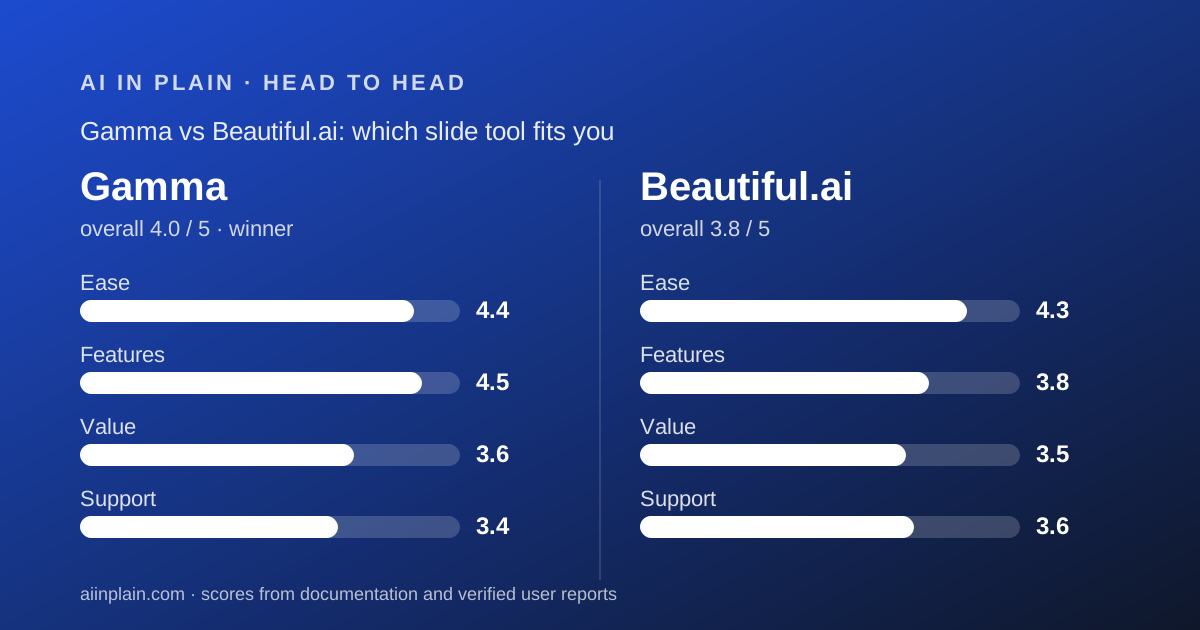
 4.0Gamma
 3.8Beautiful.ai
Specification by specification
| Spec | Gamma | Beautiful.ai |
|---|---|---|
| Entry paid price | Not readable in US dollars from our location on October 20, 2026; the pricing page served Vietnamese dong | $14.50 per member per month, billed annually (Pro) |
| Single-project option | Monthly billing on Plus or Pro; cancel immediately and keep the month | $45 for one month, described as everything in Pro billed monthly |
| Free plan | Yes - 400 credits at signup that never refill, no card required, no time limit | None |
| Free trial | None. The help centre says so plainly | 14 days on Pro or Team, credit card required, charged in full if not cancelled |
| AI usage model | Credit allowance: 1,000/month on Plus, 4,000 on Pro, 20,000 on Ultra, 10,000 per seat on Business | Unlimited AI content generation listed on every paid tier |
| Documented cost per deck | 1 to 3 credits per card, 2 to 15 credits per standard image; a 10-card deck with 5 basic images is listed at about 20 to 60 credits | Not applicable - no per-deck metering is published |
| Seats | Per-member billing; every member of a workspace is on the same plan | Pro 1 member, Team 2 to 20, Enterprise unlimited |
| Team price | Business $40 per member per month billed annually, per the help centre | $40 per user per month billed annually per the page FAQ; the plan card instead reads $40 a month including 3 users |
| Output formats | Presentations, documents, websites, social posts, graphics | Presentations only |
| Import | PPTX and DOCX up to 200 MB, PDF up to 100 MB, webpage by link; no direct Excel or Keynote | PowerPoint import listed in the comparison table; files or links can add context to a generation |
| Export | PDF, PNG, PPTX, Google Slides via PPTX upload, direct post to a personal LinkedIn profile | PDF export and editable PowerPoint export; offline playback listed in the same section |
| Slides per prompt | 10 on free plans, 100 on paid plans | No published cap |
| Workspace library limits | Not published as counts; custom domains run 10 on Pro, 100 on Ultra and Business | Pro 5 themes, 10 templates, 50 library slides, 100 assets; Team unlimited on all four |
| SSO and SCIM | SSO on Business; SCIM listed under Enterprise | SAML SSO and SCIM listed in the Enterprise column |
| Security statements | Pricing page states a SOC 2 Type II compliant organisation; SOC 2 documentation on request on Business | Security page lists SOC 2 Type II, GDPR, CCPA and PCI certifications, AES-256 at rest, HTTPS 1.3 and 1.2 |
| Refunds | Three days from subscribing, by support request, and only under the plan's credit-use threshold | Annual may be eligible for a partial refund within 24 hours of purchase or renewal; monthly non-refundable; processing fee applies |
| Student offer | Not published on the pages we read | Verified students with a .edu email are eligible for a free annual Pro subscription |
| API and agents | MCP server on all plans including Free; API keys from Pro upward | No public API or MCP server advertised on the pages we read |
The short answer
Two tools that look the same in a demo and are built on opposite commercial ideas.
- Gamma is best for people who start from a document, need more than slides, want a real free tier, and accept that AI work is metered in credits.
- Beautiful.ai is best for people who ship client-facing decks regularly, need brand rules enforced, and want a flat seat price with no generation quota.
- Winner for most readers of this site: Gamma, because the free plan lets you find out whether AI slides suit your content before any card is involved.
Gamma meters AI work; Beautiful.ai sells it flat
This is the one difference that should decide the purchase, and it is not a feature.
Gamma's every plan carries a monthly credit allowance. Per the pricing page read October 20, 2026, that is 1,000 credits on Plus, 4,000 on Pro, 20,000 on Ultra and 10,000 per seat on Business.
Generations, image creation and agent edits all draw from the same balance. Unused plan credits roll over up to twice the allowance.
Beautiful.ai lists unlimited AI content generation on Pro, Team and Enterprise, as read the same day, and its marketing copy explicitly contrasts that with generation capped by credit limits.
So the cost question is about volume, not about price. A light user is better off with Gamma's free block. A daily user avoids a lot of arithmetic with a flat seat.
Our full Gamma review breaks down the credit table, and our Beautiful.ai review covers what the flat seat does and does not include.
Gamma's credit costs are published; Beautiful.ai has nothing to publish
Credit against Gamma for the meter, credit to Gamma for documenting it.
The developer documentation, checked October 20, 2026, states 1 to 3 credits per card for text. Images run 2 to 15 credits on standard models, 20 to 33 on advanced, 34 to 75 on premium and 30 to 125 on ultra.
It also gives worked examples. A deck of 10 cards with 5 basic images is listed at roughly 20 to 60 credits. A 20-card document with 15 premium images is listed at roughly 320 to 1,070.
Run those against a 1,000-credit Plus allowance and the plan choice answers itself. Text-led decks fit easily. Premium imagery on every card does not.
One caveat the vendor states itself: agent generations are charged by the work done, and the same prompt can cost different amounts on different runs. If you need predictable cost inside Gamma, use classic generations.
Beautiful.ai has no equivalent table because it has no equivalent meter.
Pricing: Beautiful.ai publishes a dollar figure, Gamma did not show us one
This is an unusual row to write and we would rather be awkward than vague.
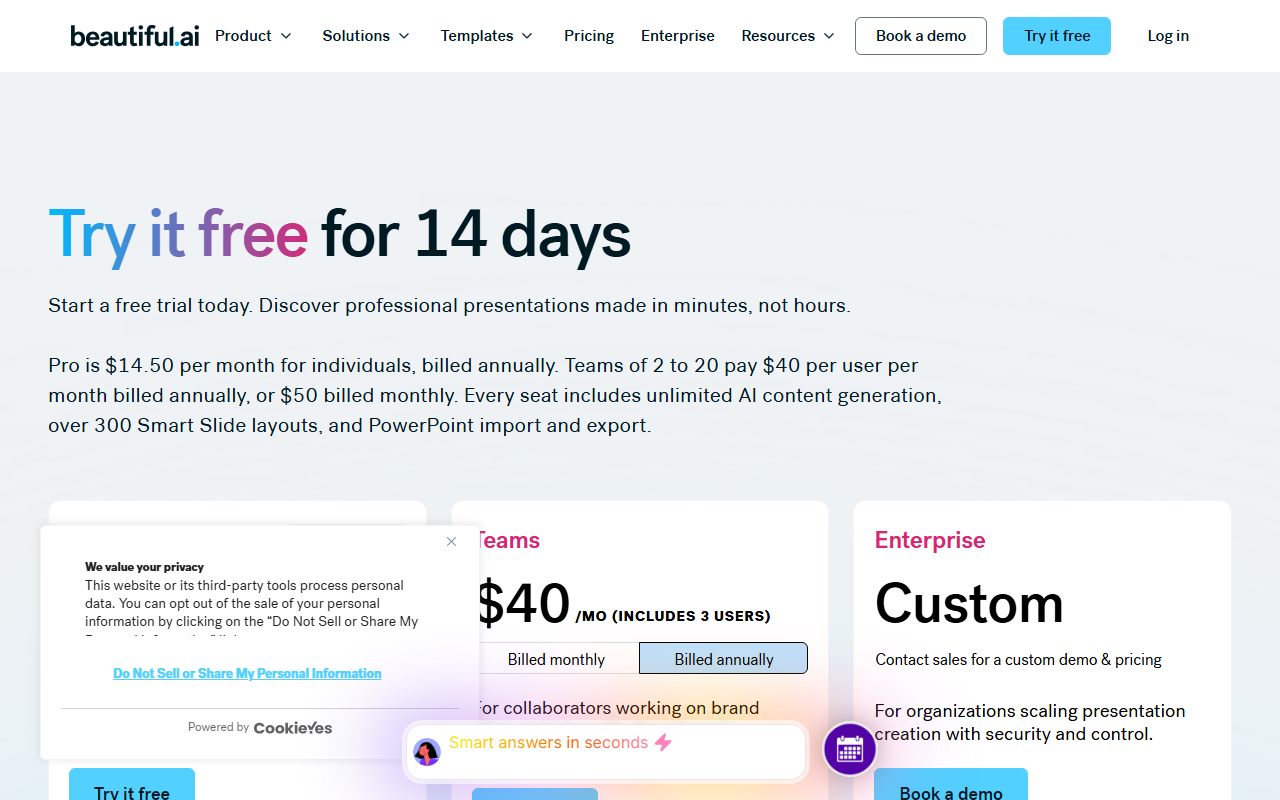
Beautiful.ai's page, read October 20, 2026, lists Pro at $14.50 per member per month billed annually, a $45 one-month option, and Team at $40 per user per month billed annually or $50 monthly.
Gamma's pricing page prices by visitor location. From our location it quoted Vietnamese dong for every paid tier: ₫203,200 per seat per month for Plus on annual billing, ₫430,000 for Pro, ₫2,368,328 for Ultra.
We are not converting those. A rate we picked would read like a price Gamma published, and it would be neither.
The one dollar figure Gamma does publish, in its own help centre, is Business at $40 per member per month billed annually. Extra credits are $6 per 1,500.
That gives one clean comparison at the team level: Gamma Business and a Beautiful.ai Team seat are both $40 per member per month on annual billing, on the vendors' own pages.
One warning on the Beautiful.ai side. Its Team card reads $40 a month including 3 users, while its own FAQ reads $40 per user per month. For three people that is roughly $480 against roughly $1,440 a year, by our arithmetic. Confirm it at checkout.
Gamma has a free plan; Beautiful.ai has a trial with a card
How you get to try each one differs more than the feature lists do.
Gamma's free plan has no time limit and needs no card. It hands over 400 credits at signup that never refill, caps you at 10 slides per prompt, and stamps a 'Made by Gamma' badge on PDF and PPTX exports.
The help centre states plainly that there is no traditional free trial of a paid tier.
Beautiful.ai runs a 14-day free trial of Pro or Team. Its own FAQ says a credit card is required and that the card is charged in full if you do not cancel before the trial ends.
There is no free tier at Beautiful.ai at all, which means you cannot keep a deck parked in it without paying.
If you are evaluating without a budget approved, that difference decides it on its own.
Refunds: three days against twenty-four hours, and neither is generous
Both policies are tighter than buyers expect, and both are published, which is more than some competitors manage.
Gamma allows refunds only within three days of subscribing, only on contacting support, and only if credit use stayed under a threshold: under 200 credits on Plus, 600 on Pro, 900 on Team, 1,000 on Business, 2,000 on Ultra.
Beautiful.ai says annual subscriptions may be eligible for a partial refund if requested within 24 hours of the initial purchase or renewal, that monthly subscriptions are non-refundable, and that all refunds carry a processing fee.
Read together, the practical rule is the same for both: whatever test you intend to run, run it in the first day or two.
Gamma's version at least lets you generate two or three real decks inside the window. Beautiful.ai's annual window closes before most people have finished one.
Beautiful.ai is stricter about design; Gamma is wider about output
Beautiful.ai's product is the guardrail. Smart Slides auto-format and auto-align as content changes, with over 300 layouts on the pricing page, and layout iteration preserves your exact copy and numbers.
It also gates the team-grade features behind Team: real-time collaborative editing, version control and locked slides, custom branded themes, a shared asset library, and engagement analytics.
And it enforces library limits on Pro: 5 themes, 10 presentation templates, 50 library slides and 100 assets, all unlimited on Team.
Gamma trades that discipline for range. One editor and one credit balance cover presentations, documents, websites, social posts and graphics.
It also has the automation story. The hosted MCP server works on all plans including Free with no API key; API keys start at Pro. Beautiful.ai advertises no public API on the pages we read.
So the question is whether your problem is consistency or breadth. They are not the same problem and these two tools answer different ones.
Export fidelity: Gamma documents its own limits in more detail
Both export to PowerPoint, and only one of them tells you what will break.
Gamma's export article lists the caveats directly: theme fonts are embedded in PPTX, including custom uploads, but Google Slides ignores embedded fonts in an uploaded PowerPoint file and substitutes its own.
Tables export as editable tables by default on all plans, with square corners because PowerPoint does not support rounded ones. Speaker notes come through. Slide masters do not. Fillable PDFs are unsupported.
The same page warns that decks over roughly 150 slides can fail to export at all, and that exports reflect Present Mode rather than the editing view.
Beautiful.ai's comparison table lists PDF export, editable PowerPoint export, PowerPoint import and offline playback. We found no equivalent published list of export limitations on the pages we read on October 20, 2026.
That is not a claim that Beautiful.ai exports worse. It is a claim that Gamma tells you more about what to check before you send a file.
Security and compliance: Beautiful.ai lists more on a public page
If a procurement form is in your future, Beautiful.ai's security page is the more useful document.
It states SOC 2 Type II, GDPR, CCPA and PCI certifications, SAML SSO 2.0 and Google OAuth, SCIM provisioning, AES-256 encryption at rest and HTTPS 1.3 and 1.2 in transit.
It also states that data processed by its AI models will not be used to train public large language models, and that its AI sub-processors are barred from using customer data for training.
Gamma's pricing page carries the line that it is a SOC 2 Type II compliant organisation, and the Business help article says SOC 2 documentation is available on request.
On training, Gamma's privacy article says you control whether your data trains its models, and the Business article says that opt-out is locked workspace-wide on Business while on Pro an individual can change it.
Both therefore give you a training opt-out. Beautiful.ai publishes more of the underlying detail without asking.
A five-seat budget, using only the figures the vendors publish
Here is the arithmetic for a five-person team, done by us from published numbers rather than quoted from either vendor.
Gamma Business is $40 per member per month billed annually. Five seats is $200 a month, or $2,400 a year. That carries 10,000 credits per seat per month on the pricing page, with shared workspace credits on top.
Beautiful.ai Team, on the per-user reading of its own FAQ, is also $40 per user per month billed annually. Five seats is $200 a month, or $2,400 a year, with unlimited generation and unlimited library items.
On the other reading printed on the same page, where $40 covers three users, five seats would need two subscriptions and the sums change. This is exactly why we are telling you to confirm it at checkout.
So at team scale the headline cost is a draw, and the decision moves to what each $40 buys. Gamma buys breadth and automation. Beautiful.ai buys brand enforcement and a meter you never check.
One cost Gamma can add and Beautiful.ai cannot: top-up credits at $6 per 1,500. The help centre notes credits are not pooled on individual plans, so three teammates topping up separately is three charges.
What neither tool does
Worth saying out loud, because both marketing pages imply more than they promise.
Neither will fix a weak argument. A generated deck inherits whatever logic was in the source text, and both tools will lay out a bad point beautifully.
Neither guarantees a figure is correct. Gamma names the models it routes to, including Claude, ChatGPT, Gemini and several image models; a model that invents a number will still invent it inside a slide.
Neither replaces a slide master. Gamma's documentation says PPTX exports carry none, and Beautiful.ai's design system lives inside Beautiful.ai rather than inside the exported file.
And neither is a design review. If the image needs readable text inside it, that is a different job again, which our Ideogram review covers.
The practical consequence is that the last twenty minutes before a meeting still belong to a human. Read the numbers, read the claims, open the export.
Choose Gamma if
Four conditions point clearly to Gamma.
- You want to try before paying anything - the free plan needs no card and has no deadline.
- Your source is a document you already wrote - PPTX, DOCX and PDF import keeps the original layout, and the Preserve option changes no wording.
- You need more than slides - documents, one-page sites and social posts come out of the same balance.
- An agent or automation will make the decks - the MCP server runs on every plan and API keys start at Pro.
Choose Beautiful.ai if
Four conditions point clearly the other way.
- You generate every day - unlimited AI content generation on a flat seat removes the meter entirely.
- The deck represents your brand to a client - locked slides, branded themes and guardrails are the product, not an add-on.
- Two to twenty people maintain a shared library - that is the Team plan's published range, with unlimited themes, templates and assets.
- You are a verified student - a .edu email is eligible for a free annual Pro subscription.
Bottom line
Gamma wins for most people reading this, and it wins on access rather than on quality. A free account with 400 credits lets you test AI slides on your own content tonight, at no risk.
Beautiful.ai wins the moment slides become a weekly obligation with a brand attached. A flat seat with no meter and real design rules is worth $14.50 a month if decks are part of your job.
If you are choosing for a team, the two meet at $40 per member per month on annual billing, on both vendors' own pages. At that point pick on breadth against brand control, not on price.
Whatever you pick, check what the AI writes before anyone else reads it. How to check an AI answer before you pass it on is the relevant habit.
Our guide to writing a prompt that gets a usable first draft will cut the rework in either tool, and how to ask an AI tool for what you want is the shorter version.
If the deck is really a writing problem, start with the best AI writing assistants for everyday work instead. And before you cancel either subscription, read how to get your data out before you cancel.
This is a documentation review of both tools. Every figure above comes from the vendors' own pricing, help centre, security and developer pages as read on October 20, 2026, and may have changed since.
Frequently asked
Which is cheaper, Gamma or Beautiful.ai?
For one person, Beautiful.ai publishes $14.50 a month billed annually and Gamma published no dollar figure we could read on October 20, 2026. For a team, both land at $40 per member per month on annual billing, per Gamma's help centre and Beautiful.ai's pricing FAQ.
Which one has a free plan?
Only Gamma. Its free plan needs no card, has no time limit, and includes 400 credits that never refill plus a 10-slide cap per prompt. Beautiful.ai has no free tier, only a 14-day trial that requires a credit card.
Does Beautiful.ai really have unlimited AI generation?
Unlimited AI content generation is listed on Pro, Team and Enterprise on the pricing page checked October 20, 2026, and no per-month generation quota appears anywhere on that page. Workspace library counts are capped on Pro, but generation is not.
Which is better for a pitch deck?
Beautiful.ai, if investors will see it and you have no designer: the auto-design rules stop a deck looking homemade. Gamma, if you need the pitch deck tonight from a document you already wrote and will polish the imagery later.
Can I move a deck from one to the other?
Partly. Gamma exports PPTX and Beautiful.ai lists PowerPoint import, so a deck can travel as a PowerPoint file. Expect layout work on arrival: Gamma's own documentation says PPTX exports carry no slide master.
Which is safer for company data?
Both offer a training opt-out. Beautiful.ai publishes more detail on a public page: SOC 2 Type II, GDPR, CCPA and PCI, AES-256 at rest and HTTPS 1.3. Gamma states SOC 2 Type II compliance and provides documentation on request on Business.
Sources
- Gamma plans and pricing - checked October 20, 2026
- Gamma developer documentation: access and pricing - checked October 20, 2026
- What is Gamma's refund policy? - checked October 20, 2026
- What options does Gamma offer for teams and business? - checked October 20, 2026
- Beautiful.ai pricing and plan comparison - checked October 20, 2026
- Beautiful.ai security page - checked October 20, 2026
Visit Gamma
We have no affiliate relationship with this vendor. Link goes to the official site.
Visit Beautiful.ai
We have no affiliate relationship with this vendor. Link goes to the official site.