
Crisp
A flat price per workspace, unlimited conversations, and an AI agent paid for in credits
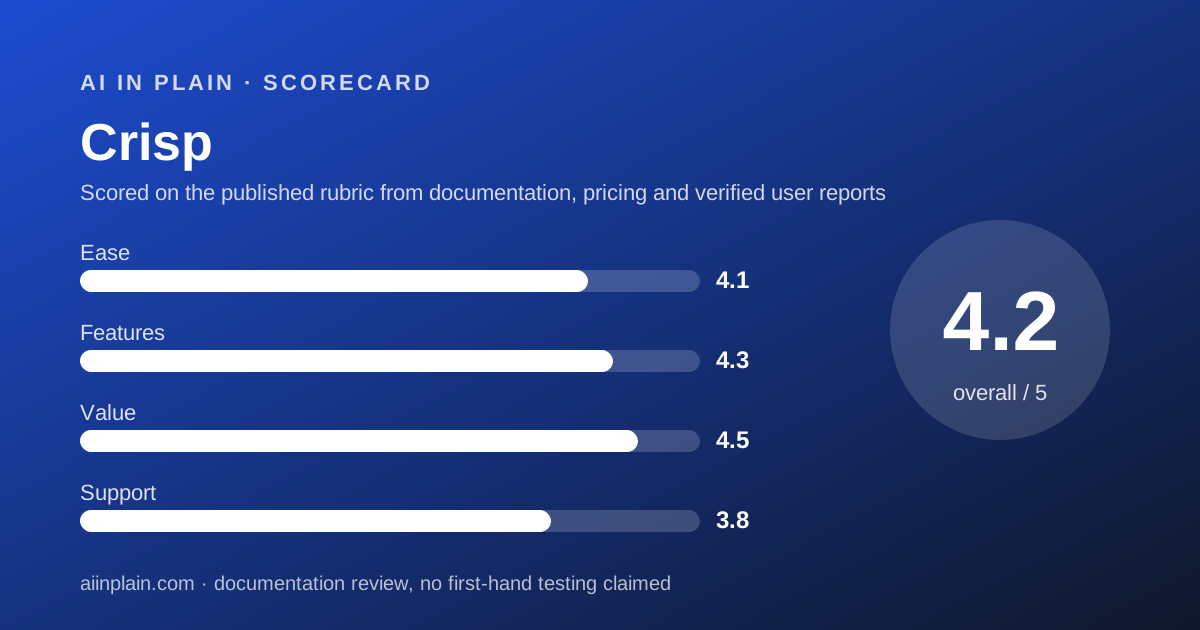
Scored on the published rubric, from documentation, pricing and verified user reports.
Best for: Small sites that cannot forecast their chat volume and want one predictable monthly invoice.
Verdict
Crisp prices the opposite way to most of its rivals. You pay a flat monthly fee per workspace and the conversation count is not capped.
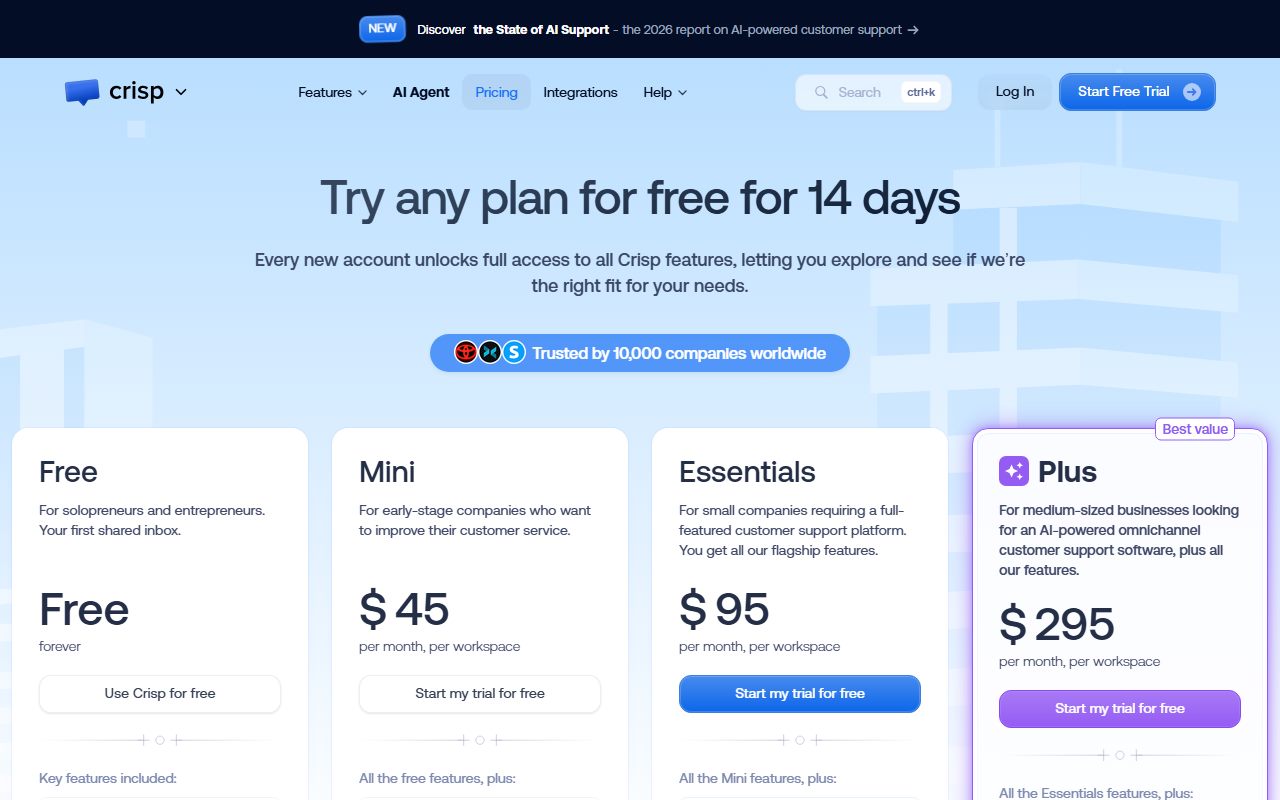
Mini is $45 a month and includes four agents. Essentials is $95 with ten. Plus is $295 with twenty or more. Extra agents are $10 a month each.
The pricing page makes this a stated position rather than a side effect. Its FAQ argues that billing by consumption belongs to the past, and that unlimited plans are peace of mind at month end.
AI is the one metered part. Each paid plan includes a dollar allowance of AI credits: $5 on Mini, $25 on Essentials and $75 on Plus.
This is a documentation review. We read the pricing page, its comparison table and FAQ, and two knowledge base pages on October 25, 2026. No paid account was opened.
Visit Crisp
We have no affiliate relationship with this vendor. Link goes to the official site.
Where it is strong
- Conversations are not capped on any plan, which is an explicit stance in the pricing FAQ
- Agent seats are bundled generously: 4 on Mini, 10 on Essentials, 20 or more on Plus
- Extra seats are a flat $10 a month, published rather than quoted
- The free trial runs 14 days across every feature and asks for no card
- Data is hosted in the EU, with a DPA, TLS and two factor authentication named on the page
Where it falls short
- AI answers are paid from a credit balance, and the page does not publish the credit rate itself
- The free plan has no AI credits at all and caps customer profiles at 100
- Yearly billing exists but no annual discount figure is printed anywhere we could read
- VAT is not included in the listed prices
- White labelling, the customer portal and advanced analytics only arrive on the $295 plan
At a glance
| Starting price | $45/mo per workspace (Mini) |
|---|---|
| Pricing note | From $45/mo per workspace with 4 agents and unlimited conversations (pricing page HTML, checked October 25, 2026) |
| Free plan | Yes, 2 agents, 100 customer profiles, no AI credits |
| Agents included | 2 (Free), 4 (Mini), 10 (Essentials), 20+ (Plus) |
| Extra agents | $10 per agent per month |
| Conversation limit | None stated on any plan |
| Included AI credits | $0, $5, $25 and $75 a month by plan |
| Trial | 14 days, all features, no card required |
| Billing unit | One flat fee per workspace, not per domain |
What Crisp actually is
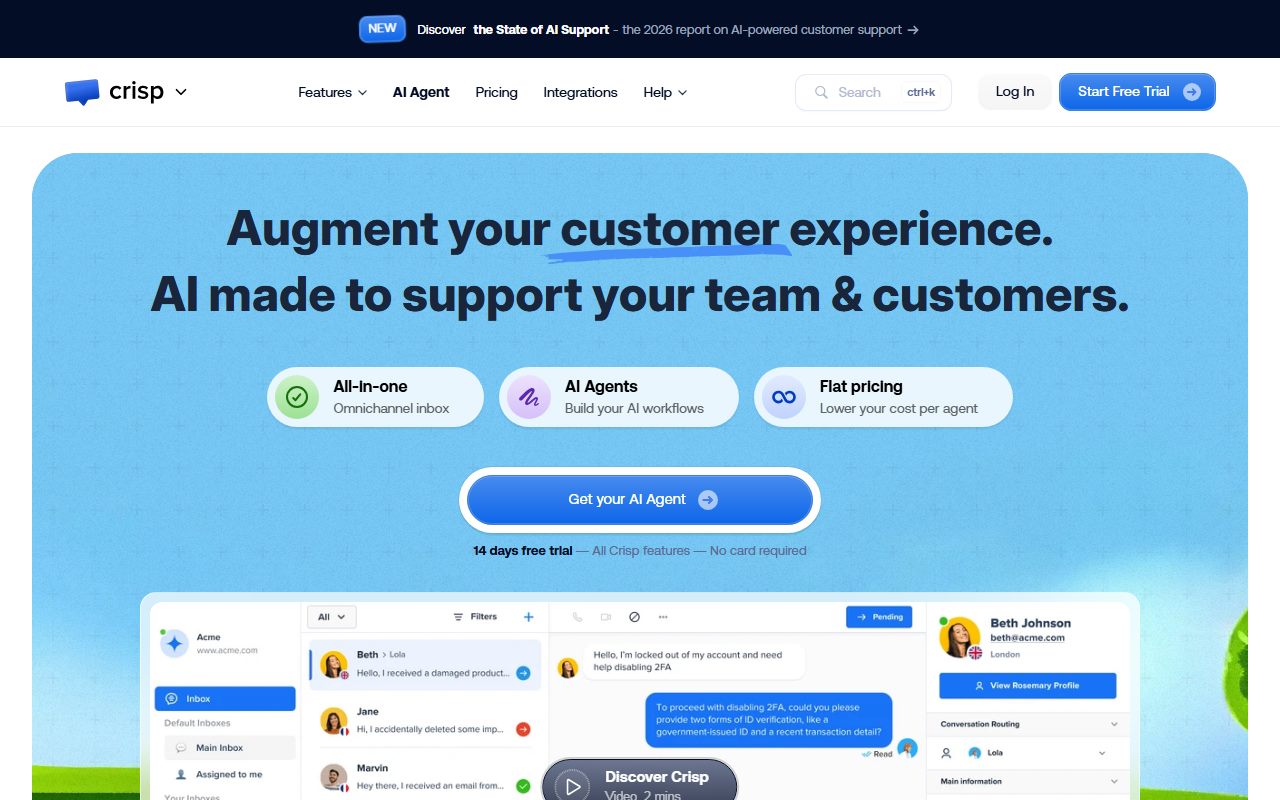
Crisp is a support suite sold by the workspace. A workspace holds the inbox, the chat widget, the help centre, the contacts and the AI agent, which the vendor now calls Hugo.
The pricing model is the product's main argument. One flat fee covers as many conversations as arrive, across every channel the plan includes.
Everything else is a question of which plan unlocks which channels. The ladder is short and the steps are large.
Who Crisp is best for
Crisp suits the site that cannot answer the question every metered rival asks first: how many chats will you get next month.
- Shops whose volume spikes during sales and collapses afterwards
- Small teams of four to ten people who would otherwise pay per seat
- European businesses that want data hosted in the EU with a DPA on file
- Sites that want a help centre, a status page and a chat widget from one vendor
- Nonprofits and students, who are offered a 50% discount through the chat widget
Who should skip it
The flat model is not automatically the cheapest, and the AI side is less transparent than the human side.
- Sites with fewer than fifty answered chats a month, where a metered plan costs less
- Buyers who need a published per conversation AI price before signing
- Teams that need white labelling or a customer portal but cannot reach $295 a month
What the free plan includes, as of October 2026
The free plan is permanent and the page labels it Free Forever. It carries the website chat widget, a shared inbox, mobile apps, chat SDKs, a contact form, ecommerce integrations and push notifications.
Two agent seats are included. Customer profiles are capped at 100, per the comparison table.
There are no AI credits on the free plan, so Hugo is effectively off. Separately, a 14 day trial opens every feature of every plan, with no card required.
How the pricing is structured
Every figure below was read from the pricing page HTML on October 25, 2026, in both the plan cards and the comparison table.
Mini is $45 a month per workspace. Essentials is $95. Plus is $295. Enterprise is quoted and adds dedicated onboarding, a personalised SLA and custom features.
Agents included run 2, 4, 10 and 20 or more across the four plans. Additional agents are $10 a month each.
Customer profiles run 100, 5,000, 50,000 and 200,000. Sub-inboxes run 0, 0, 2 and 5.
The FAQ adds three things the cards do not. VAT is not included. Nonprofits and students get 50% off on request. Running three extra workspaces on the same account earns 20% off, on Essentials and Plus only.
The AI credits are the one metered part
Crisp bundles a dollar allowance rather than a conversation count. Mini includes $5 of AI credits, Essentials $25 and Plus $75.
Next to each figure the page prints an estimate: around 90, 450 and 1,350 automated conversations respectively. Those are the vendor's own approximations.
Divide one by the other and the implied rate is close to 5.6 cents per automated conversation at every tier. That division is ours, and it is the only way we could get to a unit price.
We did not find a published credit rate on the pricing page, nor in the billing or AI Agent sections of the knowledge base, on October 25, 2026. So treat the 5.6 cents as an inference from the vendor's estimates, not as a quoted rate.
What happens when the credits run out is also not stated on the pricing page.
What a workspace covers, and where it stops
The billing unit is the workspace, and the FAQ is precise about what that means. A plan covers one workspace, not one domain, so subdomains do not multiply the bill.
The limit sits on channels instead. One workspace can connect one Instagram account, one Messenger page, one WhatsApp Business number, one Viber, one Line and one Telegram.
Email is the exception and can be connected more than once. Beyond that, the FAQ says you connect more by subscribing to higher limits.
The same FAQ also warns that some things sit outside the plan: paid integrations for specific systems, additional contacts, and more than twenty agents. Flat pricing is not the same as everything included.
Ease of use: what the score is built from
The 4.1 comes from documentation quality and install routes, not from a timed test. The knowledge base is well structured and written in steps, which suits a small team with no admin.
Installing on a custom site is one script in the page HTML. There are separate guides for CMS and ecommerce platforms, and a JavaScript SDK for opening the widget from your own button.
The AI side needs more thought than the widget does. Hugo's instructions have to be written, and our guide on writing a prompt that gets a usable first draft carries over directly.
For framing the request itself, how to ask an AI tool for what you want is the quick version.
Features: the plan ladder decides your channels
The jumps between plans are mostly about where conversations can arrive from, and how much automation you may build.
- Mini adds a shared email inbox, shortcuts, chat triggers, private notes and a custom email domain
- Mini also adds unlimited data retention and internal search
- Essentials adds the omnichannel inbox: WhatsApp Business, Instagram DMs, SMS, Line and Viber
- Essentials also adds the workflow automation builder, the knowledge base, analytics and routing rules
- Plus adds the AI first support suite, unlimited task automations and the ticketing customer portal
- Plus also adds 100+ integrations, white labelling, enhanced rate limits and advanced analytics
How the AI agent is configured
Hugo supports several model families and lets you choose between automatic and manual selection. The knowledge base says the current auto-selected model is GPT-5.6 Luna from OpenAI.
Manual selection exists for compliance, cost control, provider preference, performance and language coverage. The listed providers are OpenAI, Anthropic, Google, Mistral and a Crisp hosted model.
There is also a processing region setting and a built-in fallback model, which keeps the agent answering if one provider is unavailable.
That is more control than most small business tools offer. It also means the AI credit burn depends on choices you make, which is the same trap as every credit based product.
Before letting Hugo answer unsupervised, read the output. Our guide on checking an AI answer before you pass it on is the habit worth building in the trial fortnight.
Value: the flat fee earns the 4.5
Compare like for like and Crisp is strong at the small end. Mini gives four seats, unlimited conversations and a working AI allowance for $45 a month.
A metered rival with a $29 entry plan looks cheaper until you add an AI allowance that refreshes, at which point the total passes $45. That comparison is ours, drawn from published ladders on both sides.
The flat fee also removes a hidden cost: the hour you would otherwise spend forecasting volume and re-checking the invoice.
What holds the score below 5 is the AI credit opacity and the $200 gap between Essentials and Plus. Nothing sits between $95 and $295.
Support, security and what the vendor states
The support score of 3.8 reflects what the page publishes rather than what the team does. No response time or support channel matrix appears on the pricing page.
Enterprise is where support language appears: dedicated onboarding, a personalised SLA and team training.
- Data is hosted on European servers, per the pricing page security list
- A data processing agreement, TLS encryption and data replication are named
- Two factor authentication is listed for account login
- Each workspace has its own subscription, so plan changes are per workspace
- Yearly billing is switched on inside the app, after you subscribe to a plan
What we could not read on October 25, 2026
Three things. The AI credit rate is not published on the pricing page or in the billing and AI Agent categories of the knowledge base, so the per conversation figure in this review is our own division.
No annual discount percentage is printed. The FAQ and the knowledge base both describe how to switch to yearly billing, but neither states a saving.
Aggregate scores on G2 and Capterra were not reachable from this machine that day, so no user rating appears here. The page's own banner claims 10,000 companies, which is the vendor's figure.
Alternatives, and when to choose them instead
Tidio meters the inbox by answered conversation and sells its AI agent separately. Choose Tidio if your volume is predictable and the entry price matters more than the ceiling.
Chatbase sells one trained agent on message credits and is not an inbox. Choose Chatbase if you only want the AI layer and humans reply somewhere else.
Otherwise choose Crisp when you want one invoice, no conversation cap and seats that come bundled rather than counted.
Before you commit, plan the exit
Conversation history, contacts and help centre articles all end up inside the workspace. Read our guide on getting your data out before you cancel during the 14 day trial, not after.
If a support thread turns into a call, the record keeping moves with it. Our AI meeting note takers guide and the Fireflies review cover that step.
And if you have to present the decision internally, our AI presentation tools guide covers the slide making part.
Bottom line
Crisp is the safest pick on this list for a small site with unpredictable traffic. Flat pricing, bundled seats and no conversation cap remove most of the ways a support bill surprises you.
The weak spot is the AI meter, where the vendor publishes a dollar allowance and an estimate rather than a rate. Measure your own burn during the 14 day trial before you lean on it.
Buy it if
- Your chat volume swings with promotions and you refuse to be surprised by an invoice
- You need four to ten agent seats without paying per seat for each one
- You want EU hosted data and a data processing agreement named up front
- You are a nonprofit or a student, since the FAQ offers a 50% discount on request
Skip it if
- You want AI answers included outright rather than drawn from a credit balance
- You need the exact cost per AI conversation published before you commit
- You run one very low volume site where a cheaper metered plan would do
Frequently asked
Is Crisp free?
Yes, there is a permanent free plan with two agent seats, the chat widget, a shared inbox and 100 customer profiles. It includes no AI credits, so the AI agent is effectively off, per the comparison table checked October 25, 2026.
How much does Crisp cost for a small team?
Mini is $45 a month per workspace with four agents included. Essentials is $95 with ten. Extra agents beyond the included count are $10 a month each. VAT is not included in those prices.
Does Crisp limit the number of conversations?
No. The pricing page states unlimited conversations on every plan and argues the case for it in the FAQ. The limits that do exist are on customer profiles, sub-inboxes and AI credits.
How much does the AI agent cost per conversation?
The page does not publish a rate. It lists $5, $25 and $75 of included credits against estimates of around 90, 450 and 1,350 automated conversations, which works out near 5.6 cents each. That division is ours.
Is annual billing cheaper on Crisp?
Yearly billing can be switched on in the app after you subscribe, per the FAQ and the knowledge base. Neither page printed a discount percentage that we could read on October 25, 2026.
Which AI model does Crisp use?
Hugo picks automatically by default, and the knowledge base says the current auto-selected model is GPT-5.6 Luna from OpenAI. You can select manually from OpenAI, Anthropic, Google, Mistral or a Crisp hosted model.
Are there any discounts?
Two are published. Nonprofits and students are offered 50% off through the chat widget. Running three additional workspaces on one account earns 20% off, on the Essentials and Plus plans only.
Sources
- Crisp pricing page, plan cards and full comparison table read from the page HTML - checked October 25, 2026
- Crisp knowledge base: how to choose and configure Hugo's AI model - checked October 25, 2026
- Crisp knowledge base: billing and subscription articles, including yearly billing - checked October 25, 2026
Update history
- October 25, 2026 - First publication. Plan prices, seat counts and AI credit allowances read from the pricing page HTML.
Visit Crisp
We have no affiliate relationship with this vendor. Link goes to the official site.